Migrate from Analytics mobile extension to Adobe Experience Platform Edge Network
Overview
Are you currently using the Adobe Analytics mobile extension and considering a migration to Edge Network? If so, you've come to the right place!
This guide outlines the available options for migrating to Edge Network and Analytics service:
- Implement the Edge Network extension using the
Edge.sendEventAPI. - Implement the Edge Bridge extension using the
MobileCore.trackActionandMobileCore.trackStateAPIs.
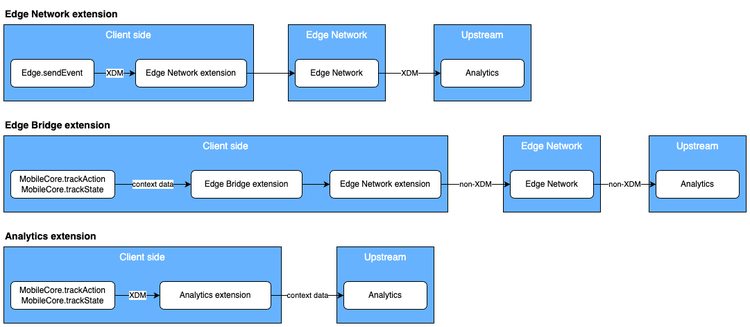
The Edge Network extension and its sendEvent API is the recommended implementation path for sending data to Analytics through Edge Network. It sends Experience Data Model (XDM) formatted data directly to Edge Network, which is well understood by Experience Platform and upstream services. That means the same XDM events can be used in Analytics and other powerful solutions within Experience Platform, such as Journey Optimizer, Journey Orchestration, and Server-Side Forwarding.
The Edge Bridge extension offers a drop in solution for migrating existing Analytics extension implementations using the MobileCore.trackAction / MobileCore.trackState APIs. Edge Bridge automatically routes those API calls to the Edge Network and the Adobe Analytics upstream service when enabled in the datastream configuration.
data-variant=info
data-slots=text
Extensions comparison
data-variant=info
data-slots=text
Workflow comparison
Get started with the migration
Implement the Edge Network extension
To learn about the end to end Edge Network extension implementation process, follow the tutorials below:
Implement the Edge Bridge extension
To learn about the end to end Edge Bridge extension implementation process, follow the tutorials below:
Other migration considerations
Not yet on latest Mobile SDK?
If you are not using the latest version of the Mobile SDK (IE: v4 Mobile SDK or the ACP-prefixed Mobile SDK), you should first migrate to the latest version, and then continue with this guide.
Consent for Edge Network extension
The Consent for Edge Network mobile extension enables consent preference collection from your mobile app when using the Experience Platform Mobile SDK and Edge Network.
The privacy status setting (MobilePrivacyStatus.OPT_IN, OPT_OUT, UNKNOWN) set in the mobile tag property which is used by Adobe Experience Cloud mobile extensions (for example, Analytics and Target), are not read nor used by the Edge Network extensions. The Edge Network extensions rely on the Consent for Edge Network extension for this setting.
For more details, please refer to the Consent for Edge Network extension documentation.
Identity consideration for the migration
When using Identity for Edge Network extension, the Mobile SDK automatically migrates an existing ECID (previously known as MID) to the new XDM IdentityMap format out of the box. If you are using custom identities with the syncIdentifier / syncIdentifiers APIs, you should consider migrating your IDs to the XDM format.
The previous Identity for Experience Cloud ID Service extension can be safely removed from the SDK registration process if there are no other extensions which depend on it. A list of dependent extensions may be found on the Identity overview page.
If you need further assistance, please contact Adobe Experience Cloud customer care.
Lifecycle for Edge Network
Lifecycle for Edge Network is part of the existing Lifecycle extension but formats the Lifecycle data in XDM to send to the Edge Network. It uses the same MobileCore.lifecycleStart/MobileCore.lifecyclePause APIs so there are no additional client-side changes required if you already have these APIs implemented in your application. However, there are a few important differences from Lifecycle used with Analytics.
To enable Lifecycle for Edge Network, a rule must be created in the application's Tags mobile property in Data Collection. The rule is required regardless if the application is using the Edge extension or the Edge extension with the Edge Bridge extension to send data to the Adobe Experience Platform. Use the following guide to configure a rule to forward Lifecycle data to Platform.
Lifecycle for Edge Network dispatches an Application Launch (Foreground) event on every app launch and an Application Close (Background) event on every app close. With every app launch and app close being its own event, customers can define user sessions at reporting time instead of needing to change a client-side configuration to determine when sessions start and end.
The Analytics extension includes additional data with every hit sent, such as some Lifecycle data. The Edge Network extension is a general purpose extension handling a variety of use cases including Messaging, Optimize, and Consent. Certain data included in all Analytics hits are no longer supported in the Edge Network. The Lifecycle for Edge Network data is only sent during Lifecycle events.
For more details, please refer to the Lifecycle for Edge Network migration reference and the Lifecycle for Edge Network extension documentation.
Next steps
To learn more about latest versions available for the Edge Network and Edge Bridge extensions, see the Current SDK versions page.