Consent for Edge Network
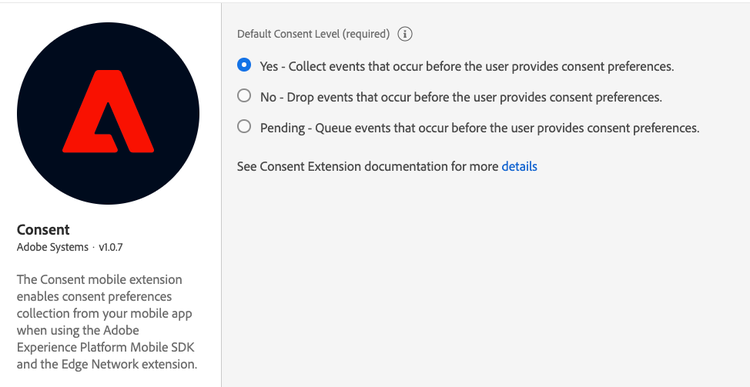
The Adobe Experience Platform Consent mobile extension enables consent preferences collection from your mobile app when using the Adobe Experience Platform Mobile SDK and the Edge Network extension.
Configure the Adobe Experience Platform Consent extension in Data Collection UI
- In Data Collection UI, in your mobile property, select the Extensions tab.
- On the Catalog tab, locate or search for the Consent extension, and select Install.
- Set your desired default consent level.
- Select Save.
- Follow the publishing process to update SDK configuration.
data-variant=info
data-slots=text
data-variant=info
data-slots=text
data-variant=warning
data-slots=text
Add the Consent extension to your app
Include Consent extension as an app dependency
Add MobileCore, Edge and EdgeConsent extensions as dependencies to your project.
Android Kotlin
Add the required dependencies to your project by including them in the app's Gradle file.
implementation(platform("com.adobe.marketing.mobile:sdk-bom:3.+"))
implementation("com.adobe.marketing.mobile:core")
implementation("com.adobe.marketing.mobile:edge")
implementation("com.adobe.marketing.mobile:edgeidentity")
implementation("com.adobe.marketing.mobile:edgeconsent")
data-variant=warning
data-slots=text
Android Groovy
Add the required dependencies to your project by including them in the app's Gradle file.
implementation platform('com.adobe.marketing.mobile:sdk-bom:3.+')
implementation 'com.adobe.marketing.mobile:core'
implementation 'com.adobe.marketing.mobile:edge'
implementation 'com.adobe.marketing.mobile:edgeidentity'
implementation 'com.adobe.marketing.mobile:edgeconsent'
data-variant=warning
data-slots=text
iOS CocoaPods
Add the required dependencies to your project using CocoaPods. Add following pods in your Podfile:
use_frameworks!
target 'YourTargetApp' do
    pod 'AEPCore', '~> 5.0'
    pod 'AEPEdge', '~> 5.0'
    pod 'AEPEdgeIdentity', '~> 5.0'
    pod 'AEPEdgeConsent', '~> 5.0'
end
Initialize Adobe Experience Platform SDK with Consent Extension
Next, initialize the SDK by registering all the solution extensions that have been added as dependencies to your project with Mobile Core. For detailed instructions, refer to the initialization section of the getting started page.
Using the MobileCore.initialize API to initialize the Adobe Experience Platform Mobile SDK simplifies the process by automatically registering solution extensions and enabling lifecycle tracking.
Android Kotlin
data-variant=warning
data-slots=text
import com.adobe.marketing.mobile.LoggingMode
import com.adobe.marketing.mobile.MobileCore
...
import android.app.Application
...

class MainApp : Application() {
  override fun onCreate() {
    super.onCreate()
    MobileCore.setLogLevel(LoggingMode.DEBUG)
    MobileCore.initialize(this, "ENVIRONMENT_ID")
  }
}
Android Java
data-variant=warning
data-slots=text
import com.adobe.marketing.mobile.LoggingMode;
import com.adobe.marketing.mobile.MobileCore;
...
import android.app.Application;
...
public class MainApp extends Application {
  @Override
  public void onCreate(){
    super.onCreate();
    MobileCore.setLogLevel(LoggingMode.DEBUG);
    MobileCore.initialize(this, "ENVIRONMENT_ID");
  }
}
iOS Swift
data-variant=warning
data-slots=text
// AppDelegate.swift
import AEPCore
import AEPServices
...

final class AppDelegate: NSObject, UIApplicationDelegate {
  func application(_: UIApplication, didFinishLaunchingWithOptions _: [UIApplication.LaunchOptionsKey: Any]? = nil) -> Bool {
    MobileCore.setLogLevel(.debug)
    MobileCore.initialize(appId: "ENVIRONMENT_ID")
    ...
  }
}
iOS Objective-C
data-variant=warning
data-slots=text
// AppDelegate.m
#import "AppDelegate.h"
@import AEPCore;
@import AEPServices;
...
@implementation AppDelegate
- (BOOL)application:(UIApplication *)application didFinishLaunchingWithOptions:(NSDictionary *)launchOptions {
  [AEPMobileCore setLogLevel: AEPLogLevelDebug];
  [AEPMobileCore initializeWithAppId:@"ENVIRONMENT_ID" completion:^{
      NSLog(@"AEP Mobile SDK is initialized");
  }];
  ...
  return YES;
}
@end
Configuration keys
To update the SDK configuration programmatically, use the following information to change the Edge Consent configuration values.