Offer Decisioning and Target Extension
The Offer Decisioning and Target extension powers real-time personalization workflows using Adobe Journey Optimizer - Offer Decisioning or Adobe Target in mobile apps via the Edge Network. It helps deliver personalized decisions to your app and enables tracking user interactions with the proposed decisions.
Prerequisites
Before starting, make sure the following steps are completed.
- Your organization is provisioned for edge decisioning.
- If using Adobe Target, Target activities are set up in your desired workspace in your organization on Target UI. For more details, see the Target activities guide.
- If using Journey Optimizer - Offer Decisioning, decisions are set up in your desired sandbox in your organization on Experience Platform UI. For more details, see the create decisions guide.
Adobe Experience Platform Data Collection setup
Configure the Datastream for Adobe Target and/or Journey Optimizer - Offer Decisioning
On Experience Platform Data Collection, navigate to Data Collection > Datatreams using the left navigation panel. Select an existing datastream or create a new datastream. For more details, see the configure datastreams guide.
- In the datastream, click on the desired environment from the list. Make sure Adobe Experience Platform section is enabled and configured with the required information like Sandbox and Event Dataset.
- For Journey Optimizer - Offer Decisioning, navigate to Adobe Experience Platform section and enable Offer Decisioning checkbox.
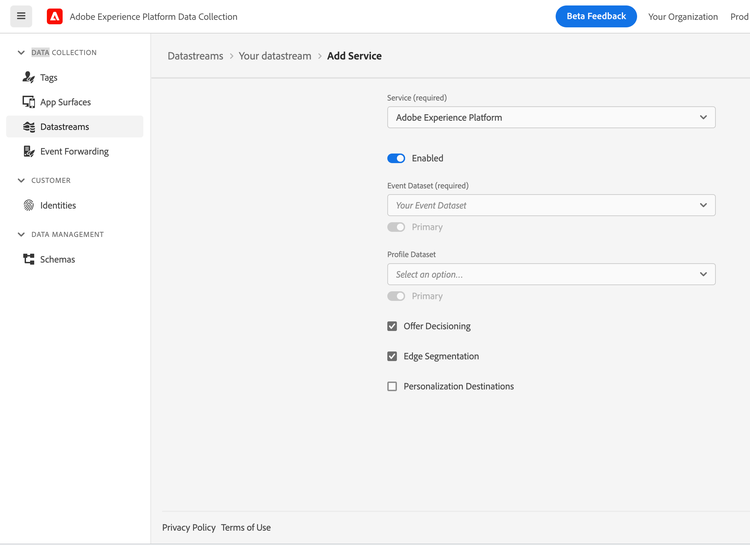
- For Adobe Target, navigate to Adobe Target section and enable it. Specify the configuration. For more information on the configuration settings, refer to the Administer Target Overview.
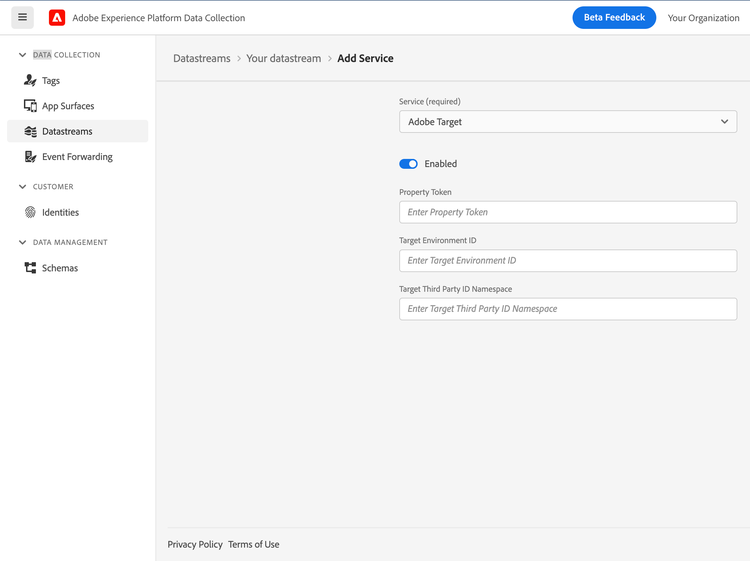
- Click Save.
Configure Offer Decisioning and Target extension in Tag property for Mobile
On Experience Platform Data Collection, navigate to Data Collection > Tags using the left navigation panel. Select an existing mobile tag property or create a new property.
- In your mobile property, navigate to Extensions in the left navigation panel and click on the Catalog tab.
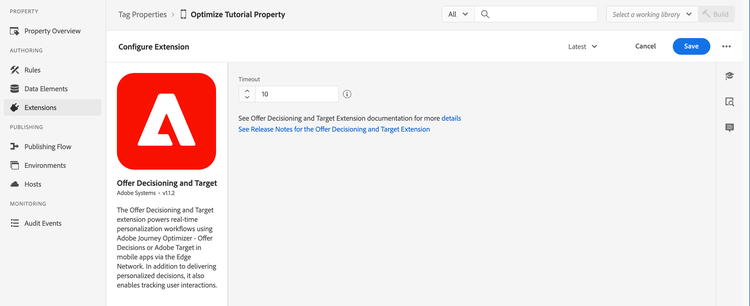
- In the extensions Catalog, search or locate the Offer Decisioning and Target extension, and click Install.
- Optionally, specify a timeout value in seconds. The default value is 10 seconds.
- Click Save.
- Follow the publishing process to update SDK configuration. For more details, see the publish the configuration guide.
Add the Offer Decisioning and Target extension to your app
data-variant=warning
data-slots=text
Include the Optimize extension as an app dependency
Add MobileCore, Edge and Optimize extensions as dependencies to your project.
Android Kotlin
Add the required dependencies to your project by including them in the app's Gradle file.
implementation(platform("com.adobe.marketing.mobile:sdk-bom:3.+"))
implementation("com.adobe.marketing.mobile:core")
implementation("com.adobe.marketing.mobile:edgeidentity")
implementation("com.adobe.marketing.mobile:edge")
implementation("com.adobe.marketing.mobile:optimize")
data-variant=warning
data-slots=text
Android Groovy
Add the required dependencies to your project by including them in the app's Gradle file.
implementation platform('com.adobe.marketing.mobile:sdk-bom:3.+')
implementation 'com.adobe.marketing.mobile:core'
implementation 'com.adobe.marketing.mobile:edgeidentity'
implementation 'com.adobe.marketing.mobile:edge'
implementation 'com.adobe.marketing.mobile:optimize'
data-variant=warning
data-slots=text
iOS CocoaPods
Add the required dependencies to your project using CocoaPods. Add following pods in your Podfile:
use_frameworks!
target 'YourAppTarget' do
    pod 'AEPCore', '~> 5.0'
    pod 'AEPEdge', '~> 5.0'
    pod 'AEPEdgeIdentity', '~> 5.0'
    pod 'AEPOptimize', '~> 5.0'
end
Initialize Adobe Experience Platform SDK with Optimize Extension
Next, initialize the SDK by registering all the solution extensions that have been added as dependencies to your project with Mobile Core. For detailed instructions, refer to the initialization section of the getting started page.
Using the MobileCore.initialize API to initialize the Adobe Experience Platform Mobile SDK simplifies the process by automatically registering solution extensions and enabling lifecycle tracking.
Android Kotlin
data-variant=warning
data-slots=text
import com.adobe.marketing.mobile.LoggingMode
import com.adobe.marketing.mobile.MobileCore
...
import android.app.Application
...

class MainApp : Application() {
  override fun onCreate() {
    super.onCreate()
    MobileCore.setLogLevel(LoggingMode.DEBUG)
    MobileCore.initialize(this, "ENVIRONMENT_ID")
  }
}
Android Java
data-variant=warning
data-slots=text
import com.adobe.marketing.mobile.LoggingMode;
import com.adobe.marketing.mobile.MobileCore;
...
import android.app.Application;
...
public class MainApp extends Application {
  @Override
  public void onCreate(){
    super.onCreate();
    MobileCore.setLogLevel(LoggingMode.DEBUG);
    MobileCore.initialize(this, "ENVIRONMENT_ID");
  }
}
iOS Swift
data-variant=warning
data-slots=text
// AppDelegate.swift
import AEPCore
import AEPServices
...

final class AppDelegate: NSObject, UIApplicationDelegate {
  func application(_: UIApplication, didFinishLaunchingWithOptions _: [UIApplication.LaunchOptionsKey: Any]? = nil) -> Bool {
    MobileCore.setLogLevel(.debug)
    MobileCore.initialize(appId: "ENVIRONMENT_ID")
    ...
  }
}
iOS Objective-C
data-variant=warning
data-slots=text
// AppDelegate.m
#import "AppDelegate.h"
@import AEPCore;
@import AEPServices;
...
@implementation AppDelegate
- (BOOL)application:(UIApplication *)application didFinishLaunchingWithOptions:(NSDictionary *)launchOptions {
  [AEPMobileCore setLogLevel: AEPLogLevelDebug];
  [AEPMobileCore initializeWithAppId:@"ENVIRONMENT_ID" completion:^{
      NSLog(@"AEP Mobile SDK is initialized");
  }];
  ...
  return YES;
}
@end
Offer Decisioning and Target
DecisionScope
The DecisionScope public class provides a constructor to create a scope object using the activityId, placementId, and optional itemCount. The decision scope activity and placement information can be obtained from the decision on the Experience Platform UI.
Android Java
final DecisionScope decisionScope = DecisionScope("xcore:offer-activity:1111111111111111", "xcore:offer-placement:1111111111111111", 3);
iOS Swift
let decisionScope = DecisionScope(activityId: "xcore:offer-activity:1111111111111111",
                                  placementId: "xcore:offer-placement:1111111111111111",
                                  itemCount: 3)
iOS Objective-C
AEPDecisionScope* decisionScope = [[AEPDecisionScope alloc] initWithActivityId:@"xcore:offer-activity:1111111111111111"
                                                                   placementId:@"xcore:offer-placement:1111111111111111"
                                                                     itemCount:3];
Alternately, another of the class's constructor can be used to create a scope object using the encoded decision scope. The encoded scope can also be read directly from the decision on the Experience Platform UI.
Android Java
final DecisionScope decisionScope = DecisionScope("eyJ4ZG06YWN0aXZpdHlJZCI6Inhjb3JlOm9mZmVyLWFjdGl2aXR5OjEyYmEyZjM4MWJjYTY3NWUiLCJ4ZG06cGxhY2VtZW50SWQiOiJ4Y29yZTpvZmZlci1wbGFjZW1lbnQ6MTJiOWEwMDA1NTUwNzM1NyIsICJ4ZG06aXRlbUNvdW50IjozfQ==");
iOS Swift
let decisionScope = DecisionScope(name: "eyJ4ZG06YWN0aXZpdHlJZCI6Inhjb3JlOm9mZmVyLWFjdGl2aXR5OjEyYmEyZjM4MWJjYTY3NWUiLCJ4ZG06cGxhY2VtZW50SWQiOiJ4Y29yZTpvZmZlci1wbGFjZW1lbnQ6MTJiOWEwMDA1NTUwNzM1NyIsICJ4ZG06aXRlbUNvdW50IjozfQ==")
iOS Objective-C
AEPDecisionScope* decisionScope = [[AEPDecisionScope alloc] initWithName:@"eyJ4ZG06YWN0aXZpdHlJZCI6Inhjb3JlOm9mZmVyLWFjdGl2aXR5OjEyYmEyZjM4MWJjYTY3NWUiLCJ4ZG06cGxhY2VtZW50SWQiOiJ4Y29yZTpvZmZlci1wbGFjZW1lbnQ6MTJiOWEwMDA1NTUwNzM1NyIsICJ4ZG06aXRlbUNvdW50IjozfQ=="];
Adobe Target
Target location
The DecisionScope public class provides a designated initializer which can be used to create a Target location (or mbox).
Android Java
final DecisionScope decisionScope = DecisionScope("myTargetLocation");
iOS Swift
let decisionScope = DecisionScope(name: "myTargetLocation")
iOS Objective-C
AEPDecisionScope* decisionScope = [[AEPDecisionScope alloc] initWithName:@"myTargetLocation"];
Target Parameters
Target Parameters can be sent in a personalization query request to the Experience Edge network by adding them in data dictionary when calling the updatePropositions API.
Android Java
final Map<String, Object> data = new HashMap<>();
final Map<String, String> targetParameters = new HashMap<>();

// Add mbox parameters
targetParameters.put("someKey", "someValue");

// Add profile parameters - prefix with profile.
targetParameters.put("profile.membershipLevel", "platinum");

// Add product parameters
targetParameters.put("productId", "111");
targetParameters.put("categoryId", "Books");

// Add order parameters
targetParameters.put("orderId", "10");
targetParameters.put("orderTotal", "110.56");
targetParameters.put("purchasedProductIds", "111");

data.put("__adobe", new HashMap<String, Object>() {
  {
    put("target", targetParameters);
  }
});


final DecisionScope decisionScope = DecisionScope("myTargetLocation") // Target location (or mbox)

final List<DecisionScope> decisionScopes = new ArrayList<>();
decisionScopes.add(decisionScope);

Optimize.updatePropositions(decisionScopes, null, data);
iOS Swift
var data: [String: Any] = [:]
var targetParameters: [String: String] = [:]

// Add mbox parameters
targetParameters["someKey"] = "someValue"

// Add profile parameters - prefix with profile.
targetParameters["profile.membershipLevel"] = "platinum"

// Add product parameters
targetParameters["productId"] = "111"
targetParameters["categoryId"] = "Books"

// Add order parameters
targetParameters["orderId"] = "10"
targetParameters["orderTotal"] = "110.56"
targetParameters["purchasedProductIds"] = "111"

data["__adobe"] = [
  "target": targetParameters
]

let decisionScope = DecisionScope(name: "myTargetLocation") // Target location (or mbox)
Optimize.updatePropositions(for: [decisionScope] withXdm: nil andData: data)
iOS Objective-C
NSMutableDictionary* data = [NSMutableDictionary dictionary];
NSMutableDictionary* targetParameters = [NSMutableDictionary dictionary];

// Add mbox parameters
targetParameters[@"someKey"] = @"someValue";

// Add profile parameters - prefix with profile.
targetParameters[@"profile.membershipLevel"] = @"platinum";

// Add product parameters
targetParameters[@"productId"] = @"111";
targetParameters[@"categoryId"] = @"Books";

// Add order parameters
targetParameters[@"orderId"] = @"10";
targetParameters[@"orderTotal"] = @"110.56";
targetParameters[@"purchasedProductIds"] = @"111";

[data setObject:[NSDictionary dictionaryWithObject:targetParameters forKey:@"target"] forKey:@"__adobe"];

AEPDecisionScope* decisionScope = [[AEPDecisionScope alloc] initWithName:@"myTargetLocation"]; // Target location (or mbox)
[AEPMobileOptimize updatePropositions:@[decisionScope] withXdm:nil andData:data];
Target Third Party ID
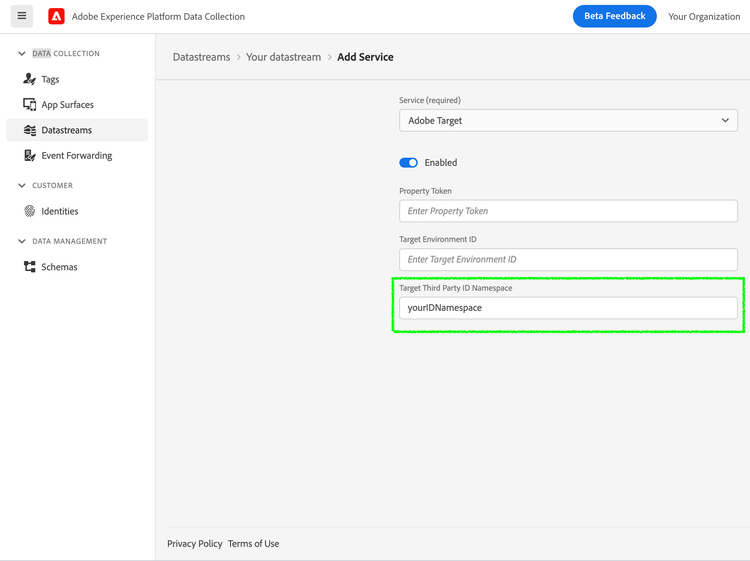
To use Target Third Party ID in the Experience Edge mobile workflows, the corresponding namespace needs to be configured in Experience Platform Data Collection.
- On Experience Platform Data Collection, navigate to Data Collection > Datatreams using the left navigation panel.
- Select your configured datastream and click on the desired environment from the list.
- Navigate to Adobe Target section, specify the Target Third Party ID Namespace.
- Click Save.
In your mobile application, integrate the Identity for Edge Network extension to add the Target Third Party ID in the Identity Map in the personalization query request to the Edge network when calling the updatePropositions API. For more details, see the Identity for Edge Network - updateIdentities API.
Android Java
final IdentityItem item = new IdentityItem("1111", AuthenticatedState.AUTHENTICATED, true);
final IdentityMap identityMap = new IdentityMap();
identityMap.addItem(item, "userCRMID") // userCRMID being used as Third Party ID
Identity.updateIdentities(identityMap);
iOS Swift
let identityMap = IdentityMap()
identityMap.add(item: IdentityItem(id: "1111", authenticatedState: AuthenticatedState.authenticated, primary: true),
                withNamespace: "userCRMID") // userCRMID being used as Third Party ID
Identity.updateIdentities(with: identityMap)
iOS Objective-C
AEPIdentityItem *item = [[AEPIdentityItem alloc] initWithId:@"1111" authenticatedState:AEPAuthenticatedStateAuthenticated primary:true];

AEPIdentityMap *identityMap = [[AEPIdentityMap alloc] init];
[identityMap addItem:item withNamespace:@"userCRMID"]; // userCRMID being used as Third Party ID

[AEPMobileEdgeIdentity updateIdentities:identityMap];
Target Audience Segmentation using Mobile Lifecycle Metrics
To send mobile Lifecycle metrics to Target for creating audiences, a rule needs to be set up on Experience Platform Data Collection to attach these metrics to the Edge personalization query requests. Follow the link to learn how to target visitors using Custom Parameters in Adobe Target.
Create a rule
On Experience Platform Data Collection, navigate to Data Collection > Tags using the left navigation panel. Select an existing mobile tag property or create a new property.
- In your mobile property, navigate to Rules in the left navigation panel and click on Create New Rule. If there already are existing rules, you can click on Add Rule to add a new rule.
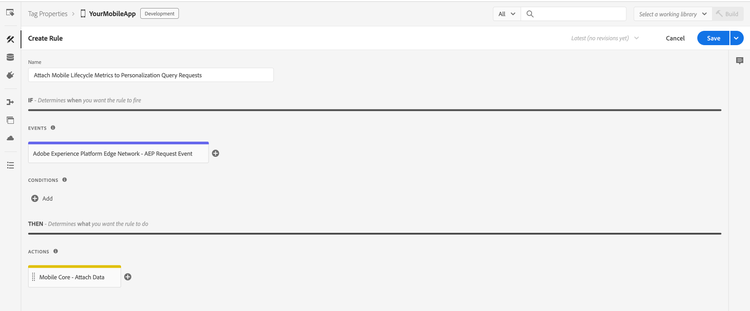
- Provide a name for your rule. In the example here, the rule is named "Attach Mobile Lifecycle Metrics to Personalization Query Requests".
Select an event
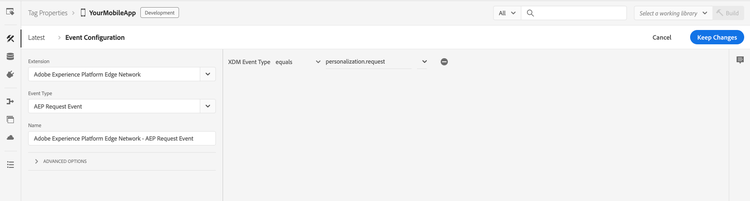
- Under the Events section, click on Add.
- From the Extension dropdown list, select Adobe Experience Platform Edge Network.
- From the Event Type dropdown list, select AEP Request Event.
- On the right pane, click on + to specify XDM Event Type equals personalization.request.
- Click on Keep Changes.
Define the action
- Under the Actions section, click on Add.
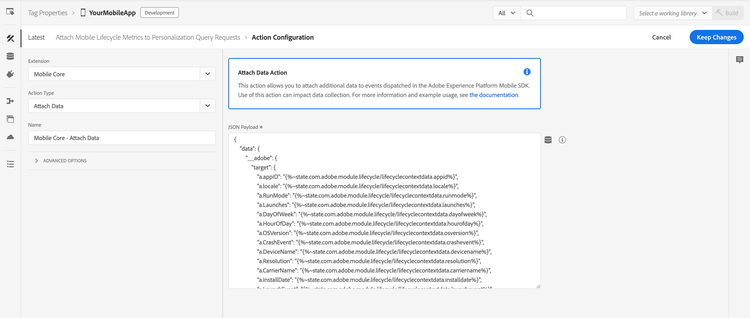
- From the Extension dropdown list, select Mobile Core.
- From the Action Type dropdown list, select Attach Data.
- On the right pane, specify the JSON Payload containing metrics of interest. An example JSON Payload containing all of the mobile Lifecycle metrics is shown below.
- Click on Keep Changes.
{
    "data": {
        "__adobe": {
            "target": {
                "a.appID": "{%~state.com.adobe.module.lifecycle/lifecyclecontextdata.appid%}",
                "a.locale": "{%~state.com.adobe.module.lifecycle/lifecyclecontextdata.locale%}",
                "a.RunMode": "{%~state.com.adobe.module.lifecycle/lifecyclecontextdata.runmode%}",
                "a.Launches": "{%~state.com.adobe.module.lifecycle/lifecyclecontextdata.launches%}",
                "a.DayOfWeek": "{%~state.com.adobe.module.lifecycle/lifecyclecontextdata.dayofweek%}",
                "a.HourOfDay": "{%~state.com.adobe.module.lifecycle/lifecyclecontextdata.hourofday%}",
                "a.OSVersion": "{%~state.com.adobe.module.lifecycle/lifecyclecontextdata.osversion%}",
                "a.CrashEvent": "{%~state.com.adobe.module.lifecycle/lifecyclecontextdata.crashevent%}",
                "a.DeviceName": "{%~state.com.adobe.module.lifecycle/lifecyclecontextdata.devicename%}",
                "a.Resolution": "{%~state.com.adobe.module.lifecycle/lifecyclecontextdata.resolution%}",
                "a.CarrierName": "{%~state.com.adobe.module.lifecycle/lifecyclecontextdata.carriername%}",
                "a.InstallDate": "{%~state.com.adobe.module.lifecycle/lifecyclecontextdata.installdate%}",
                "a.LaunchEvent": "{%~state.com.adobe.module.lifecycle/lifecyclecontextdata.launchevent%}",
                "a.InstallEvent": "{%~state.com.adobe.module.lifecycle/lifecyclecontextdata.installevent%}",
                "a.UpgradeEvent": "{%~state.com.adobe.module.lifecycle/lifecyclecontextdata.upgradeevent%}",
                "a.DaysSinceLastUse": "{%~state.com.adobe.module.lifecycle/lifecyclecontextdata.dayssincelastuse%}",
                "a.DailyEngUserEvent": "{%~state.com.adobe.module.lifecycle/lifecyclecontextdata.dailyenguserevent%}",
                "a.DaysSinceFirstUse": "{%~state.com.adobe.module.lifecycle/lifecyclecontextdata.dayssincefirstuse%}",
                "a.PrevSessionLength": "{%~state.com.adobe.module.lifecycle/lifecyclecontextdata.prevsessionlength%}",
                "a.MonthlyEngUserEvent": "{%~state.com.adobe.module.lifecycle/lifecyclecontextdata.monthlyenguserevent%}",
                "a.DaysSinceLastUpgrade": "{%~state.com.adobe.module.lifecycle/lifecyclecontextdata.dayssincelastupgrade%}",
                "a.LaunchesSinceUpgrade": "{%~state.com.adobe.module.lifecycle/lifecyclecontextdata.launchessinceupgrade%}",
                "a.ignoredSessionLength": "{%~state.com.adobe.module.lifecycle/lifecyclecontextdata.ignoredsessionlength%}"
            }
        }
    }
}
Save the rule and republish the configuration
After you finish your rule configuration, verify the rule details are as shown below:
- Click on Save.
- Republish your configuration to the desired environment.
Analytics for Target (A4T)
Set up the Analytics for Target (A4T) cross-solution integration by enabling the A4T campaigns to use Adobe Analytics as the reporting source for a Target activity. Subsequently, all reporting and segmentation for that activity is based on Analytics data collection. For more information, see Adobe Analytics for Adobe Target (A4T).
Once Analytics is listed as the reporting source for an activity on Target UI, based on server-side or client-side logging appropriate actions need to be taken in the customer mobile apps to register impressions, visits/visitors and possibly conversions with Adobe Analytics.
When using server-side logging, tracking methods need to be implemented in the customer mobile apps for server-side data exchange to happen with Adobe Analytics. This is because Optimize mobile SDK operates in prefetch mode and display notifications are required to indicate scope content is rendered so Experience Edge should share relevant A4T payloads with Adobe Analytics. In addition, content interactions need to be reported using click notifications and these may lead to additional A4T data exchange with Adobe Analytics.
data-variant=info
data-slots=text1, text2
Tracking
Single offer interactions events tracking
User interactions with the decision propositions can be tracked using the following public methods in the Offer class.
Android Java
public class Offer {
  ...
  /**
    * Dispatches an event for the Edge network extension to send an Experience Event to the Edge network with the display interaction data for the
    * given {@code Proposition} offer.
    */
  public void displayed() {...}

  /**
    * Dispatches an event for the Edge network extension to send an Experience Event to the Edge network with the tap interaction data for the
    * given {@code Proposition} offer.
    */
  public void tapped() {...}
}
iOS Swift
public extension Offer {
    /// Dispatches an event for the Edge extension to send an Experience Event to the Edge network with the display interaction data for the given proposition item.
    func displayed() {...}

    /// Dispatches an event for the Edge extension to send an Experience Event to the Edge network with the tap interaction data for the given proposition item.
    func tapped() {...}
}
Upon calling these Offer methods, an Experience Event is sent to the Edge network with the proposition interaction data for the given offer.
Android Java
offer.displayed(); // Sends an Offer display notification to Edge network
Android Kotlin
offer.displayed() // Sends an Offer display notification to Edge network
iOS Swift
offer.displayed() // Sends an Offer display notification to Edge network
iOS Objective-C
[offer displayed]; // Sends an Offer display notification to Edge network
Multiple offers display interactions events tracking
To track display interactions involving multiple offers from different propositions, you can now batch them into a single XDM payload and send a consolidated tracking event. This is particularly useful when multiple offers from various propositions are displayed together within a single activity or screen.
data-variant=info
data-slots=text
Android Kotlin
object OfferUtils {
    /**
     * Dispatches an event for the Edge network extension to send an Experience Event to the Edge
     * network with the display interaction data for the given list of [Offer]s.
     *
     * This function extracts unique [OptimizeProposition]s from the list of offers based on their
     * proposition ID and dispatches an event with multiple propositions.
     *
     * @see XDMUtils.trackWithData
     */
    @JvmStatic
    fun List<Offer>.displayed() {...}
}
iOS Swift
@objc
public extension Optimize {
    /// This API dispatches an event for the Edge extension to send an Experience Event to the Edge network with the display interaction data for list of offers passed.
    ///
    /// - Parameter offers: An array of offer.
    @objc(displayed:)
    static func displayed(for offers: [Offer]) {...}
}
Upon calling this OfferUtils | Optimize methods of android or iOS respectively, an Experience Event is sent to the Edge network with the display proposition interaction data for the given list of offers.
Android Kotlin
// Create a list of offers from different propositions
val offersToDisplay = listOf(
    proposition1.offers[0],
    proposition2.offers[0]
)
// Send list of offers to multiple offers display track public API
offersToDisplay.displayed()
Android Java
// Create a list of offers from different propositions
final List<Offer> offersToDisplay = new ArrayList<>();
offersToDisplay.add(proposition1.getOffers().get(0));
offersToDisplay.add(proposition2.getOffers().get(0));
// Send list of offers to multiple offers display track public API
OfferUtils.displayed(offersToDisplay);
iOS Swift
// Create an array of offers from different propositions
let offersToDisplay = [
    proposition1.offers[0],
    proposition2.offers[0]
]
// Send array of offers to multiple offers display track public API
Optimize.displayed(offersToDisplay)
iOS Objective-C
// Create an array of offers from different propositions
NSArray<AEPOffer *> *offersToDisplay = @[
    proposition1.offers[0],
    proposition2.offers[0]
];
// Send array of offers to multiple offers display track public API
[AEPMobileOptimize displayed: offersToDisplay];
Single offer interactions events tracking using Edge extension API
For more advanced tracking use cases, additional public methods are available in the Offer class. These methods can be used to generate XDM formatted data for Experience Event - Proposition Interactions field groups.
Android Java
public class Offer {
  ...
  /**
    * Generates a map containing XDM formatted data for {@code Experience Event - Proposition Interactions} field group from this {@code Proposition} item.
    *
    * The returned XDM data does contain the {@code eventType} for the Experience Event with value {@code decisioning.propositionDisplay}.
    *
    * Note: The Edge sendEvent API can be used to dispatch this data in an Experience Event along with any additional XDM, free-form data, and override
    * dataset identifier.
    *
    * @return {@code Map<String, Object>} containing the XDM data for the proposition interaction.
    */
  public Map<String, Object> generateDisplayInteractionXdm() {...}

  /**
    * Generates a map containing XDM formatted data for {@code Experience Event - Proposition Interactions} field group from this {@code Proposition} offer.
    *
    * The returned XDM data contains the {@code eventType} for the Experience Event with value {@code decisioning.propositionInteract}.
    *
    * Note: The Edge sendEvent API can be used to dispatch this data in an Experience Event along with any additional XDM, free-form data, and override
    * dataset identifier.
    *
    * @return {@code Map<String, Object>} containing the XDM data for the proposition interaction.
    */
  public Map<String, Object> generateTapInteractionXdm() {...}
}
iOS Swift
public extension Offer {
  /// Creates a dictionary containing XDM formatted data for `Experience Event - Proposition Interactions` field group from the given proposition option.
  ///
  /// The Edge `sendEvent(experienceEvent:_:)` API can be used to dispatch this data in an Experience Event along with any additional XDM, free-form data, or override dataset identifier.
  ///
  /// - Note: The returned XDM data also contains the `eventType` for the Experience Event with value `decisioning.propositionDisplay`.
  /// - Returns A dictionary containing XDM data for the proposition interactions.
  func generateDisplayInteractionXdm() -> [String: Any] {...}

  /// Creates a dictionary containing XDM formatted data for `Experience Event - Proposition Interactions` field group from the given proposition option.
  ///
  /// The Edge `sendEvent(experienceEvent:_:)` API can be used to dispatch this data in an Experience Event along with any additional XDM, free-form data, or override dataset identifier.
  ///
  /// - Note: The returned XDM data also contains the `eventType` for the Experience Event with value `decisioning.propositionInteract`.
  /// - Returns A dictionary containing XDM data for the proposition interactions.
  func generateTapInteractionXdm() -> [String: Any] {...}
}
The Edge sendEvent API can then be used to send this tracking XDM data along with any additional XDM and freeform data to the Experience Edge network. Additionally, an override dataset can also be specified for tracking data. For more details, see Edge - sendEvent API.
Android Kotlin
// When a proposition is retrieved using getPropositions API or onUpdatePropositions API callback
// and the corresponding offer is displayed, invoke method on Offer object to get the XDM data.

val displayInteractionXdm = offer.generateDisplayInteractionXdm() // Offer display tracking XDM
val additionalData = mapOf("someDataKey" to "someDataValue")

val experienceEvent = ExperienceEvent.Builder()
    .setXdmSchema(displayInteractionXdm)
    .setData(additionalData)
    .build()
Edge.sendEvent(experienceEvent, null)
Android Java
// When a proposition is retrieved using getPropositions API or onUpdatePropositions API callback
// and the corresponding offer is displayed, invoke method on Offer object to get the XDM data.

final Map<String, Object> displayInteractionXdm = offer.generateDisplayInteractionXdm() // Offer display tracking XDM
final Map<String, Object> additionalData = new HashMap<>();
additionalData.put("someDataKey", "someDataValue");

final ExperienceEvent experienceEvent = new ExperienceEvent.Builder().setXdmSchema(displayInteractionXdm).setData(additionalData).build();
Edge.sendEvent(experienceEvent, null)
iOS Swift
// When a proposition is retrieved using getPropositions API or onUpdatePropositions API callback
// and the corresponding offer is displayed, invoke method on Offer object to get the XDM data.

let displayInteractionXdm = offer.generateDisplayInteractionXdm() // Offer display tracking XDM
let additionalData: [String: Any] = ["someDataKey": "someDataValue"]

let experienceEvent = ExperienceEvent(xdm: displayInteractionXdm, data: additionalData)
Edge.sendEvent(experienceEvent)
iOS Objective-C
// When a proposition is retrieved using getPropositions API or onUpdatePropositions API callback
// and the corresponding offer is displayed, invoke method on Offer object to get the XDM data.

NSDictionary* displayInteractionXdm = [offer generateDisplayInteractionXdm];
NSDictionary* additionalData = @{@"someDataKey": @"someDataValue"};

AEPExperienceEvent* experienceEvent = [[AEPExperienceEvent alloc] initWithXdm:displayInteractionXdm data:additionalData datasetIdentifier:nil];
[AEPMobileEdge sendExperienceEvent:event completion:nil];
Multiple offer display interactions events tracking using Edge extension API
Starting with Optimize SDK version 3.5.0 for Android and 5.5.0 for iOS, you can handle more advanced use cases by generating XDM data for multiple display propositions and send display interaction tracking events through the Edge Extension API. The OfferUtils class provides a public method that extends List<Offer> | Optimize to generate XDM formatted data for the Experience Event - Proposition Interactions field group for a list of offers.
data-variant=info
data-slots=text
Android Kotlin
object OfferUtils {
    /**
     * Generates a map containing XDM formatted data for `Experience Event - OptimizeProposition
     * Interactions` field group from the given list of [Offer]s.
     *
     * This function extracts unique [OptimizeProposition]s from the list of offers based on their
     * proposition ID and generates XDM data for the interaction.
     *
     * @return [Map] containing the XDM data for the proposition interaction, or null if the list is empty
     * or no valid propositions are found
     */
    @JvmStatic
    fun List<Offer>.generateDisplayInteractionXdm(): Map<String, Any>? {...}
}
iOS Swift
@objc
public extension Optimize {
    /// This API returns a dictionary containing XDM formatted data for Experience Event - Proposition Interactions field group for the list of offers
    ///
    /// The Edge sendEvent(experienceEvent:_:) API can be used to dispatch this data in an Experience Event along with any additional XDM, free-form data, or override dataset identifier.
    ///
    /// - Parameter offers: An array of offer.
    /// - Note: The returned XDM data also contains the eventType for the Experience Event with value decisioning.propositionInteract.
    /// - Returns A dictionary containing XDM data for the propositon interactions.
    /// - SeeAlso: interactionXdm(for:)
    @objc(generateDisplayInteractionXdm:)
    static func generateDisplayInteractionXdm(for offers: [Offer]) -> [String: Any]?{...}
}
The Edge sendEvent API can then be used to send this tracking XDM data along with any additional XDM and freeform data to the Experience Edge network. Additionally, an override dataset can also be specified for tracking data. For more details, see Edge - sendEvent API.
Android Kotlin
// When propositions are retrieved using getPropositions API or onUpdatePropositions API callback
// and the corresponding offers are displayed, invoke method on List<Offer> to get the XDM data.

val displayInteractionXdm = offers.generateDisplayInteractionXdm() // Offers display tracking XDM
val additionalData = mapOf("someDataKey" to "someDataValue")

val experienceEvent = ExperienceEvent.Builder()
    .setXdmSchema(displayInteractionXdm)
    .setData(additionalData)
    .build()
Edge.sendEvent(experienceEvent, null)
Parameters
- offers - A
[Offer]that may or may not belong to the same proposition. The associated proposition(s) need to be tracked.
Android Java
// When propositions are retrieved using getPropositions API or onUpdatePropositions API callback
// and the corresponding offers are displayed, invoke method on List<Offer> to get the XDM data.

final Map<String, Object> displayInteractionXdm = offers.generateDisplayInteractionXdm() // Offers display tracking XDM
final Map<String, Object> additionalData = new HashMap<>();
additionalData.put("someDataKey", "someDataValue");

final ExperienceEvent experienceEvent = new ExperienceEvent.Builder().setXdmSchema(displayInteractionXdm).setData(additionalData).build();
Edge.sendEvent(experienceEvent, null)
Parameters
- offers - A
List<Offer>that may or may not belong to the same proposition. The associated proposition(s) need to be tracked.
iOS Swift
// When propositions are retrieved using getPropositions API or onUpdatePropositions API callback
// and the corresponding offers are displayed, invoke method on [Offer] to get the XDM data.

let displayInteractionXdm = offers.generateDisplayInteractionXdm() // Offers display tracking XDM
let additionalData: [String: Any] = ["someDataKey": "someDataValue"]

let experienceEvent = ExperienceEvent(xdm: displayInteractionXdm, data: additionalData)
Edge.sendEvent(experienceEvent)
Parameters
- offers - A
[Offer]that may or may not belong to the same proposition. The associated proposition(s) need to be tracked.
iOS Objective-C
// When propositions are retrieved using getPropositions API or onUpdatePropositions API callback
// and the corresponding offers are displayed, invoke method on NSArray<AEPOffer *> to get the XDM data.

NSDictionary* displayInteractionXdm = [offers generateDisplayInteractionXdm];
NSDictionary* additionalData = @{@"someDataKey": @"someDataValue"};

AEPExperienceEvent* experienceEvent = [[AEPExperienceEvent alloc] initWithXdm:displayInteractionXdm data:additionalData datasetIdentifier:nil];
[AEPMobileEdge sendExperienceEvent:event completion:nil];
Parameters
- offers - A
List<Offer>that may or may not belong to the same proposition. The associated proposition(s) need to be tracked.
data-variant=info
data-slots=text
Android Kotlin
import com.google.gson.Gson
import java.nio.charset.StandardCharsets

fun calculateJsonSizeInKB(jsonMap: Map<String, Any>) {
    val gson = Gson()
    val jsonString = gson.toJson(jsonMap)
    val byteArray = jsonString.toByteArray(StandardCharsets.UTF_8)
    val sizeInKB = byteArray.size / 1024.0
    println("JSON size: %.2f KB".format(sizeInKB))
}
iOS Swift
import Foundation

func calculateJsonSizeInKB(jsonMap: [String: Any]) {
    do {
        let jsonData = try JSONSerialization.data(withJSONObject: jsonMap)
        let sizeInKB = Double(jsonData.count) / 1024.0
        print(String(format: "JSON size: %.2f KB", sizeInKB))
    } catch {
        print("Error calculating JSON size: \(error)")
    }
}
Configuration keys
To update the SDK configuration programmatically, use the following information to change the Optimize extension configuration values. For more information, see the programmatic updates to Configuration guide.
data-variant=info
data-slots=text
Experience Event - Proposition Interaction field group. For more information, see the setup schemas and datasets guide.