Export PDF Form Data
The Export PDF Form Data API will retrieve the data from a PDF form and return it as a JSON file
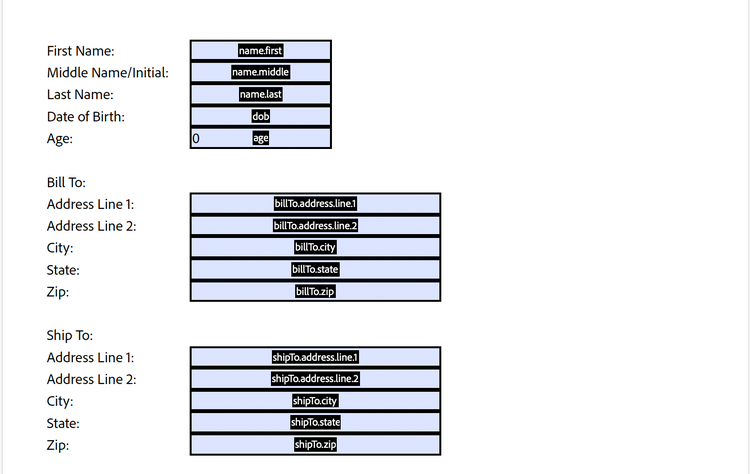
Input Documents : Required
Supported formats:
- PDF (application/pdf) – Only PDF version 1.6 and above is supported.
- AcroForm and Static XFA – The input document must contain an interactive form from which data needs to be extracted.
Input Document
A filled interactive PDF form (AcroForm/Static XFA) from which data needs to be exported.
Important Notes:
- Only Static XFA files are supported.
- Dynamic XFA format is not supported and will result in an error.
REST API
See our public API Reference for Export PDF Form Data API.
Export PDF Form Data
The sample below exports PDF form data and returns it as a JSON file.
Please refer to the API usage guide to understand how to use our APIs.
data-slots=heading, code
data-repeat=3
data-languages=Java, Python, REST API
Java
// Get the samples from https://www.adobe.com/go/pdftoolsapi_java_samples
// Run the sample:
// mvn -f pom.xml exec:java -Dexec.mainClass=com.adobe.pdfservices.operation.samples.ExportPDFFormData

public class ExportPDFFormData {
    // Initialize the logger
    private static final Logger LOGGER = LoggerFactory.getLogger(ExportPDFFormData.class);

    public static void main(String[] args) {
        try (InputStream inputStream = Files.newInputStream(new File("src/main/resources/exportPdfFormDataInput.pdf").toPath())) {
            // Initial setup, create credentials instance
            Credentials credentials = new ServicePrincipalCredentials(System.getenv("PDF_SERVICES_CLIENT_ID"), System.getenv("PDF_SERVICES_CLIENT_SECRET"));

            // Creates a PDF Services instance
            PDFServices pdfServices = new PDFServices(credentials);

            // Creates an asset(s) from source file(s) and upload
            Asset asset = pdfServices.upload(inputStream, PDFServicesMediaType.PDF.getMediaType());

            // Creates a new job instance
            ExportPDFFormDataJob exportPDFFormDataJob = new ExportPDFFormDataJob(asset);

            // Submit the job and gets the job result
            String location = pdfServices.submit(exportPDFFormDataJob);
            PDFServicesResponse<ExportPDFFormDataResult> pdfServicesResponse = pdfServices.getJobResult(location, ExportPDFFormDataResult.class);

            // Get content from the resulting asset(s)
            Asset resultAsset = pdfServicesResponse.getResult().getAsset();
            StreamAsset streamAsset = pdfServices.getContent(resultAsset);

            Files.createDirectories(Paths.get("output/"));
            OutputStream outputStream = Files.newOutputStream(new File("output/ExportPDFFormData.pdf").toPath());
            LOGGER.info(String.format("Saving asset at output/ExportPDFFormData.pdf", outputFilePath));
            IOUtils.copy(streamAsset.getInputStream(), outputStream);
            outputStream.close();
        } catch (ServiceApiException | IOException | SDKException | ServiceUsageException ex) {
            LOGGER.error("Exception encountered while executing operation", ex);
        }
    }
}
Python
# Get the samples https://github.com/adobe/pdfservices-python-sdk-samples
# Run the sample:
# python src/exportpdfformdata/export_pdf_form_data.py

# Initialize the logger
logging.basicConfig(level=logging.INFO)

class ExportPDFFormData:
    def __init__(self):
        try:
            file = open('../resources/exportPdfFormDataInput.pdf', 'rb')
            input_stream = file.read()
            file.close()

            # Initial setup, create credentials instance
            credentials = ServicePrincipalCredentials(
                client_id=os.getenv('PDF_SERVICES_CLIENT_ID'),
                client_secret=os.getenv('PDF_SERVICES_CLIENT_SECRET')
            )

            # Creates a PDF Services instance
            pdf_services = PDFServices(credentials=credentials)

            # Creates an asset(s) from source file(s) and upload
            input_asset = pdf_services.upload(input_stream=input_stream,
                                              mime_type=PDFServicesMediaType.PDF)

            # Creates a new job instance
            export_pdf_form_data_job = ExportPDFFormDataJob(input_asset=input_asset)

            # Submit the job and gets the job result
            location = pdf_services.submit(export_pdf_form_data_job)
            pdf_services_response = pdf_services.get_job_result(location, ExportPDFFormDataResult)

            # Get content from the resulting asset(s)
            result_asset = pdf_services_response.get_result().get_asset()
            stream_asset = pdf_services.get_content(result_asset)

            # Creates an output stream and copy stream asset's content to it
            output_file_path = self.create_output_file_path()
            with open(output_file_path, "wb") as file:
                file.write(stream_asset.get_input_stream())

        except (ServiceApiException, ServiceUsageException, SdkException) as e:
            logging.exception(f'Exception encountered while executing operation: {e}')

    # Generates a string containing a directory structure and file name for the output file
    @staticmethod
    def create_output_file_path() -> str:
        now = datetime.now()
        time_stamp = now.strftime("%Y-%m-%dT%H-%M-%S")
        os.makedirs("../../output/ExportPDFFormData", exist_ok=True)
        return f"../../output/ExportPDFFormData/export{time_stamp}.json"


if __name__ == "__main__":
    ExportPDFFormData()
REST API
// Please refer our REST API docs for more information
// https://developer.adobe.com/document-services/docs/apis/#tag/Export-PDF-Form-Data

curl --location --request POST 'https://pdf-services.adobe.io/operation/getformdata' \
--header 'x-api-key: {{Placeholder for client_id}}' \
--header 'Content-Type: application/json' \
--header 'Authorization: Bearer {{Placeholder for token}}' \
--data-raw '{
    "assetID": "urn:aaid:AS:UE1:23c30ee0-2e4d-46d6-87f2-087832fca718"
}'