Add-on Architecture Guide
Learn about the dual-runtime architecture, communication patterns, and development workflow essentials for building Adobe Express add-ons.
Overview
Add-ons run as iframes within Adobe Express, with isolated runtime environments communicating through a secure proxy layer. This guide explains add-on's dual-runtime architecture, cross-runtime communication, SDK usage, and development best practices for building secure and performant add-ons.
data-variant=info
data-slots=header, text1
Dual-Runtime Architecture
Adobe Express add-ons run in two separate JavaScript execution environments that work together:
- iframe runtime - Your add-on's user interface environment (uses the Add-on UI SDK)
- document sandbox - Secure environment for document manipulation (uses the Document Sandbox SDK)
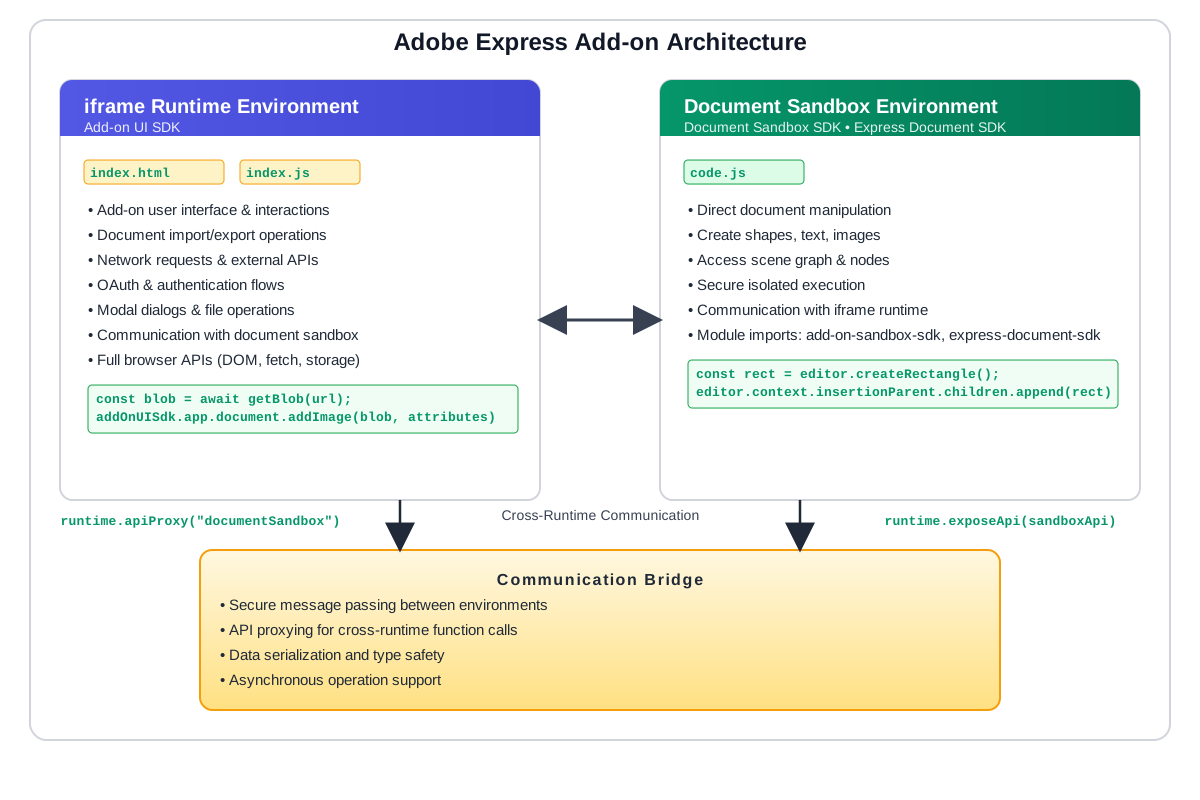
How it works
Your add-on is bundled and loaded as an iframe within Adobe Express. Both runtime environments are isolated from each other and from the host application for security. They communicate exclusively through a proxy-based message passing system, which ensures that:
- The UI can access the document through specific Add-on UI SDK methods (ie:
app.document.addImage()) but does not directly manipulate document elements - The document sandbox cannot directly access the iframe's HTML DOM
- All cross-runtime communication is type-safe and validated
This isolation is fundamental to Adobe Express's security model, allowing third-party add-ons to extend functionality without compromising user data or application stability.
The Two Environments
Iframe Runtime
The browser environment where the add-on's user interface runs for users to interact with it. When a user chooses an add-on, the add-on opens in a panel on the right side of the Adobe Express UI in a secure sandboxed iframe, where permissions are controlled by a Permissions Policy and the sandbox attribute. See the Iframe Runtime Context & Security Guide for more details on the iframe runtime and its security. The iframe runtime is where the Add-on UI SDK addOnUISdk is imported to access the APIs for features like OAuth, media import, rendition creation, and more.
index.js or index.htmladdOnUISdk):<br/>• app.document.addImage() - Import media<br/>• app.document.createRenditions() - Export document<br/>• app.showModalDialog() - Display dialogs<br/>• app.oauth - Auth flows<br/>• addOnUISdk.instance.clientStorage - Persistent storage<br/>Communication: Use runtime.apiProxy() to call sandbox functions or runtime.exposeApi() to expose functions to the document sandboxImport Pattern:
import addOnUISdk from "https://express.adobe.com/static/add-on-sdk/sdk.js";

// Always wait for SDK to be ready
addOnUISdk.ready.then(() => {
  const { runtime } = addOnUISdk.instance;
  const { app } = addOnUISdk;

  // runtime - for communication with document sandbox
  // app - for UI SDK features (dialogs, OAuth, renditions, etc.)
});
data-slots=header, text1, text2, text3, text4
data-variant=success
runtime.apiProxy() to communicate with the document sandbox if:- Creating/modifying document elements (text, shapes, etc.)
- Reading document properties not available in UI SDK
- Performing complex document operations
- Only using Add-on UI SDK features (e.g.,
app.document.addImage(),app.document.createRenditions()) - Building a pure UI add-on (settings, external integrations)
- Only displaying information fetched from external APIs
Document Sandbox
The secure isolated environment for document manipulation with limited browser APIs but direct document access. The document sandbox is where the Document Sandbox SDKs are used to access the APIs for features like document manipulation, document properties, and more.
code.jseditor<br/>Scenegraph access: Read and traverse the document structure<br/>Express Document SDK features:<br/>• editor.createRectangle(), editor.createText() - Create content<br/>• editor.context.selection - Access selected elements<br/>• editor.context.insertionParent - Add content to document<br/>• colorUtils - Create and convert colors<br/>• fonts - Manage and load fonts<br/>• viewport - Control canvas navigation<br/>Limited Web APIs: Only console and Blob (see the Web APIs Reference)<br/>Communication: Use runtime.exposeApi() to expose functions to the iframe runtime or runtime.apiProxy() to call UI functionsImport Patterns:
Option 1: Communication Only
import addOnSandboxSdk from "add-on-sdk-document-sandbox";
const { runtime } = addOnSandboxSdk.instance;

runtime.exposeApi({
  processData: function(data) {
    // Process data without touching document
    return data.map(item => item.toUpperCase());
  }
});
Option 2: Communication + Document Manipulation (Most Common)
import addOnSandboxSdk from "add-on-sdk-document-sandbox";
import { editor, colorUtils, constants, fonts, viewport } from "express-document-sdk";

const { runtime } = addOnSandboxSdk.instance;

runtime.exposeApi({
  createShape: function() {
    const rectangle = editor.createRectangle();
    rectangle.width = 100;
    rectangle.height = 100;
    editor.context.insertionParent.children.append(rectangle);
  }
});
data-slots=header, text1, text2, text3, text4
data-variant=success
addOnSandboxSdk):- ✅ YES if your
code.jsneeds to communicate with the iframe runtime - ✅ YES if iframe runtime triggers document operations
- ❌ NO if you don't have a
documentSandboxentry in your manifest
express-document-sdk):- ✅ YES if creating/modifying document content
- ✅ YES if accessing document properties
- ❌ NO if only processing data or communicating
data-variant=info
data-slots=header, text1
express-document-sdk is automatically injected in Script mode. In production add-ons, you must always use explicit import statements as shown above.What's Available Without Import:
The document sandbox automatically provides limited Web APIs and standard JavaScript built-ins. For complete details, see Web APIs Reference.
// Console APIs - for debugging
console.log("Debugging output");
console.error("Error logging");
console.warn("Warnings");
console.assert(condition, "Assertion message");

// Blob interface - for binary data handling
const blob = new Blob(['data'], { type: 'text/plain' });
blob.text().then(text => console.log(text));

// Standard JavaScript built-ins - available globally
JSON.parse('{"key": "value"}');
Math.floor(3.7);
Date.now();
Object.keys({a: 1});
Array.from([1, 2, 3]);
String.prototype.toUpperCase.call('hello');
// ... and other standard JavaScript globals
Environment Characteristics
- Isolated JavaScript context: Secure sandbox execution
- Limited browser APIs: Only essential APIs like
consoleandBlob - Performance: Slower than iframe runtime but secure
- No HTML DOM access: Must communicate through iframe runtime for UI updates
Debugging Tips:
The console object is available in the document sandbox to allow you to log messages to the console. You can use it to debug your code by logging variables, objects, and other information to the console. For example:
// View variable values
console.log("Variable:", myVariable);

// Object inspection - serialize to see structure
console.log("Object:", JSON.stringify(myObject, null, 2));

// Error tracking
try {
    const result = editor.createText("Hello");
    console.log("Success:", result);
} catch (error) {
    console.error("Failed:", error.message);
}

// Performance debugging
const start = performance.now();
// ... your code ...
console.log(`Took ${performance.now() - start}ms`);
The Runtime Object
The runtime object provides communication APIs that enable the two environments to talk to each other. Each environment has its own runtime object for secure message passing.
Where to Access:
- iframe runtime:
addOnUISdk.instance.runtime(from the Add-on UI SDK) - document sandbox:
addOnSandboxSdk.instance.runtime(from the Document Sandbox SDK)
Think of it like a phone - where each side has their own phone with two key methods:
exposeApi()- Makes your functions callable from the other side (like publishing your phone number)apiProxy()- Gets a proxy to call functions on the other side (like dialing the other phone)
This abstraction ensures:
- Type-safe cross-runtime communication
- Security boundaries are maintained
- Both environments can initiate communication
- No direct access between environments
Communication Flow
From Iframe Runtime to Document Sandbox
To manipulate the document from your UI, use the following pattern:
data-slots=heading, code
data-repeat=2
Iframe Runtime (ui/index.js)
/**
 * ENVIRONMENT: Iframe Runtime (UI)
 * FILE: src/ui/index.js
 * PURPOSE: Handle user interactions and trigger document operations
 * SDK: Add-on UI SDK
 */
import addOnUISdk, { RuntimeType } from "https://express.adobe.com/static/add-on-sdk/sdk.js";

// Wait for SDK to be ready before accessing runtime
addOnUISdk.ready.then(async () => {
  const { runtime } = addOnUISdk.instance;

  // Button click handler - responds to user action
  document.getElementById("createText").addEventListener("click", async () => {
    // Step 1: Get a proxy to call document sandbox functions
    const sandboxProxy = await runtime.apiProxy(RuntimeType.documentSandbox);

    // Step 2: Call the function exposed in code.js
    await sandboxProxy.createTextElement("Hello World!");
  });
});
Document Sandbox (sandbox/code.js)
/**
 * ENVIRONMENT: Document Sandbox (Isolated)
 * FILE: src/sandbox/code.js
 * PURPOSE: Perform document manipulation operations
 * SDKs: Document Sandbox SDK (communication) + Express Document SDK (document APIs)
 */
import addOnSandboxSdk from "add-on-sdk-document-sandbox";  // For communication
import { editor } from "express-document-sdk";              // For document manipulation

const { runtime } = addOnSandboxSdk.instance;

// Expose functions that Iframe Runtime can call
runtime.exposeApi({
  createTextElement: function(text) {
    const textNode = editor.createText(text);
    editor.context.insertionParent.children.append(textNode);
  }
});
From Document Sandbox to Iframe Runtime
To update the UI from the document sandbox, use the following pattern:
data-slots=heading, code
data-repeat=2
Document Sandbox (sandbox/code.js)
/**
 * ENVIRONMENT: Document Sandbox (Isolated)
 * FILE: src/sandbox/code.js
 * PURPOSE: Process document and send updates to UI
 * SDK: Document Sandbox SDK (for communication back to UI)
 */

import addOnSandboxSdk, { RuntimeType } from "add-on-sdk-document-sandbox";

const { runtime } = addOnSandboxSdk.instance;

async function processDocument() {
  // Step 1: Get a proxy to call UI functions
  const uiProxy = await runtime.apiProxy(RuntimeType.panel);

  // Step 2: Update UI with progress
  await uiProxy.updateProgress(50);

  // Step 3: Perform document manipulation here...

  // Step 4: Notify UI when complete
  await uiProxy.updateProgress(100);
}
Iframe Runtime (ui/index.js)
/**
 * ENVIRONMENT: Iframe Runtime (UI)
 * FILE: src/ui/index.js
 * PURPOSE: Expose UI update functions that document sandbox can call
 * SDK: Add-on UI SDK
 */
import addOnUISdk from "https://express.adobe.com/static/add-on-sdk/sdk.js";

addOnUISdk.ready.then(() => {
  const { runtime } = addOnUISdk.instance;

  // Expose functions that document sandbox can call
  runtime.exposeApi({
    updateProgress: function(percentage) {
      // Update the DOM directly (iframe has standard Web APIs)
      const progressBar = document.getElementById("progress");
      progressBar.style.width = percentage + "%";
    }
  });
});
Manifest Configuration
Your add-on's manifest.json is where you enable communication between the iframe runtime and the document sandbox, by specifying the documentSandbox entrypoint and the code file to execute in the document sandbox.
/**
 * FILE: manifest.json
 * PURPOSE: Define add-on structure and entrypoints
 */
{
  "entryPoints": [
    {
      "type": "panel",              // Creates a panel in the Adobe Express UI
      "id": "panel1",                // Unique panel identifier
      "main": "index.html",          // UI entry point (iframe runtime)
      "documentSandbox": "code.js"   // Document sandbox code (optional)
    }
  ]
}
Communication Between Environments:
Use the runtime.apiProxy() method with RuntimeType constants for type-safe communication:
// In iframe runtime (index.js)
import addOnUISdk, { RuntimeType } from "https://express.adobe.com/static/add-on-sdk/sdk.js";

const sandboxProxy = await runtime.apiProxy(RuntimeType.documentSandbox);
// In document sandbox (code.js)
import addOnSandboxSdk, { RuntimeType } from "add-on-sdk-document-sandbox";

const { runtime } = addOnSandboxSdk.instance;
const uiProxy = await runtime.apiProxy(RuntimeType.panel);
How it works:
- From iframe runtime: Call
runtime.apiProxy(RuntimeType.documentSandbox)to communicate with the document sandbox- Requires
"documentSandbox": "code.js"in your manifest
- Requires
- From document sandbox: Call
runtime.apiProxy(RuntimeType.panel)to communicate with the iframe runtime- The panel type matches
"type": "panel"from your manifest
- The panel type matches
data-variant=info
data-slots=header, text1
"documentSandbox": "code.js"in manifest enables the document sandbox runtime- If
documentSandboxis omitted, only the iframe runtime runs (UI-only add-on) - Always use
RuntimeTypeconstants for type safety in both environments - Import
RuntimeTypefrom the appropriate SDK in each environment
Common Communication Patterns
Now that you understand the communication flow, here are the most common patterns you'll use:
Pattern 1: UI-Triggered Document Operations
Most common - User clicks button in UI → Create/modify document elements.
/**
 * PATTERN: UI-Triggered Document Operations
 * FLOW: User Action (iframe) → API Call → Document Change (sandbox)
 * FILES: index.js + code.js
 */

// index.js (Iframe Runtime)
import addOnUISdk, { RuntimeType } from "https://express.adobe.com/static/add-on-sdk/sdk.js";

addOnUISdk.ready.then(async () => {
  const { runtime } = addOnUISdk.instance;
  const sandboxProxy = await runtime.apiProxy(RuntimeType.documentSandbox);

  document.getElementById("createBtn").onclick = async () => {
    await sandboxProxy.createTextElement("Hello!");
  };
});

// code.js (Document Sandbox)
import addOnSandboxSdk from "add-on-sdk-document-sandbox";
import { editor } from "express-document-sdk";

const { runtime } = addOnSandboxSdk.instance;

runtime.exposeApi({
  createTextElement: function(text) {
    const textNode = editor.createText(text);
    editor.context.insertionParent.children.append(textNode);
  }
});
Pattern 2: Document-Driven UI Updates
Read document properties → Display in UI.
/**
 * PATTERN: Document-Driven UI Updates
 * FLOW: Document Read (sandbox) → Send Data → UI Update (iframe)
 * FILES: index.js + code.js
 */

// index.js (Iframe Runtime)
import addOnUISdk, { RuntimeType } from "https://express.adobe.com/static/add-on-sdk/sdk.js";

addOnUISdk.ready.then(async () => {
  const { runtime } = addOnUISdk.instance;
  const sandboxProxy = await runtime.apiProxy(RuntimeType.documentSandbox);

  const stats = await sandboxProxy.getDocumentStats();
  document.getElementById("stats").textContent =
    `Pages: ${stats.pageCount}, Elements: ${stats.elementCount}`;
});

// code.js (Document Sandbox)
import addOnSandboxSdk from "add-on-sdk-document-sandbox";
import { editor } from "express-document-sdk";

const { runtime } = addOnSandboxSdk.instance;

runtime.exposeApi({
  getDocumentStats: function() {
    return {
      pageCount: editor.documentRoot.pages.length,
      elementCount: editor.context.insertionParent.children.length
    };
  }
});
Pattern 3: Bi-directional Communication
Document sandbox calls back to UI to show progress.
/**
 * PATTERN: Bi-directional Communication
 * FLOW: UI → Sandbox → Document + Sandbox → UI (progress updates)
 * FILES: index.js + code.js
 */

// index.js (Iframe Runtime)
import addOnUISdk, { RuntimeType } from "https://express.adobe.com/static/add-on-sdk/sdk.js";

addOnUISdk.ready.then(async () => {
  const { runtime } = addOnUISdk.instance;

  // Expose progress handler
  runtime.exposeApi({
    updateProgress: (percent) => {
      document.getElementById("progress").style.width = percent + "%";
    }
  });

  const sandboxProxy = await runtime.apiProxy(RuntimeType.documentSandbox);
  await sandboxProxy.processLargeOperation();
});

// code.js (Document Sandbox)
import addOnSandboxSdk, { RuntimeType } from "add-on-sdk-document-sandbox";

const { runtime } = addOnSandboxSdk.instance;

runtime.exposeApi({
  processLargeOperation: async function() {
    const uiProxy = await runtime.apiProxy(RuntimeType.panel);

    await uiProxy.updateProgress(25);
    // ... do work ...
    await uiProxy.updateProgress(50);
    // ... more work ...
    await uiProxy.updateProgress(100);
  }
});
SDK Structure & Import Patterns
data-variant=warning
data-slots=header, text1
new to create any new instances yourself. Understanding this pattern is essential for correct usage. The singleton approach provides reliability, consistency, efficiency, and simplicity in add-on development.Examples of SDK Singletons
Add-on UI SDK Singletons
addOnUISdk.instance- Add-on-specific featuresaddOnUISdk.app- Adobe Express application interfaceaddOnUISdk.instance.runtime- Communication between environmentsaddOnUISdk.app.document- Document import/export
Document Sandbox SDK Singletons
addOnSandboxSdk.instance- Add-on instance in sandboxaddOnSandboxSdk.instance.runtime- Communication from sandbox
Express Document SDK Singletons:
editor- Document editing and manipulationcolorUtils- Color creation and conversionconstants- Document constants for type safetyfonts- Font managementviewport- Viewport control
Remember: You never call new on any of these, they're ready to use when you import them.
The Complete Runtime Hierarchy
When a user opens your add-on, one running instance is created with all SDK singleton objects pre-instantiated and ready to use.
Your Add-on Instance (when user opens your panel)
├── Iframe Runtime Environment
│   ├── addOnUISdk.instance
│   │   ├── runtime (communication APIs)
│   │   ├── clientStorage (persistent storage)
│   │   └── manifest (manifest details)
│   └── addOnUISdk.app
│       ├── ui (theme, locale, panels)
│       ├── document (import/export, renditions)
│       ├── oauth (authentication)
│       └── currentUser (user info)
└── Document Sandbox Environment (if configured)
    ├── addOnSandboxSdk.instance
    │   └── runtime (communication APIs)
    └── Express Document SDK instances
        ├── editor (document manipulation)
        ├── colorUtils (color utilities)
        ├── constants (document constants)
        ├── fonts (font management)
        └── viewport (viewport control)
SDK Export Patterns & Naming
The three Adobe Express add-on SDKs use different export patterns:
Add-on UI SDK & Document Sandbox SDK:
- Default export of SDK object:
import addOnUISdk from "https://express.adobe.com/static/add-on-sdk/sdk.js" - Access singletons via properties:
addOnUISdk.instance,addOnUISdk.app
Express Document SDK:
- Named exports of singleton instances:
import { editor, colorUtils } from "express-document-sdk" - Lowercase names are the singletons you use
- Uppercase names (
Editor,ColorUtils) are the TypeScript types (see the Express Document SDK Reference for more details)
Usage Example
// Document sandbox (sandbox/code.js) - Import all singletons you need
import { editor, colorUtils, constants, fonts, viewport } from "express-document-sdk";

// Use the singletons directly
const rectangle = editor.createRectangle();
rectangle.fill = {
  type: constants.FillType.color,
  color: colorUtils.fromHex("#0066CC")
};

editor.context.insertionParent.children.append(rectangle);

// Use viewport to navigate to the new content
viewport.bringIntoView(rectangle);
Common Mistakes
// ❌ Mistake 1: Trying to import TypeScript classes
import { Editor } from "express-document-sdk";
const myEditor = new Editor();  // Error! Cannot instantiate

// ❌ Mistake 2: Wrong import style for the Express Document SDK
import express from "express-document-sdk";
const { editor } = express;  // Wrong! Use named imports

// ✅ Correct: Import the singleton instances directly
import { editor, colorUtils } from "express-document-sdk";
editor.createRectangle();
colorUtils.fromHex("#FF0000");
Add-on Development Best Practices
1. Clear File Organization
- Keep UI logic in
index.js - Keep document sandbox logic in
code.js - Use consistent naming for exposed APIs
- Separate concerns clearly between environments
2. Error Handling
Always handle errors gracefully in both environments:
/**
 * BEST PRACTICE: Error Handling
 * APPLIES TO: Both iframe runtime and document sandbox
 * WHY: Graceful failures improve user experience and aid debugging
 */

// Iframe Runtime: Wait for SDK ready state
addOnUISdk.ready.then(() => {
  const { runtime } = addOnUISdk.instance;
  // Safe to use runtime now
}).catch(error => {
  console.error("SDK initialization failed:", error);
});

// Document Sandbox: Wrap API calls in try-catch
runtime.exposeApi({
  createText: function(text) {
    try {
      // Direct document editing
      const textNode = editor.createText(text);
      editor.context.insertionParent.children.append(textNode);
      return { success: true };
    } catch (error) {
      // Log error for debugging
      console.error("Text creation failed:", error.message);
      // Return error info to caller
      return { success: false, error: error.message };
    }
  }
});
data-variant=info
data-slots=header,text1
- Always wrap API calls in try-catch blocks
- Provide meaningful error messages to users
- Handle communication failures gracefully
- Use
console.error()for debugging in sandbox - Validate inputs before processing
3. Performance
- Minimize data transfer between environments
- Batch multiple operations when possible
- Use appropriate data types (see Communication APIs)
- Avoid frequent cross-runtime communication in loops
4. Debugging
- Use
console.login both environments - Check browser dev tools for iframe runtime
- Use sandbox console for document sandbox debugging
- Use
console.assert()for validation checks - Test communication flows thoroughly
5. Security
- Never expose sensitive data through communication APIs
- Validate all data received from the UI
- Use the sandbox's isolation as intended
- Don't attempt to bypass security restrictions
FAQs
Q: Why are there two different runtime objects?
A: Each environment has its own runtime object that acts as a "communication phone." The iframe runtime calls the document sandbox, and the document sandbox calls the iframe runtime. This separation ensures security and proper isolation.
Q: When do I use addOnUISdk.instance.runtime vs addOnSandboxSdk.instance.runtime?
A: Use the runtime object from the environment you're currently in:
- In
index.js(iframe runtime): UseaddOnUISdk.instance.runtime - In
code.js(document sandbox): UseaddOnSandboxSdk.instance.runtime
Q: What does await runtime.apiProxy("documentSandbox") actually do?
A: It creates a proxy object that lets you call functions you've exposed in the document sandbox from your iframe runtime code. Think of it as getting a "remote control" for the other environment.
Q: What's the difference between "documentSandbox" and "panel" in apiProxy?
A: These specify which environment you want to communicate with:
"documentSandbox"- Call from iframe runtime to document sandbox"panel"- Call from document sandbox to iframe runtime
Q: Can I access Document APIs directly from the iframe runtime?
A: No, Document APIs (Express Document SDK) are only available in the document sandbox for security reasons. You must use the communication system (Document Sandbox SDK) to bridge between environments.
Q: How do I know which environment my code is running in?
A: Check your file structure and imports:
- If you're importing
addOnUISdk(Add-on UI SDK) → You're in the iframe runtime - If you're importing
addOnSandboxSdk(Document Sandbox SDK) → You're in the document sandbox
Q: Do I always need both imports in my code.js file?
A: No! It depends on what your add-on does:
- Communication only: Just Document Sandbox SDK (
addOnSandboxSdk) - processing data without document changes - Communication AND document manipulation: Both SDKs (Document Sandbox SDK + Express Document SDK) - most common pattern
- You typically need both if you're creating/modifying document content based on UI interactions
Q: When does my document sandbox code (code.js) actually execute?
A: Your code.js only executes when your add-on's panel is opened by the user. Specifically:
- If you have a panel entrypoint with
documentSandbox: "code.js"in your manifest, the code.js file loads when the user opens your add-on panel - The code doesn't run automatically on document load or in the background
- It only executes in the context of your add-on being actively used
- This ensures security and performance by only running code when needed
Q: What else is available in the Document Sandbox SDK package?
A: Besides runtime, the Document Sandbox SDK provides:
- Web APIs: Limited browser APIs like
consoleandBlobfor debugging and data handling - Automatic global injections: No need to import basic APIs like
console - Secure execution environment: Isolated JavaScript context with performance monitoring
- Communication infrastructure: Handles the complex proxy system between environments
Q: Can I use fetch() or other network APIs in the document sandbox?
A: No, network APIs like fetch() are not available in the document sandbox for security reasons. If you need to make network requests, do them in the iframe runtime and pass the data to the document sandbox via communication APIs (Document Sandbox SDK).
Q: Can my code.js file run without a UI panel?
A: No, for third-party add-ons, the document sandbox (code.js) only runs in the context of a panel entrypoint. Your add-on must have a UI (panel) that users interact with, and the document sandbox code executes to support that UI's document manipulation needs.
Q: Why does my add-on feel slower in the document sandbox?
A: The document sandbox runs in an isolated environment (QuickJS) which is inherently slower than the native browser JavaScript engine. This is by design for security. Minimize complex operations and data transfer between environments.
Q: What is the singleton pattern and which SDKs use it?
A: All three Adobe Express add-on SDKs use the singleton pattern:
- Add-on UI SDK (
addOnUISdk) - Pre-instantiated SDK with.instanceand.appproperties - Document Sandbox SDK (
addOnSandboxSdk) - Pre-instantiated SDK with.instanceproperty - Express Document SDK - Multiple singleton exports:
editor,colorUtils,constants,fonts,viewport
These are pre-instantiated objects you import and use directly. You never create new instances yourself (no new keyword). This ensures:
- All your code works with the same SDK instances
- Consistent state across your add-on
- No conflicts from multiple instances
See the SDK Structure & Import Patterns section for complete details and common mistakes to avoid.
Related Topics
Next Steps
Now that you understand the architecture, explore these guides and tutorials:
- Document API deep dive: Learn how to use the Document API to create and modify document content.
- Building your first add-on: Use the Document API to create a simple add-on that adds a grid to the document.
- Using the Communication APIs: Build an add-on to gather statistics on the active document using the Communication APIs.