Creating a Document Stats add-on with the Adobe Express Communication API
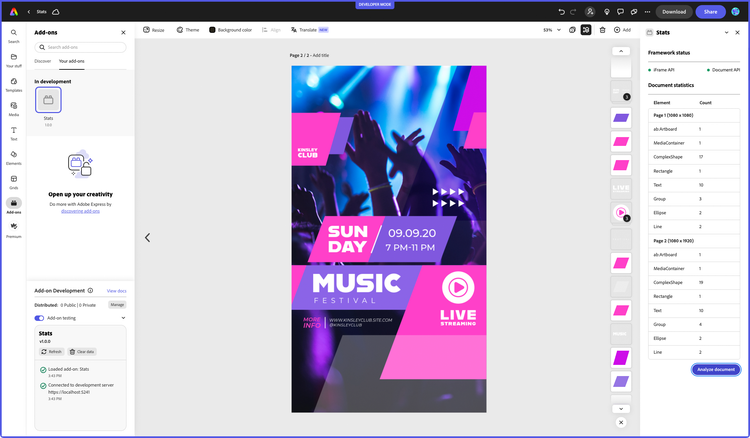
In this tutorial, we'll build an Adobe Express add-on that gathers statistics on the active document using the Communication API.
Introduction
Hello, and welcome to this Adobe Express Communication API tutorial, where we'll build together a fully functional Stats add-on from scratch. This add-on will retrieve metadata from the currently open Adobe Express document, such as pages and their size, plus information about the kind and number of any element used.
Timestamp
This tutorial has been written by Davide Barranca, software developer and author from Italy. It's been first published on December 14th, 2023.
Prerequisites
- Familiarity with HTML, CSS, JavaScript.
- Familiarity with the Adobe Express add-ons environment; if you need a refresher, follow the quickstart guide.
- Familiarity with the Adobe Express Document API, covered in this tutorial.
- An Adobe Express account; use your existing Adobe ID or create one for free.
- Node.js version 16 or newer.
Topics Covered
data-slots=text1, text2
data-repeat=2
data-iconColor=#2ac3a2
data-icon=disc
data-variant=fullWidth
Getting Started with the Communication API
As we've seen in the previous Adobe Express Document API tutorial, add-ons belong to the UI iframe: a sandboxed environment subject to CORS policies, where the User Interface (UI) and the add-on logic are built. The iframe itself has limited editing capabilities, though: via the addOnUISdk module, it can invoke a few methods to import media (image, video, and audio) and export the document into a number of formats, like .pdf, .mp4 or .jpg for example.
The Document API makes new, more powerful capabilities available, allowing the add-on to manipulate elements directly—like scripting in Desktop applications such as Photoshop or InDesign. This API is one component of the Document Sandbox, a JavaScript execution environment that also includes a restricted set of Web API (mostly debugging aids) as well as the means for the UI iframe and the Document API to exchange messages—the Communication API. This infrastructure is paramount as it bridges the gap between the two environments, allowing them to create a seamless experience.
Proxies
How does this all work, then? The process involves exposing proxies for the other context to use, serving as a user-friendly abstraction; under the hood, the implementation relies on a messaging system, which is hidden to us developers.
// runtime in the UI iframe
import addOnUISdk from "https://express.adobe.com/static/add-on-sdk/sdk.js";
const { runtime } = addOnUISdk.instance;

// runtime in the Document Sandbox
import addOnSandboxSdk from "add-on-sdk-document-sandbox";
const { runtime } = addOnSandboxSdk.instance;
The runtime object uses the exposeApi()to make content available to the other context—it works the same, regardless of whether the subject is the iframe or the Document Sandbox.
// 👇 both in the UI frame and the Document Sandbox
runtime.exposeApi({
  /* ... */
}); // exposing a payload {}
We'll get to the details of such a payload in a short while; for the moment, think about it as a collection of methods acting on their environment (UI iframe or Document Sandbox). There needs to be more than exposing, though: some action is required on the other side to surface such a payload—it involves using the apiProxy() method documented here.
// UI iframe, importing a payload from the Document Sandbox
const sandboxProxy = await runtime.apiProxy("documentSandbox");

// Document Sandbox, importing a payload from the UI iframe
const panelUIProxy = await runtime.apiProxy("panel");
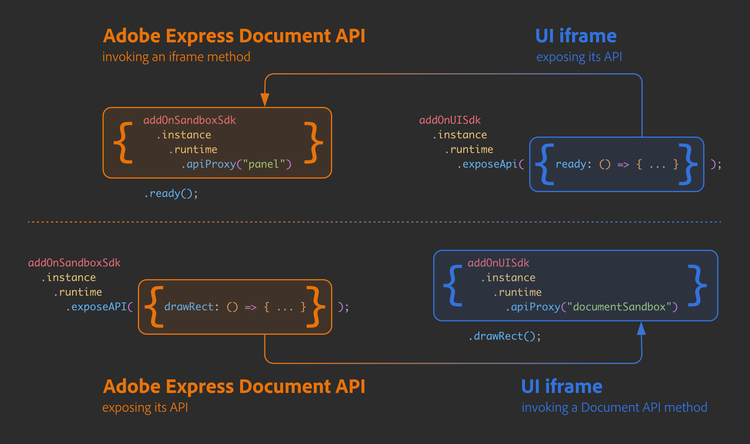
At this point, sandboxProxy and panelUIProxy represent their counterparts from the original contexts. It all may be easier to understand when the entire process is written down; for example, in the following code, we expose a custom method called ready() defined in the UI iframe to the Document API.
data-slots=heading, code
data-repeat=2
UI iframe
import addOnUISdk from "https://express.adobe.com/static/add-on-sdk/sdk.js";
const { runtime } = addOnUISdk.instance;

// exporting a payload to the Document Sandbox
runtime.exposeApi({
  ready: (env) => {
    console.log(`The ${env} environment is ready`);
  },
});
Document Sandbox
import addOnSandboxSdk from "add-on-sdk-document-sandbox";
const { runtime } = addOnSandboxSdk.instance;

// importing from the iframe
const panelUIProxy = await runtime.apiProxy("panel");

// We can call this method now
await panelUIProxy.ready("Document Sandbox");
As the name implies, the panelUIProxy constant in the Document Sandbox is a proxy for the object exposed by the iframe's runtime. The other way around works the same: exposing a Document API method to the iframe.
data-slots=heading, code
data-repeat=2
UI iframe
import addOnUISdk from "https://express.adobe.com/static/add-on-sdk/sdk.js";
const { runtime } = addOnUISdk.instance;

// importing from the Document Sandbox
const sandboxProxy = await runtime.apiProxy("documentSandbox");

// We can call this method now
await sandboxProxy.drawRect();
Document Sandbox
import addOnSandboxSdk from "add-on-sdk-document-sandbox";
const { runtime } = addOnSandboxSdk.instance;

// exporting a payload to the iframe
runtime.exposeApi({
  drawRect: () => {
    // uss the Document API to draw a Rectangle shape...
  },
});
The following diagram helps visualize the process.
Proxy API
Now that we've seen how contexts expose and import each other's API, let's discuss what's inside the payload objects that cross this environment boundary.
Functions
Most of the time, you're going to expose functions.
// Document Sandbox
runtime.exposeApi({
  drawRect: () => {
    /* ... */
  }, // 👈
  drawEllipse: () => {
    /* ... */
  }, // 👈
  drawShape: () => {
    /* ... */
  }, // 👈
  // etc.
});
In the above example, if drawShape() needs to call either drawEllipse() or drawRect(), you may use the method shorthand syntax.
// Document Sandbox
runtime.exposeApi({
  drawRect() {
    /* ... */
  }, // 👈
  drawEllipse() {
    /* ... */
  }, // 👈
  drawShape() {
    this.drawRect(); // 👆
    // or
    this.drawEllipse(); // 👆
  },
  // etc.
});
When not strictly necessary, keep functions private and expose only the ones needed.
// Document Sandbox
const drawRect = () => {
  /* ... */
}; // 👈 private
const drawEllipse = () => {
  /* ... */
}; // 👈 private

runtime.exposeApi({
  drawShape() {
    drawRect(); // 👆
    // or
    drawEllipse(); // 👆
  },
});
Here, drawRect() and drawEllipse() exist within the closure of the drawShape() function exposed to the iframe and will work just fine when the iframe invokes it. This notion of "private" variables defined in one context can be exploited in various ways, for instance, with a counter as follows.
data-slots=heading, code
data-repeat=2
UI iframe
const sandboxProxy = await runtime.apiProxy("documentSandbox");

// Calling the exposed method
const shapesNo = await sandboxProxy.drawShape();
console.log("Shapes drawn", shapesNo);
Document Sandbox
const drawRect = () => {
  /* ... */
};
const drawEllipse = () => {
  /* ... */
};

let counter = 0; // 👈 private to the sandbox

runtime.exposeApi({
  drawShape() {
    if (counter >= 10) {
      throw new Error("Shape's budget depleted!");
    }
    // Randomly draw either a rectangle or an ellipse
    Math.random() < 0.5 ? drawRect() : drawEllipse();

    return ++counter; // 👆
  },
});
The counter variable in the Document Sandbox is maintained between iframe calls within the same user session. It remains isolated to the specific document and cannot be shared with other open documents or users. However, it can be accessed by the drawShape() function. In this context, it's returned to provide the iframe with the count of shapes created up to that point. This introduces us to the notion of returned values.
Generally speaking, you should restrict your returns to the following types.
- ✅ Primitive values.
- ✅ Object literals.
- ✅ JSON strings.
- ✅ ArrayBuffers and Blobs.
- ✅ Promises.
The following returns won't work as expected and must be avoided.
- ❌ Classes (constructor functions).
- ❌ Class instances (will get serialized and stripped away from any method).
- ❌ Functions.
- ❌ Proxies.
- ❌ Constructs such as
MapsandSetswon't get through either, nor willDateandRegExp. - ❌
new Error(), either thrown or returned, won't provide any error message (at the moment) when caught using atry/catchblock.
Primitives
Nothing prevents you from using something else besides functions in your proxy. For instance, you can refactor the drawShape() example by exposing a counter property alongside its setter and getter.
data-slots=heading, code
data-repeat=2
UI iframe
// iframe
const sandboxProxy = await runtime.apiProxy("documentSandbox");

for (let i = 0; i < 10; i++) {
  await sandboxProxy.drawShape();
}
sandboxProxy.counter = 0; // resetting the counter
await sandboxProxy.drawShape();
Document Sandbox
// Document Sandbox
const drawRect    = () => { /* ... */ };
const drawEllipse = () => { /* ... */ };

let _counter = 0; 👈 // private member (mind the underscore)

runtime.exposeApi({
  drawShape() {
    if (_counter >= 10) { // 👈 mind the underscore
      throw new Error("Shape's budget depleted!");
    }
    // Randomly draw either a rectangle or an ellipse
    Math.random() < 0.5 ? drawRect() : drawEllipse();
    this.counter = this.counter + 1; // Use the setter to increment
    return this.counter; // Return the new value after incrementing
  },
  get counter()    { return _counter; }, // 👈 getter
  set counter(val) { _counter = val; }   // 👈 setter
});
The counter setter has the ability to perform additional actions, such as manipulating the document, in addition to assigning a new value to the private variable _counter.
Please note that, given the async nature of the Communication API, retrieving the counter value in the iframe requires the use of await or a then() callback.
let counter = await sandboxProxy.counter;
// or
sandboxProxy.counter.then((counter) => {
  /* ... */
});
Asynchronous communication
The Communication API wraps all inter-context function invocations with a Promise. In other words, regardless of the nature of the function called, when it gets from one context to the other (from the iframe to the Document Sandbox or vice-versa), it must be dealt with as if it were asynchronous.
// Document Sandbox
runtime.exposeApi({
  drawShape() { /* ... */ } // 👈 Document API methods are typically *synchronous*
});

// iframe
❌ const res = sandboxProxy.drawShape(); // 👀 no await, returns a Promise
❌ console.log(res instanceof Promise);  // true

✅ const res = await sandboxProxy.drawShape(); // using await
✅ console.log(typeof res); // number (it returns the counter, as you remember)
Coding the Stats add-on
You are now equipped with all the theory and reference snippets needed to start building the Stats add-on: it's a simple project implementing the Communication API in a couple of different ways. Feature-wise, it's split into two parts.
- The add-on shows two status lights that indicate whether the SDKs are ready for use.
- At the press of a button, the add-on (via Document API) collects the document's metadata1, which is used to compile and show a table of Nodes (elements).
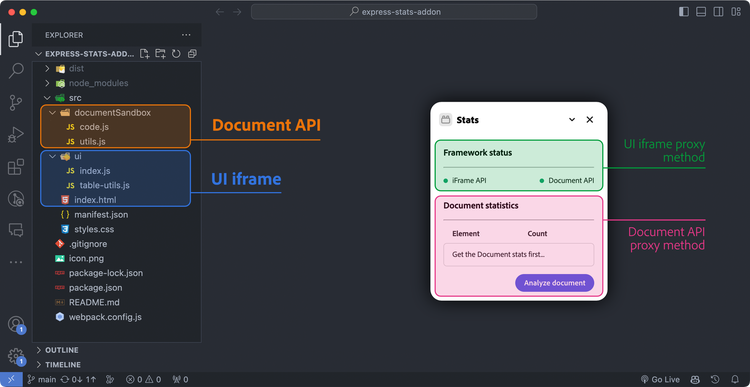
Like in the Grids add-on tutorial, the starting point will be this template, which provides a Webpack-managed JavaScript—hence, able to easily import Spectrum Web Components to build the User Interface. Everything's in the src folder:
index.htmlis where the iframe's UI is built.ui/index.jsdeals with the add-on's internal logic.ui/table-utils.jscontains table-related functions consumed by the iframe and imported byindex.jsto keep it slim.documentSandbox/code.jscontains the Document API methods exposed to the iframe.documentSandbox/utils.jsstores Document API private functions imported incode.js.
User Interface
To keep a consistent look & feel with the rest of the application, we'll use Spectrum Web Component as much as possible, styling them with the express theme provided by the <sp-theme> wrapper.
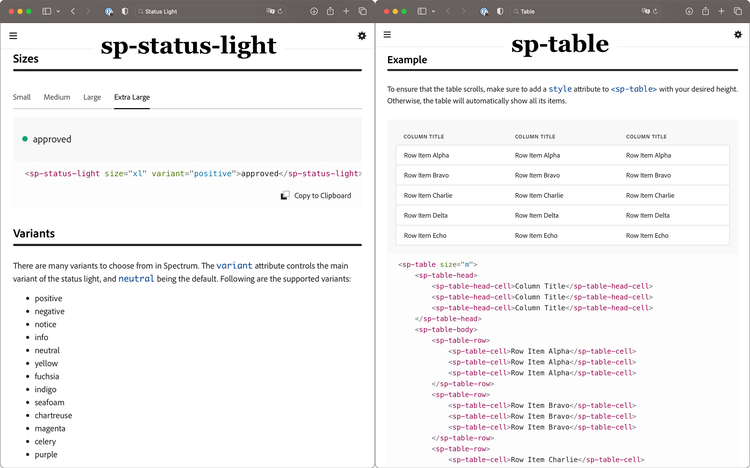
For the "Framework Status", the Status Light component is spot-on: it comes in many variants, which set different light colors—positive and negative (green 🟢 and red 🔴) will be enough for us. The "Document Statistics" section is going to show a list of key/value pairs (the element type and the number of items found on each page). The most obvious choice is a Table component, which in SWC is constructed with several tags.
<sp-table>is the outer wrapper.<sp-table-head>and<sp-table-head-cell>set the header.<sp-table-body>is for the body, which contains<sp-table-row>and<sp-table-cell>elements.
We'll start with a placeholder row with a friendly message, which is going to be removed at the first launch. A regular <sp-button> is placed at the bottom to initiate the metadata-collecting process.
data-slots=heading, code
data-repeat=1
index.html
<body>
  <sp-theme
    scale="medium"
    color="light"
    system="express"
  >
    <h3>Framework status</h3>
    <hr />
    <div class="row">
      <sp-status-light
        size="m"
        variant="negative"
        id="iframe-status"
      >
        iFrame API
      </sp-status-light>
      <sp-status-light
        size="m"
        variant="negative"
        id="document-status"
      >
        Authoring API
      </sp-status-light>
    </div>
    <h3>Document statistics</h3>
    <hr />
    <div class="row">
      <sp-table size="m">
        <sp-table-head>
          <sp-table-head-cell>Element</sp-table-head-cell>
          <sp-table-head-cell>Count</sp-table-head-cell>
        </sp-table-head>
        <sp-table-body id="stats-table-body">
          <sp-table-row id="row-placeholder">
            <sp-table-cell>Get the Document stats first...</sp-table-cell>
          </sp-table-row>
        </sp-table-body>
      </sp-table>
    </div>
    <div class="row align-right">
      <sp-button id="stats">Analyze document</sp-button>
    </div>
  </sp-theme>
</body>
Logic
The diagram below illustrates the communication flow between the two contexts.
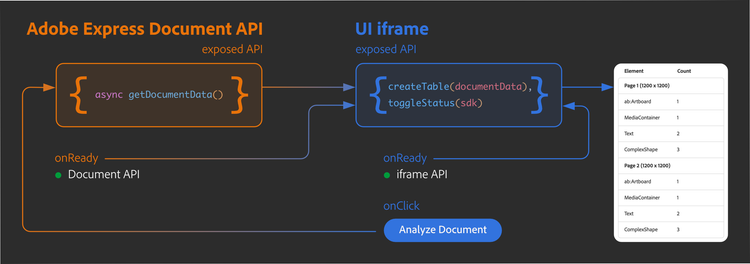
The iframe exposes two methods:
toggleStatus()will be used independently by the iframe and the Document API to switch the Framework Status lights to green when ready.createTable()expects to be passed the document metadata and deals with the<sp-table>setup.
The Document Sandbox exposes only a getDocumentData() method, which collects the metadata from the open document. Both contexts import each other's API via proxy.
When the iframe has loaded its SDK, it will call toggleStatus(), passing the "iframe" string as a parameter—telling the function which light to turn green. Similarly, when the Document Sandbox is ready, it will reach out for toggleStatus() on its own. Neither process requires the user's intervention.
When the "Analyze Document" button is clicked, the iframe—via the Document Sandbox proxy—invokes getDocumentData(). Instead of returning an object with the metadata to the iframe for further processing (which would be OK), the Document API uses the iframe proxy to run directly createTable() and initiate the table subroutine in an iframe-to-Document-Sandbox-to-iframe roundtrip. Let's have a look at the overall structure in index.js implementing the logic I've just described.
data-slots=heading, code
data-repeat=1
ui/index.js
// SWC imports
import "@spectrum-web-components/styles/typography.css";
import "@spectrum-web-components/theme/src/themes.js";
import "@spectrum-web-components/theme/theme-light.js";
import "@spectrum-web-components/theme/express/theme-light.js";
import "@spectrum-web-components/theme/express/scale-medium.js";
import "@spectrum-web-components/theme/sp-theme.js";

import "@spectrum-web-components/status-light/sp-status-light.js";
import "@spectrum-web-components/table/elements.js";
import "@spectrum-web-components/button/sp-button.js";

import addOnUISdk from "https://express.adobe.com/static/add-on-sdk/sdk.js";

// Wait until the addOnUISdk has been loaded
addOnUISdk.ready.then(async () => {
  // API to expose to the Document Sandbox
  const iframeApi = {
    createTable(documentData) {
      /* ... */
    },
    toggleStatus(sdk) {
      /* ... */
    },
  };
  runtime.exposeApi(iframeApi);

  // Toggle the iframe SDK status light
  iframeApi.toggleStatus("iframe");

  // Import the Document Sandbox API proxy
  const { runtime } = addOnUISdk.instance;
  const sandboxProxy = await runtime.apiProxy("documentSandbox");
  // Exposing the iFrame API to the Document Sandbox.

  // Set the button's click handler
  const statsButton = document.getElementById("stats");
  statsButton.addEventListener("click", async () => {
    // Invoke the Document API via Document Sandbox proxy
    // to get the document metadata and initiate the table creation process
    await sandboxProxy.getDocumentData(); // 👈 mind the await
  });

  // Enable the button only when the addOnUISdk is ready
  statsButton.disabled = false;
});
Besides the usual SWC imports, everything must be wrapped by a callback invoked when the addOnUISdk module is ready—which also means we can switch the first SDK status light to green. Please note that toggleStatus() must be available to both the iframe and the Document Sandbox: declaring the iframeApi constant first (lines 18-21) and passing it to exposeApi() later allows me to call it (line 21).
// ❌ _in this case_ it's the wrong syntax choice!
runtime.exposeApi({
  createTable(documentData) { /* ... */ },
  toggleStatus(sdk) { /* ... */ }
});

// ✅ better for our needs _in this context_
const iframeApi = {
  createTable(documentData) { /* ... */ },
  toggleStatus(sdk) { /* ... */ }
});
runtime.exposeApi(iframeApi);
// toggleStatus is accessible in the iframe too
iframeApi.toggleStatus("iframe"); // 👈
data-variant=info
data-slots=text
await when invoking getDocumentData() (line 37, index.js), as the Communication API wraps proxy calls with Promises.In documentSandbox/code.js, we bring the iframe proxy in, toggle the status light, and expose the getDocumentData() function. Please note that it must be declared asynchronous (line 7) because of the need to await when invoking the panelUIProxy method createTable() (line 12).
data-slots=heading, code
data-repeat=1
documentSandbox/code.js
import addOnSandboxSdk from "add-on-sdk-document-sandbox";
const { runtime } = addOnSandboxSdk.instance;

async function start() {
  const panelUIProxy = await runtime.apiProxy("panel");
  runtime.exposeApi({
    async getDocumentData() {
      // 👈 async keyword, because 👇
      // Get the document's metadata
      let documentData;
      // ... TODO
      // ... then, directly invoke the iframe method
      await panelUIProxy.createTable(documentData); // 👈 the Communication API is async 👆
    },
  });
  // switch the Framework Status light to green
  panelUIProxy.toggleStatus("document");
}
start();
data-variant=info
data-slots=text, text1, text2
documentData object to the iframe and let it invoke createTable() on its own. I've chosen to do it this way to show you how that this sort of "circular" communication is possible—although the other approach is perhaps more common.const getDocumentData = async () => {
/* ... */
};
// ...
runtime.exposeApi({
getDocumentData, // 👈 shorthand syntax
// ...
});
Implementation
Let's start filling in the missing parts in our code; we'll begin with the Framework Status, the easiest bit. The toggleStatus() method is immediately invoked in the addOnUISdk.ready callback, as well as the Document Sandbox code.js, where it is also exposed. It updates the variant attribute of the <sp-status-light> element based on the sdk parameter passed in.
data-slots=heading, code
data-repeat=2
UI iframe
const iframeApi = {
  toggleStatus(sdk) {
    // sdk parameter validation
    if (["document", "iframe"].indexOf(sdk) === -1) {
      throw new Error("Invalid SDK type");
    }
    const el =
      sdk === "document"
        ? document.getElementById("document-status")
        : document.getElementById("iframe-status");
    el.setAttribute("variant", "positive"); // 🟢
  },
  // ...
};

iframeApi.toggleStatus("iframe"); // 👈
Document Sandbox
import addOnSandboxSdk from "add-on-sdk-document-sandbox";
const { runtime } = addOnSandboxSdk.instance;

async function start() {
  const panelUIProxy = await runtime.apiProxy("panel");
  // ...
  panelUIProxy.toggleStatus("document"); // 👈
}
start();
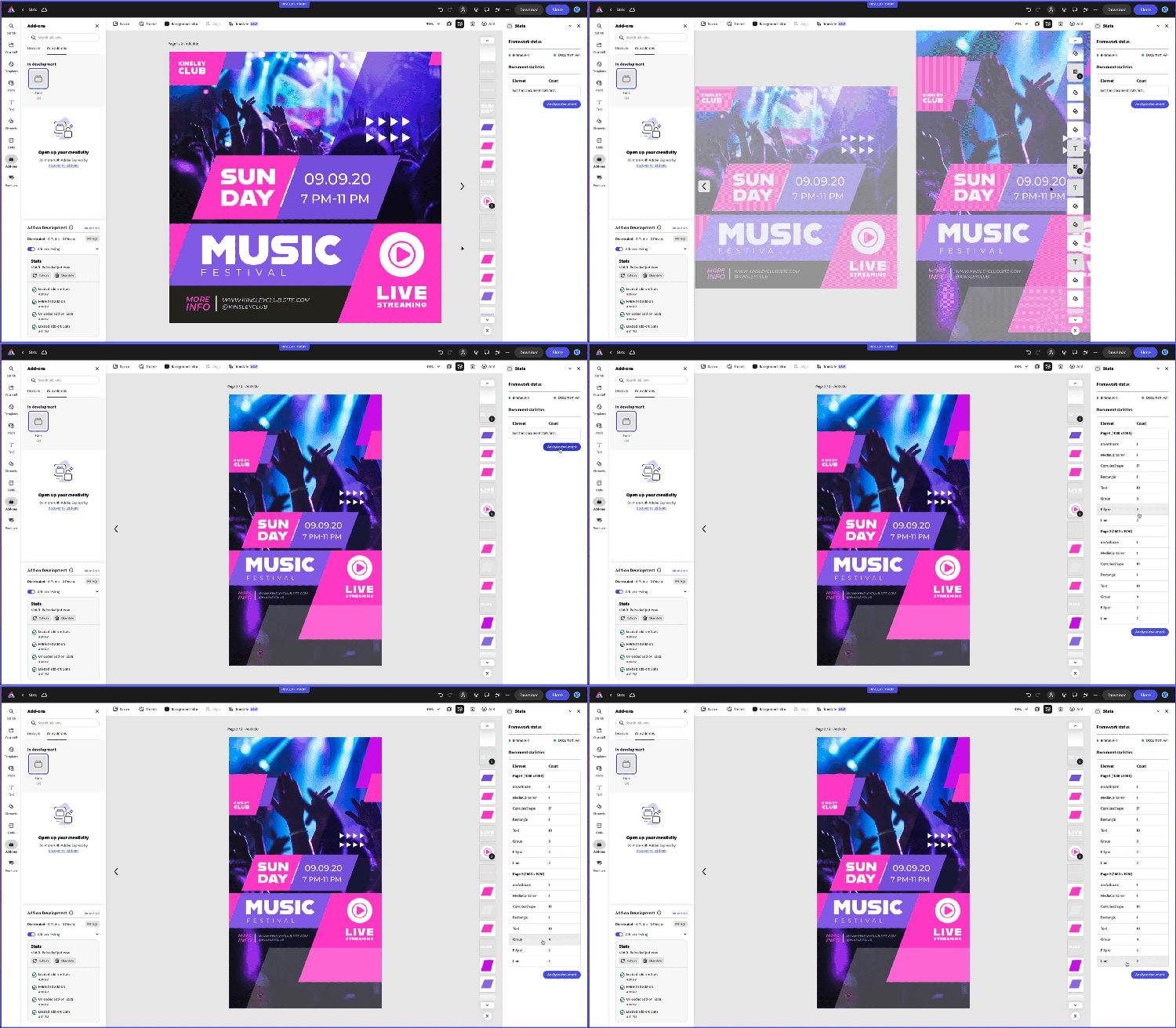
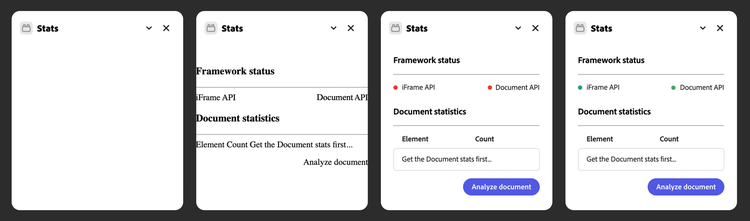
When refreshing the add-on, the UI updates almost instantly, but a frame-by-frame analysis would reveal a progression in the rendering process: first, the HTML is loaded, then the CSS with the <sp-status-light> components in their original, "red" variant; finally, when the two SDK are fully loaded, we get the green lights.2
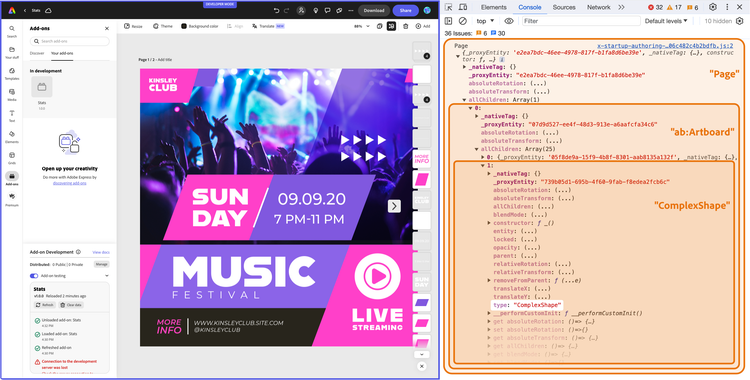
Let's tackle the metadata collection in the Document Sandbox, especially the data structure we want to create3. There are many ways to go about this business: I've decided to keep track of elements on a Page basis and store page dimensions, too. Eventually, the iframe will receive documentData, an array of objects, one for each page, with dimensions and nodes properties. If you've got a taste for TypeScript, the type definition would be as follows.
type DocumentData = Array<{
  dimensions: { width: number; height: number };
  nodes: { [key: string]: number };
}>;
The above would transpose into something along these lines.
[
  {
    // page 1
    dimensions: { width: 1200, height: 1200 },
    nodes: {
      "ab:Artboard": 1,
      MediaContainer: 1,
      Text: 2,
      ComplexShape: 3,
    },
  },
  {
    // page 2
    dimensions: { width: 800, height: 400 },
    nodes: {
      "ab:Artboard": 1,
      MediaContainer: 4,
      Rectangle: 2,
    },
  },
  // ...
];
The various "ab:Artboard", "MediaContainer" and others, are the Node type strings as Adobe Express exposes them. Let's create the getDocumentData() function that outputs such a structure.
data-slots=heading, code
data-repeat=1
documentSandbox/code.js
import { getNodeData } from "./utils";

runtime.exposeApi({
  async getDocumentData() {
    const pages = editor.documentRoot.pages; // get the pages list
    let documentData = []; // initialize the array to return
    // Visit every page so its content (and allChildren) is accessible while we read it
    await pages.visitPages([...pages], (page) => {
      let pageData = {}; // create an empty object
      pageData.dimensions = {
        // get and store the page `dimensions`
        width: page.width,
        height: page.height,
      };
      pageData.nodes = getNodeData(page); // 👈 build the `nodes` object (more on this later)
      documentData.push(pageData); // push the object to the documentData array
    });
    // invoke the iframe method to create the table on the UI
    await panelUIProxy.createTable(documentData);
  },
});
The code comments will guide you through the process of getting the document, loop through pages extracting dimensions, and retrieving nodes metadata, but up to a point. What's getNodeData? As I mentioned before, I've split the Document API code into two parts: the main Document Sandbox entrypoint (code.js, where methods are exposed to and imported from the iframe) and table-utils.js, which is kept private to the context and exports just what code.js needs—the getNodeData() method, which makes use of increaseCount().
data-slots=heading, code
data-repeat=1
documentSandbox/table-utils.js
const increaseCount = (obj, type) => {
  // If the type is already in the object, increase its count, otherwise set it to 1
  if (obj.hasOwnProperty(type)) {
    obj[type] += 1;
  } else {
    obj[type] = 1;
  }
};

const getNodeData = (node, nodeData = {}) => {
  if (node.type === "MediaContainer") {
    return nodeData;
  }

  // Check if the current node has children and if they are not an empty array
  if (node.allChildren && node.allChildren.length > 0) {
    // Iterate over all children using for..of
    for (const child of node.allChildren) {
      // Increase the count for the current type
      increaseCount(nodeData, child.type);

      // Recursively call getNodeData for each child that has its own children
      // ... unless it's a MediaContainer
      if (
        child.type !== "MediaContainer" &&
        child.allChildren &&
        child.allChildren.length > 0
      ) {
        getNodeData(child, nodeData);
      }
    }
  }

  return nodeData;
};

export { getNodeData };
Given the nature of Adobe Express documents (which will be covered in detail in a future tutorial), it makes sense to build getNodeData() as a recursive function: a PageNode can contain multiple ArtboardNode elements, which in turn can contain multiple GroupNode elements, and so on. As follows, the metacode.
-
The
getNodeData()method begins its execution when called bygetDocumentData(), taking a single parameter namedpage. At the start,nodeDatais initialized as an empty object. The method then checks if the current node has theallChildrenproperty, which should be a non-empty iterable (please note: it's not an Array, but can be transformed into one if needed viaArray.from()). If so, it goes through it. During each iteration, it increments the count for thetypeproperty of each child node (such as"Text","Group", etc.). -
If a child node within this array also features a non-empty
allChildrenproperty,getNodeData()is called recursively on that child node. Mind you: during these recursive calls,nodeDatais passed as the second argument. This approach ensures that the samenodeDataobject is continuously used throughout the recursion, allowing it to accumulate and keep tabs on all node types encountered across all hierarchy levels. The"MediaContainer"node is a particular one, 4 and when encountered, we stop there. -
The
increaseCount()method, which we keep private to theutils.jsmodule, receives thenodeDataobject and bumps the count for eachchild.type.
When the whole process is repeated for each page, we can finally invoke the iframe createTable() method, passing the documentData.
data-slots=heading, code
data-repeat=1
documentSandbox/code.js
runtime.exposeApi({
  async getDocumentData() {
    // ... create and fill the `documentData` array
    await panelUIProxy.createTable(documentData); // 👈 calling this iframe proxy method
  },
});
Now, it's up to the iframe to manage such data (the array of objects collecting page dimensions and node counts) and transform it into a Spectrum Table.
data-slots=heading, code
data-repeat=1
ui/index.js
import { rebuildTable } from "./table-utils";

const iframeApi = {
  toggleStatus(sdk) {
    /* ... */
  },
  createTable(documentData) {
    // 👈
    const table = document.getElementById("stats-table-body");
    rebuildTable(table, documentData);
  },
};
The process is not difficult per se, but it may be slightly tedious. The rebuildTable() method is declared in the table-utils.js module alongside a private addRowToTable().
data-slots=heading, code
data-repeat=1
documentSandbox/table-utils.js
// documentSandbox/table-utils.js

const addRowToTable = (table, rowData) => {
  // Create a new row
  const newRow = document.createElement("sp-table-row");

  // For each cell data, create a cell and append it to the row
  let cell;
  rowData.forEach((cellData) => {
    cell = document.createElement("sp-table-cell");
    cell.textContent = cellData;
    newRow.appendChild(cell);
  });
  if (rowData.length === 1) {
    // Making the page row bold
    cell.className = "page-row";
  }
  // Append the row to the table body
  table.appendChild(newRow);
};

const rebuildTable = (table, documentData) => {
  // Removing all existing rows from the table,
  // either the placeholder or the previous results
  while (table.firstChild) {
    table.removeChild(table.firstChild);
  }
  documentData.forEach((pageData, index) => {
    addRowToTable(table, [
      `Page ${index + 1} (${pageData.dimensions.width} x ${
        pageData.dimensions.height
      })`,
    ]);
    // the for...in loop iterates over the keys of an object
    for (const node in pageData.nodes) {
      // for example,      ["Text", 1]
      addRowToTable(table, [node, pageData.nodes[node]]);
    }
  });
};

export { rebuildTable };
As follows, the rebuildTable() metacode.
- Initialize the existing table, which is the first argument it receives.
- Loop through each page in the
documentDataarray, adding a row with the dimensions viaaddRowToTable(); please note that, although the Table is supposed to have two columns, we can set a row with only one cell, which will span both of them. - Loop through each node in the
pageData.nodesobject, adding a row with the node type and the number of instances found on that page. addRowToTable()is a utility function that takes a table and an array of strings as arguments. It creates a new<sp-table-row>, then loops through the array, creating a<sp-table-cell>for each string and appending it to the row. If the array contains only one element, the cell is given apage-rowclass, which makes it bold.
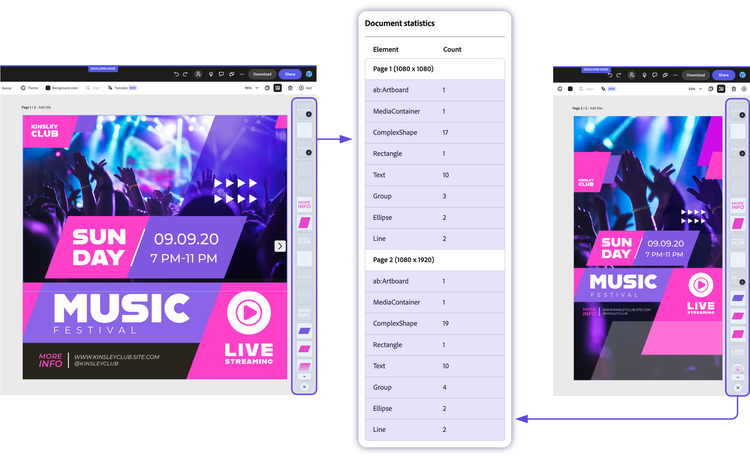
Next Steps
Congratulations! You've coded from scratch the Stats add-on for Adobe Express. As an exercise, you may want to extend it with the following features.
- Better visualization: you can add
<sp-icon>elements for each Node type, or bypass the Table altogether using an Accordion component for a hierarchical, collapsible menu. - Hide and Show: via the Document API you may hide and show elements based on their type—the
<sp-table>has aselectsand aselectedattributes that you can put to use. - Save Snapshots: using the Client Storage API, you can keep track of the document's metadata and compare it with previous versions.
Lessons Learned
Let's review the concepts covered in this tutorial and how they've been implemented in the Stats add-on.
- Communication API: the iframe and the Document Sandbox can expose and import each other's API via proxy objects. The Communication API wraps all inter-context function invocations with a Promise; hence, the need to
awaitwhen invoking a proxy method. - Proxy API: the payload objects exchanged between the two contexts can contain functions, which are the most common use case: they can return primitives, object literals, JSON strings, ArrayBuffers, and Blobs.
- Context Closures: proxy methods have access to variables defined in their context, even when invoked from the other context. This is a powerful feature that can be exploited to keep private variables and functions out of the Communication API.
- Roundtrip calls: proxy methods can be chained—the iframe can invoke the Document API via the Document Sandbox proxy, which in turn can invoke the iframe proxy, and so on.
Final Project
The code for this project can be downloaded here. Use this template as a starting point.
data-variant=info
data-slots=text1
data-slots=heading, code
data-repeat=6
data-languages=index.html, styles.css, ui/index.js, ui/table-utils.js, documentSandbox/code.js, documentSandbox/utils.js
UI iframe
<!DOCTYPE html>
<html lang="en">
  <head>
    <meta charset="UTF-8" />
    <meta
      name="description"
      content="Adobe Express Add-on template using JavaScript, the Document Sandbox, and Webpack"
    />
    <meta
      name="keywords"
      content="Adobe, Express, Add-On, JavaScript, Document Sandbox, Adobe Express Document API"
    />
    <meta
      name="viewport"
      content="width=device-width, initial-scale=1.0"
    />
    <title>Stats add-ons</title>
    <link
      rel="stylesheet"
      href="styles.css"
    />
  </head>

  <body>
    <sp-theme
      scale="medium"
      color="light"
      system="express"
    >
      <h3>Framework status</h3>
      <hr />
      <div class="row">
        <sp-status-light
          size="m"
          variant="negative"
          id="iframe-status"
          >iFrame API</sp-status-light
        >
        <sp-status-light
          size="m"
          variant="negative"
          id="document-status"
          >Authoring API</sp-status-light
        >
      </div>
      <h3>Document statistics</h3>
      <hr />
      <div class="row">
        <sp-table size="m">
          <sp-table-head>
            <sp-table-head-cell>Element</sp-table-head-cell>
            <sp-table-head-cell>Count</sp-table-head-cell>
          </sp-table-head>
          <sp-table-body id="stats-table-body">
            <sp-table-row id="row-placeholder">
              <sp-table-cell>Get the Document stats first...</sp-table-cell>
            </sp-table-row>
          </sp-table-body>
        </sp-table>
      </div>
      <div class="row align-right">
        <sp-button id="stats">Analyze document</sp-button>
      </div>
    </sp-theme>
  </body>
</html>
UI iframe
body {
  margin: 0;
  padding: 0;
  overflow-x: hidden;
}

sp-theme {
  margin: 0 var(--spectrum-global-dimension-static-size-300);
}

.row {
  display: flex;
  flex-direction: row;
  justify-content: space-between;
  margin-bottom: var(--spectrum-global-dimension-static-size-175);
}

.align-right {
  justify-content: flex-end;
}

sp-table {
  width: 100%;
}

sp-button {
  align-self: flex-end;
}

.page-row {
  font-weight: var(--spectrum-global-font-weight-bold);
}
UI iframe
import "@spectrum-web-components/styles/typography.css";
import "@spectrum-web-components/theme/src/themes.js";
import "@spectrum-web-components/theme/theme-light.js";
import "@spectrum-web-components/theme/express/theme-light.js";
import "@spectrum-web-components/theme/express/scale-medium.js";
import "@spectrum-web-components/theme/sp-theme.js";

import "@spectrum-web-components/status-light/sp-status-light.js";
import "@spectrum-web-components/table/elements.js";
import "@spectrum-web-components/button/sp-button.js";

import addOnUISdk from "https://express.adobe.com/static/add-on-sdk/sdk.js";
import { rebuildTable } from "./table-utils";

addOnUISdk.ready.then(async () => {
  const iframeApi = {
    /**
     * Toggles the status light.
     * @param {string} sdk - The type of SDK that is ready, either "document" or "iframe"
     */
    toggleStatus(sdk) {
      if (["document", "iframe"].indexOf(sdk) === -1) {
        throw new Error("Invalid SDK type");
      }
      const el =
        sdk === "document"
          ? document.getElementById("document-status")
          : document.getElementById("iframe-status");
      el.setAttribute("variant", "positive");
    },

    createTable(documentData) {
      const table = document.getElementById("stats-table-body");
      rebuildTable(table, documentData);
    },
  };

  // the addOnUISdk is ready, so we can now toggle the status light
  iframeApi.toggleStatus("iframe");

  // Get the Document Sandbox.
  const { runtime } = addOnUISdk.instance;
  // Importing the Document Sandbox API.
  const sandboxProxy = await runtime.apiProxy("documentSandbox");
  // Exposing the iframe API to the Document Sandbox.
  runtime.exposeApi(iframeApi);

  const statsButton = document.getElementById("stats");

  statsButton.addEventListener("click", async () => {
    await sandboxProxy.getDocumentData();
  });
  // Enabling the button only when the addOnUISdk is ready
  statsButton.disabled = false;
});

/**
 * Adds a new row to the specified table.
 *
 * @param {HTMLTableElement} table - The table to which the row should be added.
 * @param {Array} rowData - An array containing the data for each cell in the row.
 */
function addRowToTable(table, rowData) {
  // Create a new row
  const newRow = document.createElement("sp-table-row");

  // For each cell data, create a cell and append it to the row
  let cell;
  rowData.forEach((cellData) => {
    cell = document.createElement("sp-table-cell");
    cell.textContent = cellData;
    newRow.appendChild(cell);
  });
  if (rowData.length === 1) {
    // Making the page row bold
    cell.className = "page-row";
  }
  // Append the row to the table body
  table.appendChild(newRow);
}
UI iframe
/**
 * Adds a new row to the specified table.
 *
 * @param {HTMLTableElement} table - The table to which the row should be added.
 * @param {Array} rowData - An array containing the data for each cell in the row.
 */
const addRowToTable = (table, rowData) => {
  // Create a new row
  const newRow = document.createElement("sp-table-row");

  // For each cell data, create a cell and append it to the row
  let cell;
  rowData.forEach((cellData) => {
    cell = document.createElement("sp-table-cell");
    cell.textContent = cellData;
    newRow.appendChild(cell);
  });
  if (rowData.length === 1) {
    // Making the page row bold
    cell.className = "page-row";
  }
  // Append the row to the table body
  table.appendChild(newRow);
};

const rebuildTable = (table, documentData) => {
  // Removing all existing rows from the table
  while (table.firstChild) {
    table.removeChild(table.firstChild);
  }

  // The pageData comes as an array of objects, one for each page
  // Each pageData object contains the dimensions of the page and the nodes, e.g.
  // [{ dimensions: { width: 600, height: 800 }, nodes: { Text: 1, Rectangle: 4 } }, { ... }]
  documentData.forEach((pageData, index) => {
    addRowToTable(table, [
      `Page ${index + 1} (${pageData.dimensions.width} x ${
        pageData.dimensions.height
      })`,
    ]);
    // the for...in loop iterates over the keys of an object
    for (const node in pageData.nodes) {
      // for example,      ["Text", 1]
      addRowToTable(table, [node, pageData.nodes[node]]);
    }
  });
};

export { rebuildTable };
Document Sandbox
import addOnSandboxSdk from "add-on-sdk-document-sandbox";
const { runtime } = addOnSandboxSdk.instance;

import { editor } from "express-document-sdk";
import { getNodeData } from "./utils";

async function start() {
  const panelUIProxy = await runtime.apiProxy("panel");

  runtime.exposeApi({
    async getDocumentData() {
      const pages = editor.documentRoot.pages;
      let documentData = [];
      // Visit every page so its content (and allChildren) is accessible while we read it
      await pages.visitPages([...pages], (page) => {
        console.log("Page", page);
        let pageData = {};
        pageData.dimensions = {
          width: page.width,
          height: page.height,
        };
        pageData.nodes = getNodeData(page);
        documentData.push(pageData);
      });
      console.log("documentData", documentData);
      await panelUIProxy.createTable(documentData);
    },
  });

  panelUIProxy.toggleStatus("document");
}

start();
Document Sandbox
const increaseCount = (obj, type) => {
  // If the type is already in the object, increase its count, otherwise set it to 1
  if (obj.hasOwnProperty(type)) {
    obj[type] += 1;
  } else {
    obj[type] = 1;
  }
};

const getNodeData = (node, nodeData = {}) => {
  if (node.type === "MediaContainer") {
    return nodeData;
  }

  // Check if the current node has children and if they are not an empty array
  if (node.allChildren && node.allChildren.length > 0) {
    // Iterate over all children using for..of
    for (const child of node.allChildren) {
      // Increase the count for the current type
      increaseCount(nodeData, child.type);

      // Recursively call getNodeData for each child that has its own children
      // ... unless it's a MediaContainer
      if (
        child.type !== "MediaContainer" &&
        child.allChildren &&
        child.allChildren.length > 0
      ) {
        getNodeData(child, nodeData);
      }
    }
  }
  return nodeData;
};

export { getNodeData };
Footnotes
-
When referring to "metadata", I mean the dimensions and types of elements on each page. Custom metadata haven't been implemented in Adobe Express yet. ↩
-
In my tests, the two SDKs are ready almost instantly and together—I couldn't tell which one is loaded firsts. ↩
-
Designing data structures in the early stages of the development process is, in my humble opinion, a way to dodge a good deal of future headaches. ↩
-
A
"MediaContainer"(say, an image) has as children both the"ImageRectangle"and the mask that crops it. At this stage of the Document API development, getting complex masks may throw an Error—hence, I've decided to use the"MediaContainer"type as a recursion's termination clause. ↩