Lifecycle extension in Android
Implementing Lifecycle data collection in Android
For implementation details, please reference the implementation guide for Lifecycle.
Tracking app crashes in Android
This information helps you understand how crashes are tracked and the best practices to handle false crashes.
How does crash reporting work?
When Lifecycle data collection is implemented in an application, pausing Lifecycle data collection sets a flag which is persisted in the application. When the application is launched again and Lifecycle data collection is started, if the flag is not set then a crash event is reported.
The flag is controlled by calls to lifecyclePause (which sets the flag) and lifecycleStart (which clears the flag).
data-variant=info
data-slots=text1, text2
MobileCore.lifecycleStart() in the onResume() method of each activity, and MobileCore.lifecyclePause() in the onPause() method of each activity.To understand why this is essential, here is an illustration of the Android activity lifecycle:
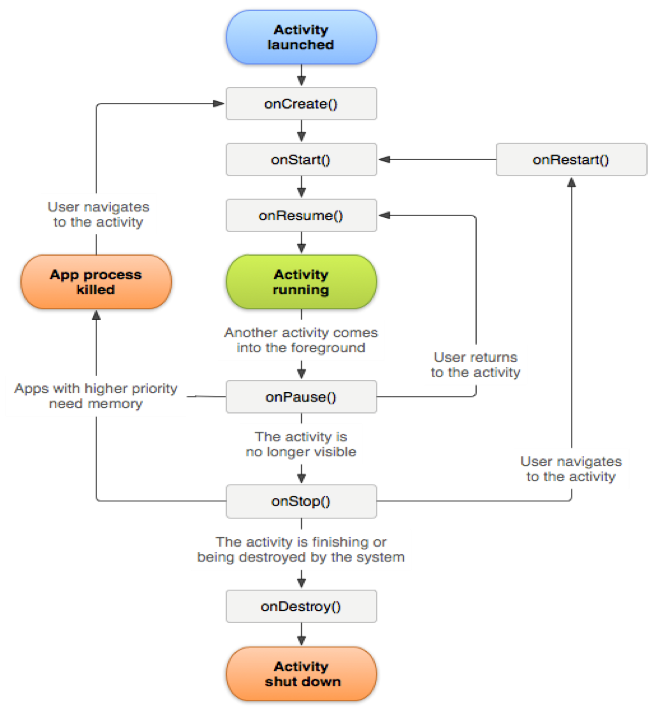
For more information about the Android activity lifecycle, see Activities.
This Android lifecycle illustration was created and shared by the Android Open Source Project and used according to terms in the Creative Commons 2.5 Attribution License.
What can cause a false crash to be reported?
- If you are debugging by using an IDE such as Android Studio, and launching the app again from the IDE while the app is in the foreground causes a crash.
- You can avoid this crash by backgrounding the app before launching again from the IDE.
- If the previous foreground Activity of your app is moved to the background and does not call
MobileCore.lifecyclePause()inonPause, and your app is manually closed or killed by the operating system, the next launch results in a crash.
How should Fragments be handled?
Fragments have application lifecycle events that are similar to Activities. However, a Fragment cannot be active without being attached to an Activity. Therefore, you should implement the Lifecycle APIs from Activities.
Further reading
The following guides further illustrate the expected Lifecycle scenarios along with example unexpected scenarios and how to correct them.
- Lifecycle behavior reference when sending Lifecycle events to Analytics.
- Lifecycle behavior reference when sending Lifecycle events to Edge Network.