Content security policies
Content Security Policies (CSP) are a powerful tool to mitigate against Cross Site Scripting (XSS) and related attacks, including card skimmers, session hijacking, clickjacking, and more. Web servers send CSPs in response HTTP headers (namely Content-Security-Policy and Content-Security-Policy-Report-Only) to browsers that whitelist the origins of scripts, styles, and other resources. Together, CSPs and built-in browser features help prevent:
- Loading a malicious script from an attacker's website
- A malicious inline script from sending credit card info to an attacker's website
- Loading a malicious style that will make users click on an element that wasn't supposed to be on a page
See Content Security Policy (CSP) and Content-Security-Policy to learn more about CSP and each individual policy.
Application support
As of version 2.3.5, Adobe Commerce and Magento Open Source support CSP headers and provides ways to configure them. (This functionality is defined in the Magento_Csp module.) The application also provides default configurations at the application level and for individual core modules that require extra configuration. Policies can be configured for adminhtml and storefront areas separately to accommodate different use cases. The application also permits configuring unique CSPs for specific pages.
CSP can work in two modes:
-
report-only- In this mode, the application reports policy violations but does not interfere. This mode is useful for debugging. By default, CSP violations are written to the browser console, but they can be configured to be reported to an endpoint as an HTTP request to collect logs. There are a number of services that will collect, store, and sort your store's CSP violations reports for you. -
restrict mode- In this mode, the application acts on any policy violations.
Default configuration
In Adobe Commerce and Magento Open Source version 2.4.7 and later, CSP is configured in restrict-mode by default for payment pages in the storefront and admin areas, and in report-only mode for all other pages. The corresponding CSP header does not contain the unsafe-inline keyword inside the script-src directive for payment pages. Also, only whitelisted inline scripts are allowed.
Prior to version 2.4.7, CSP was configured in report-only mode for all pages.
Once configured, the application can enforce policies like these:
- Any resource, such as
.js,.css,.jpg, or.ttffiles, can only be loaded from the store's domain - Iframes can only include pages from the store itself
- AJAX requests can only be sent to the store
- Forms can only be sent to the store
- Only whitelisted inline scripts and styles can be compiled by browser
For more details, check the Magento/Csp/etc/config.xml file. Some domains have already been whitelisted for modules that require it. For instance if the Magento_Paypal module is installed, www.paypal.com is already whitelisted for the script-src policy. If inline scripts and styles have also been whitelisted, their hashes will be added to the Content-Security-Policy header only when inline scripts/styles are not allowed.
Please note that eval() is still allowed.
Configure a module's CSP mode
You can set the CSP mode in a custom module by editing the module's etc/config.xml file. To set the mode to restrict, change the value of the default/csp/mode/admin/report_only and/or the default/csp/mode/storefront/report_only element to 0. To enable report-only mode, set the values to 1.
Example config.xml:
<?xml version="1.0"?>
<config xmlns:xsi="http://www.w3.org/2001/XMLSchema-instance" xsi:noNamespaceSchemaLocation="urn:magento:module:Magento_Store:etc/config.xsd">
    <default>
        <csp>
            <mode>
                <storefront>
                    <report_only>0</report_only>
                </storefront>
                <admin>
                    <report_only>0</report_only>
                </admin>
            </mode>
        </csp>
    </default>
</config>
You can use the etc/config.xml file in the Magento_Csp module as a reference. Create your component file structure describes how to create a module.
Configure CSPs for your custom code/extension/theme
Adobe Commerce and Magento Open Source provide multiple ways to add whitelisted resources to your custom code, extension, or theme. Be sure to add resources only in modules that require it. For example, adding a domain to a default-src policy when you only need to load a .js file from it is not recommended. Add the domain to script-src instead.
The following table describes each type of CSP:
default-srcbase-uri<base> element.child-srcconnect-srcfont-srcform-action<form> tags.frame-ancestorsframe-src<frame> and <iframe>.img-srcmanifest-srcmedia-srcobject-src<object>, <embed>, and <applet> elements.script-src<script> elements.style-srcAdd a domain to the whitelist
You can add a domain to the whitelist for a policy (like script-src, style-src, font-src and others) by adding a csp_whitelist.xml to your custom module's etc folder.
<?xml version="1.0"?>
<csp_whitelist xmlns:xsi="http://www.w3.org/2001/XMLSchema-instance" xsi:noNamespaceSchemaLocation="urn:magento:module:Magento_Csp:etc/csp_whitelist.xsd">
    <policies>
        <policy id="script-src">
            <values>
                <value id="devdocs-base" type="host">https://developer.adobe.com</value>
                <value id="magento" type="host">https://magento.com</value>
            </values>
        </policy>
        <policy id="connect-src">
            <values>
                <value id="devdocs" type="host">https://developer.adobe.com</value>
            </values>
        </policy>
    </policies>
</csp_whitelist>
Using CSP nonce provider to allow inline scripts
Adobe Commerce and Magento Open Source 2.4.7 and later include a Content Security Policy (CSP) nonce provider to facilitate the generation of unique nonce strings for each request. These nonce strings are then attached to the CSP header.
Use the generateNonce function in Magento\Csp\Helper\CspNonceProvider to obtain a nonce string.
use Magento\Csp\Helper\CspNonceProvider;

class MyClass
{

    /**
     * @var CspNonceProvider
     */
    private $cspNonceProvider;

    /**
     * @param CspNonceProvider $cspNonceProvider
     */
    public function __construct(CspNonceProvider $cspNonceProvider)
    {
        $this->cspNonceProvider = $cspNonceProvider
    }

    /**
     * Get CSP Nonce
     *
     * @return String
     */
    public function getNonce(): string
    {
        return $this->cspNonceProvider->generateNonce();
    }
}
Whitelist an inline script or style
Stores that have unsafe-inline disabled for style-src and script-src (default for Adobe Commerce and Magento Open Source 2.4) inline scripts and styles must be whitelisted.
You must use Magento\Framework\View\Helper\SecureHtmlRenderer, which is available as a $secureRenderer variable in the .phtml templates to achieve this.
- For
scriptorstyletags containing inline JavaScript/CSS, userenderTag:
Inside a .phtml template
<div>Other content</div>
<?= $secureRenderer->renderTag('script', ['type' => 'text/javascript'], "\nconsole.log('I am a whitelisted script');\n", false); ?>
Inside a class responsible for HTML rendering_
/** @var \Magento\Framework\View\Helper\SecureHtmlRenderer */
private $secureRenderer;

...

function someMethod() {
   ....

   $html .= $this->secureRenderer->renderTag('style', [], "#element { color: blue } ", false);

   ....
}
- For event handlers previously defined in HTML attributes, use
renderEventListenerAsTag:
Inside a .phtml template
<!-- <div onclick="alert('Old way!')">Old way</div> -->

<div id="alert-div">New way</div>
<?= $secureRenderer->renderEventListenerAsTag('onclick', 'alert("New way!");', '#alert-div'); ?>
- For inline styles previously defined in
styleattributes, userenderStyleAsTag:
Inside a .phtml template
<!-- <div style="color:blue">Old way</div> -->

<div id="blue-div">New way</div>
<?= $secureRenderer->renderStyleAsTag('color: blue', '#blue-div'); ?>
Using inline scripts and styles is discouraged in favor of UI Components and classes
You can also whitelist inline CSS and JS inside style and script tags in a csp_whitelist.xml file. To do this, get a sha256 hash of a tag's content and encode it as BASE64, then add it to your module's csp_whitelist.xml. Programmatically, it could look like this:
$whitelistHash = base64_encode(hash('sha256', $content, true));
Add the corresponding policy to a csp_whitelist.xml file:
<?xml version="1.0"?>
<csp_whitelist xmlns:xsi="http://www.w3.org/2001/XMLSchema-instance" xsi:noNamespaceSchemaLocation="urn:magento:module:Magento_Csp:etc/csp_whitelist.xsd">
    <policies>
        <policy id="script-src">
            <values>
                <value id="my-scripts-hash" type="hash" algorithm="sha256">B4yPHKaXnvFWtRChIbabYmUBFZdVfKKXHbWtWidDVF8=</value>
            </values>
        </policy>
    </policies>
</csp_whitelist>
data-variant=warning
data-slots=text
script and style tags that you add in the Admin. For example, the Scripts and Style Sheets field in the HTML Head section.data-variant=info
data-slots=text
script-src or style-src policies, whitelisted inline scripts/styles hashes will not appear in the Content-Security-Policy header.Advanced CSP configuration
To configure other CSPs such as sandbox policy, which does not consist of whitelisted hosts and hashes, or for more advanced fetch policy configurations, like removing inline support from script-src, you would have to create a config.xml file inside your custom module and rewrite the default values. For reference, see Magento\Csp\etc\config.xml.
Report-Uri configuration
Regardless of restrict or report-only mode, CSP violations may be reported to an endpoint for collection.
-
On the Admin sidebar, go to Stores > Settings > Configuration.
If you have a multi-site installation, set the Store View control in the upper-left corner to the website where the configuration applies.
-
In the left panel under Security, choose Content Security Policy.
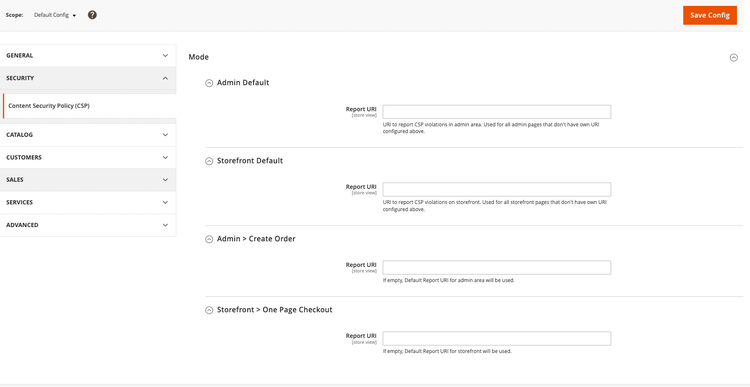
The Create Order page in the Admin and the Checkout page in the storefront can be configured to have their own URI. However, if these fields are left blank, the default URI for the admin and storefront areas is used for reporting.
The URL to use for reporting by browsers can also be configured programmatically in the config.xml for your custom module:
<?xml version="1.0"?>
<config xmlns:xsi="http://www.w3.org/2001/XMLSchema-instance" xsi:noNamespaceSchemaLocation="urn:magento:module:Magento_Store:etc/config.xsd">
    <default>
        <csp>
            <mode>
                <storefront>
                    <report_uri>http://csp-reporting-service.com/my-project/endpoint</report_uri>
                </storefront>
                <admin>
                    <report_uri>http://csp-reporting-service.com/my-project/endpoint</report_uri>
                </admin>
            </mode>
        </csp>
    </default>
</config>
Page specific Content-Security-Policies
Adobe Commerce and Magento Open Source can send unique policies for a specific page. For example, to configure policies for the Checkout page in the storefront, add the following to the config.xml file for your custom module:
<?xml version="1.0"?>
<config xmlns:xsi="http://www.w3.org/2001/XMLSchema-instance" xsi:noNamespaceSchemaLocation="urn:magento:module:Magento_Store:etc/config.xsd">
    <default>
       <csp>
          <mode>
             <storefront_checkout_index_index>
                <report_only>0</report_only>
             </storefront_checkout_index_index>
          </mode>
          <policies>
             <storefront_checkout_index_index>
                <scripts>
                   <inline>0</inline>
                   <event_handlers>1</event_handlers>
                </scripts>
             </storefront_checkout_index_index>
          </policies>
       </csp>
    </default>
</config>
Alternatively, you can implement Magento\Csp\Api\CspAwareActionInterface in a controller responsible for the page and define the modifyCsp method. It receives existing CSPs read from configs and allows you redefine them by returning a new list. See the example below:
class Mypage extends \Magento\Framework\App\Action\Action implements \Magento\Csp\Api\CspAwareActionInterface
{
    /**
     * My custom page.
     *
     * @inheritDoc
     */
    public function execute()
    {
        return $this->resultPageFactory->create();
    }

    public function modifyCsp(array $appliedPolicies): array
    {
        $appliedPolicies[] = new \Magento\Csp\Model\Policy\FetchPolicy(
            'form-action',
            false,
            ['https://my-site.com'],
            ['https']
        );

        return $appliedPolicies;
    }
}
You do not need to define other policy options in contexts like unsafe-inline. The same policy options read from config will be merged later.
Troubleshooting
Users might sometimes see browser errors due to certain scripts being blocked because of CSP:
Refused to execute inline script because it violates the following Content Security Policy directive: "script-src
To fix this issue, whitelist the blocked scripts using the SecureHtmlRenderer class or use the CSPNonceProvider class to allow scripts to be executed.