Create your component file structure
In this section, we go over the different file structures for component types. The Adobe Commerce or Magento Open Source application looks for the files that make up a component including configuration files in particular places inside the component file structure. Follow the predefined file structures for the component type you are developing to ensure that it works as expected.
Root directory location
data-src=/includes/component-root.md
Module file structure
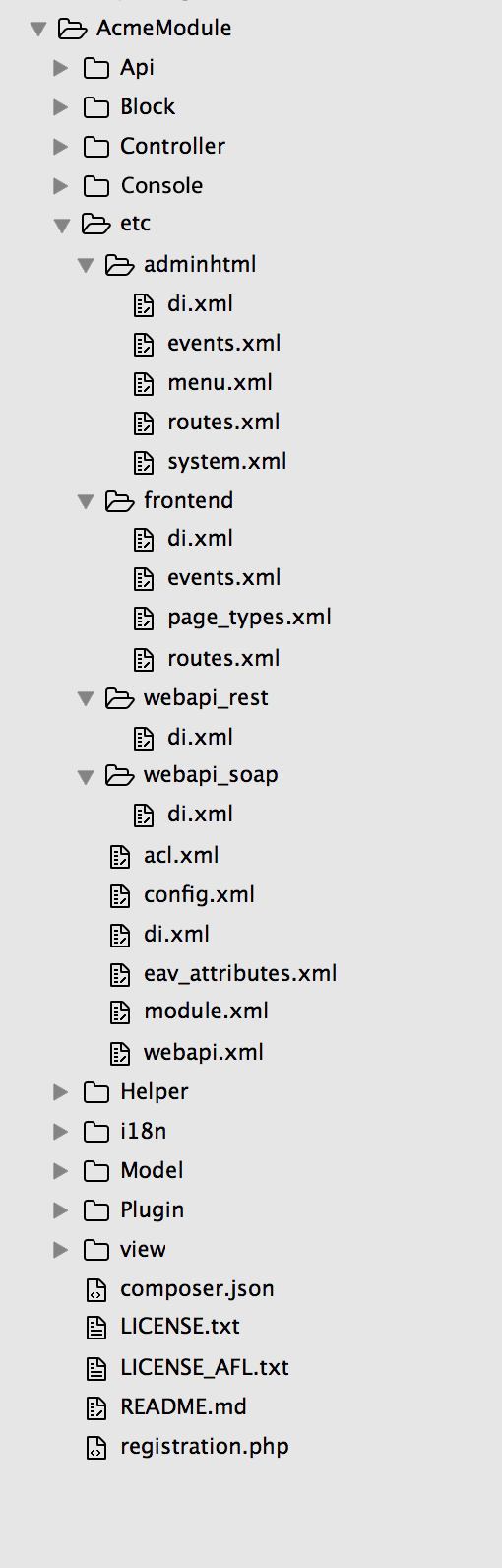
A typical file structure for a module can look like the following:
Common directories
Following are some common module directories:
Block: contains PHP view classes as part of Model View Controller(MVC) vertical implementation of module logic.Controller: contains PHP controller classes as part of MVC vertical implementation of module logic.etc: contains configuration files; in particular,module.xml, which is required.Model/ResourceModel/Colletions: contains PHP model classes as part of MVC vertical implementation of module logic.Setup: contains classes for module database structure and data setup which are invoked when installing or upgrading.ViewModel: contains PHP model classes as part of a model-view-viewmodel (MVVM) implementation. It allows developers to offload features and business logic from block classes into separate classes that are easier to maintain, test, and reuse.
Model file structure
The directory structure for the ORM follows the MVC pattern:
├── Model
│   ├── ResourceModel
│     └──  ModelName/Collection
Model directories include:
Model: Each file is responsible for defining the behavior, properties, and interactions related to a specific entity.ResourceModel: contains files that handle the interaction with the database or data storage backend for the corresponding models. These classes abstract the database operations and provide a convenient interface for CRUD (Create, Read, Update, Delete) operations on the associated entities.ModelName/Collection: contains files that define collections of entities. Collections provide a way to work with sets of data or multiple instances of a model simultaneously. These classes offer methods for querying, filtering, and manipulating groups of records from the database.
Additional directories
Additional folders can be added for configuration and other ancillary functions for items like plugin-ins, localization, and layout files.
Api: contains any PHP classes exposed to the API.Console: contains CLI commands. For more info, see Add CLI commands.Cron: contains cron job definitions.CustomerData: contains section files.Helper: contains aggregated functionality.i18n: contains localization files.Observer: contains files for executing commands from the listener.Plugin: contains any needed plug-ins.UI: contains data generation files.view: contains view files, including static view files, design templates, email templates, and layout files.
Theme file structure
A typical theme file structure can look like the following:
├── composer.json
├── etc
│   └── view.xml
├── i18n
│   └── en_US.csv
├── LICENSE_AFL.txt
├── LICENSE.txt
├── media
│   └── preview.jpg
├── registration.php
└── web
    ├── css
    │   ├── email.less
    │   ├── print.less
    │   ├── source
    │   │   ├── _actions-toolbar.less
    │   │   ├── _breadcrumbs.less
    │   │   ├── _buttons.less
    │   │   ├── components
    │   │   │   └── _modals_extend.less
    │   │   ├── _icons.less
    │   │   ├── _layout.less
    │   │   ├── _theme.less
    │   │   ├── _tooltips.less
    │   │   ├── _typography.less
    │   │   └── _variables.less
    │   ├── _styles.less
    │   ├── styles-l.less
    │   └── styles-m.less
    ├── images
    │   └── logo.svg
    └── js
        ├── navigation-menu.js
        └── theme.js
Common directories
Typical theme directories are:
-
etc: Contains configuration files such as theview.xmlfile which contains image configurations for all images and thumbnails. -
i18n: Translation dictionaries, if any. -
media: Theme preview images (screen capture of your theme) can be put in here. -
web: Optional directory that contains static files organized into the following subdirectories:css/source: Contains a theme'slessconfiguration files that invoke mixins for global elements from the UI library, and thetheme.lessfile that overrides the default variables values.css/source/lib: Contains view files that override the UI library files stored inlib/web/css/source/lib.fonts: The folder to place the different fonts for your theme.images: Static images folder.js: The folder for your JavaScript files.
For more details on the theme folder structure, see theme structure.
Language package file structure
A typical directory structure for three language packages follows:
├── de_DE
│   ├── composer.json
│   ├── language.xml
│   ├── LICENSE_AFL.txt
│   ├── LICENSE.txt
│   └── registration.php
├── en_US
│   ├── composer.json
│   ├── language.xml
│   ├── LICENSE_AFL.txt
│   ├── LICENSE.txt
│   └── registration.php
├── pt_BR
│   ├── composer.json
│   ├── language.xml
│   ├── LICENSE_AFL.txt
│   ├── LICENSE.txt
│   └── registration.php
The only required directory for a language package is the top-level directory. Although not required, we recommend that the directory name match the ISO code to identify the locale.
For more information about language packages, see Translation dictionaries and language packages.