Get Credentials
data-variant=info
data-slots=text
Access Adobe Developer Console
Navigate to the API and services section. Search for "Adobe Fusion" API.
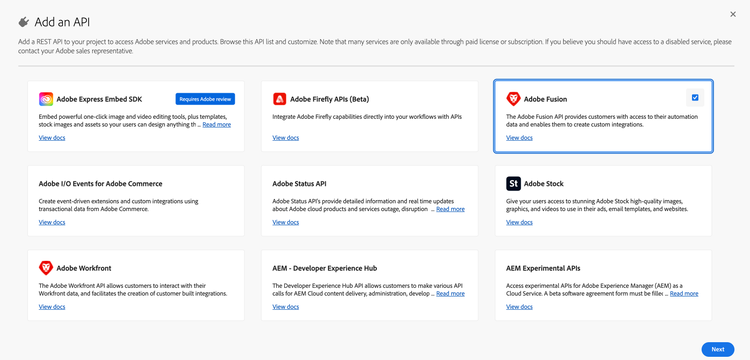
Can't find the Adobe Fusion? Make sure you are accessing the Developer Console from the organization that has a Workfront Fusion product license.
Create a new project
- On the Fusion API product card, click Create project.
- On the modal that opens, click Save configured API.
- On the next screen you can see your client ID (API key).
- If the IMS org has multiple instances, select the instance that you want the API client to be associated with.
- To get your client secret, select OAuth Server-to-Server in the left navigation, then click Retrieve client secret. For OAuth Server-to-Server option to be available, user has to be System Administrator in the IMS organization, or ask the System Administrator in your IMS organization to create the project for you and share the credentials.
To make calls to the Fusion API, developer(s) need a valid client ID (API key) and an access token. Since organization admins are the only ones who can access these projects in the Console, using the Generate access token button on the credential overview page is not ideal.
data-variant=info
data-slots=text
Share credentials with developers
After you have successfully configured your project in Developer Console:
- In the Generate access tokens block, select View cURL command.
- Copy the command and share with developers in your org. It should look similar to the following:
curl -X POST 'https://ims-na1.adobelogin.com/ims/token/v3' \
-H 'Content-Type: application/x-www-form-urlencoded' \
-d 'grant_type=client_credentials&client_id={client_id}&client_secret={client_secret}&scope=openid,AdobeID,profile,additional_info.projectedProductContext'
Read more about generating access tokens in the authentication guide.
Next steps
Once your developers have their credentials, they can:
- Follow the authentication guide to generate access tokens
- Explore the API Reference to discover available endpoints
- Build automations using the Fusion API to manage scenarios, connections, hooks, and executions
data-variant=info
data-slots=text