Samples
Create a new layer
You can create a script that creates a new layer, with the help of the Photoshop DOM API:
const app = require('photoshop').app;
await app.documents.add();
await app.activeDocument.createLayer();
app.activeDocument.layers[0].name = 'New layer';
Access the local filesystem
You can create a script that accesses your local filesystem, with the help of the UXP storage module:
const uxpfs = require("uxp").storage;
const ufs = uxpfs.localFileSystem;

try {
    const folder = await ufs.getTemporaryFolder()
    const metadata = await folder.getMetadata();
    console.log(JSON.stringify(metadata));
} catch (e) {
    console.log(`Local File system error: ${e}`);
}
Using a file picker
You can create a script that instantiates a file picker for writing/saving to files.
const fs = require('uxp').storage.localFileSystem;
try {
    // save file to a location using file picker
    const file = await fs.getFileForSaving("demo.txt");
    await file.write("Hello World! This is demo.");
} catch (e) {
    console.log(e);
}
Read/write to clipboard
You can access the clipboard module (navigator.clipboard) to:
- write to a clipboard (
setContent()) - read a clipboard's contents (
readText())
try {
    const clipboard = navigator.clipboard;
    await clipboard.setContent({ 'text/plain': "Test string" });
} catch (e) {
    throw new Error(e);
}
try {
    const clipboard = navigator.clipboard;
    const text = await clipboard.readText();
    console.log(text);
}  catch (e) {
    throw new Error(e);
}
Create dialog UIs
Simple example
async function createDialog() {
    const dialog = document.createElement("dialog");
    dialog.style.color = "white";
    const div = document.createElement("div");
    div.style.display = "block";
    div.style.height = "200px";
    div.style.width = "400px";
    const header = document.createElement("h2");
    header.id = "head";
    header.style.color = "white";
    header.textContent = "Sample Dialog";
    div.appendChild(header);
    dialog.appendChild(div);
    await document.body.appendChild(dialog).showModal();
}
// Wait for the dialog to render
await createDialog();
Example with "Done" button
async function showDialog() {
    let dialog = createDialog();
    document.body.appendChild(dialog).showModal();

    // Give the script time to show the dialog by returning a promise. Make sure that it is resolved/rejected later.
    return new Promise((resolve, reject) => {
        try {
            // Resolve the promise and dismiss the dialog when when user clicks on 'Done' button
            const doneBtn = document.getElementById("done");
            doneBtn.addEventListener("click", () => {
                console.log("user is done");
                dialog.close();
                resolve("user is done");
            })

            // reject when dialog is cancelled/closed
            dialog.addEventListener("cancel", () => {
                console.log("dialog cancelled");
                reject("dialog cancelled");
            });

            dialog.addEventListener("close", () => {
                console.log("dialog closed");
                reject("dialog closed");
            });
        } catch (e) {
            console.log(e);
            reject(e);
        }
    })
}

function createDialog() {
    const dialog = document.createElement("dialog");
    dialog.style.color = "white";
    const div = document.createElement("div");
    div.style.display = "block";
    div.style.height = "200px";
    div.style.width = "400px";
    const header = document.createElement("h2");
    header.id = "head";
    header.style.color = "white";
    header.textContent = "Sample Dialog";
    div.appendChild(header);
    const doneButton = document.createElement("button");
    doneButton.id = "done";
    doneButton.textContent = "Done";
    div.appendChild(doneButton);
    dialog.appendChild(div);
    return dialog;
}

// Wait for the dialog to render
await showDialog();
Access installed fonts
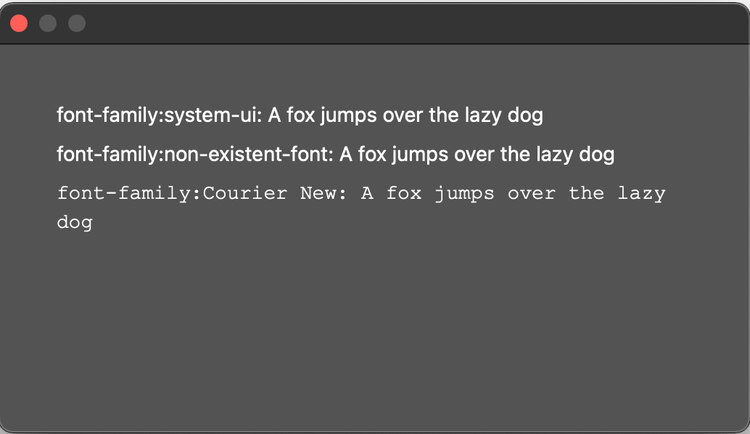
Photoshop has set the permission for the Fonts module to ReadInstalled. This means that if no font is specified or if the font is not installed, then UXP will fallback to "system-ui" font (the default OS system UI font).
async function createDialog() {
    const dialog = document.createElement("dialog");

    dialog.style.color = "white";

    const div = document.createElement("div");
    div.style.display = "block";
    div.style.height = "200px";
    div.style.width = "450px";

    const p1 = createParagraph("system-ui"); // use default OS font
    const p2 = createParagraph("non-existent-font"); // try using a non existent font. Will resolve to OS default.
    const p3 = createParagraph("Courier New"); // use any installed font
    div.appendChild(p1);
    div.appendChild(p2);
    div.appendChild(p3);

    dialog.appendChild(div);
    await document.body.appendChild(dialog).showModal();
}

function createParagraph(fontFamily) {
    const p = document.createElement("p");
    p.style.color = "white";
    p.style.fontFamily = fontFamily;
    p.textContent = `font-family:${fontFamily}: A fox jumps over the lazy dog`;
    return p;
}

// Wait for the dialog to render
await createDialog();