UXP Manifest v5
Manifest v5 gives developers access to a new plugin permissions model and WebViews in modal dialogs. Using the full manifest v5 feature set requires PS 23.3.0 or higher. (UXP 6.0 or higher)
Upgrade your plugin to use the latest manifest feature set by changing the manifestVersion element.
"manifestVersion": 5
Example manifest
{
    "manifestVersion": 5,
    "id": "YOUR_ID_HERE",
    "name": "Name of your plugin",
    "version": "1.0.0",
    "main": "index.html",
    "host": {
        "app": "PS",
        "minVersion": "23.3.0"
    },
    "entrypoints": [
        {
            "type": "command",
            "id": "commandFn",
            "label": {
                "default": "Show A Dialog"
            }
        },
        {
            "type": "panel",
            "id": "panelName",
            "label": {
                "default": "Panel Name"
            },
            "minimumSize": {"width": 230, "height": 200},
            "maximumSize": {"width": 2000, "height": 2000},
            "preferredDockedSize": {"width": 230, "height": 300},
            "preferredFloatingSize": {"width": 230, "height": 300},
            "icons": [
                {"width":23,"height":23,"path":"icons/dark.png","scale":[1,2],"theme":["darkest","dark","medium"]},
                {"width":23,"height":23,"path":"icons/light.png","scale":[1,2],"theme":["lightest","light"]}
            ]
        }
    ],
    "icons": [
        { "width": 23, "height": 23, "path": "icons/icon_D.png", "scale": [ 1, 2 ], "theme": [ "dark", "darkest" ], "species": [ "generic" ] },
        { "width": 23, "height": 23, "path": "icons/icon_N.png", "scale": [ 1, 2 ], "theme": [ "lightest", "light" ], "species": [ "generic" ] }
    ],
    "requiredPermissions": {
        "network": {
            "domains": [
                "https://adobe.com",
            ]
        },
        "clipboard": "readAndWrite",
        "webview": {
            "allow": "yes",
            "domains": [ "https://*.adobe.com", "https://*.google.com"]
        },
        "launchProcess": {
            "schemes":
                [ "https", "slack"],
            "extensions":
                [ ".xd", ".psd" ]
        },
    },
}
Changes to top-level metadata
Starting from changes to top-level metadata, here are some keys that changed with the v5 upgrade. Read manifest v4 to learn more about each key/value field.
versionx.y.z format.entrypointsEntryPointDefinition[]Updates to Entrypoints methods
With manifest v4:
- Promise-based methods were not supported for entrypoint methods.
- No timeouts for entrypoints methods.
- All panel entrypoints have only one argument
eventwhich containsnode,panel,eventNameandPanelID.
Manifest v5 brings additional lifecycle events to better manage your plugin and more flexibility in specifying the initial view and location of plugins' panels:
-
UXP honors promises returned by (most) entrypoint methods.
- Plugin entrypoints: Promise support is enabled for plugin
destroy. - Panel entrypoints: Promise support is enabled for panel
create,show,destroy,hide. - Currently, panel
showis tied to plugincreate, and panelhideis tied to plugindestroy.
- Plugin entrypoints: Promise support is enabled for plugin
-
Entrypoint methods have a timeout of 300 milliseconds
-
Panel entrypoints have
rootNodeas first argument anddataas second argument forshowandhide.
entrypoints.setup() using promises
import { entrypoints } from "uxp";
entrypoints.setup({
    plugin: {
        create() {
            console.log("Plugin has been loaded, plugin.create has been triggered.");
        },
        destroy() {
            return new Promise(function (resolve, reject) {
                console.log("Plugin has been loaded, plugin.create has been triggered.");
                resolve();
            });
        }
    },
    panels: {
        panelA: {
            create(rootNode) {
                return new Promise(function (resolve, reject) {
                    console.log("PanelA is created, panelA.create has been triggered.");
                    resolve();
                });
            },
            show(rootNode, data) {
                return new Promise(function (resolve, reject) {
                    console.log("PanelA is about to be displayed,  panelA.show has been triggered with data ", data);
                    resolve();
                });
            },
            hide(rootNode, data) {
                return new Promise(function (resolve, reject) {
                    console.log("PanelA is about to be hidden,  panelA.hide has been triggered with data ", data);
                    resolve();
                });
            },
            destroy(rootNode) {
                return new Promise(function (resolve, reject) {
                    console.log("PanelA is about to be destroyed,  panelA.destroy has been triggered.");
                    resolve();
                });
            },
            invokeMenu(menuId) {
                return new Promise(function (resolve, reject) {
                    console.log("A menu item on PanelA has been invoked,  panelA.invokeMenu has been triggered with menu id ", menuId);
                    resolve();
                });
            },
            menuItems: [...]
        },
        "panelB": {..}
    },
    commands: {
        "command1": {
            run() {..},
            cancel() {..}
        },
        "command2": function(){..}
    }
});
Plugin Permissions
Plugins using Manifest v5 will enjoy the enhancements in security with the introduction of new permissions model. Users will be asked for their consent when your plugin attempts to use openExternal, openPath, and sp-link/anchor tags. For everything else, consent is given at install time.
Starting with v5, any permissions not explicitly declared in the manifest are not granted by default.
Network
In order for our plugin to use the network, you must define domains that your plugin will access. You can do this by adding the network object to the requiredPermissions section of the manifest.
{
    "requiredPermissions": {
        "network": {
            "domains": [
                "https://source.unsplash.com",
            ]
        }
    }
}
<img src='https://source.unsplash.com/random'>
Clipboard
To grant read and/or write access to the system clipboard, declare it in requiredPermissions. clipboard accepts:
readAndWritefor read/write accessreadfor read-only access.
{
    "requiredPermissions": {
        "clipboard": "readAndWrite"
    }
}
const clipboard = navigator.clipboard;
const dataTransferProviders = {
    'text/plain': 'Sample text'
};
clipboard.writeText(dataTransferProviders).then(
    (result) => {...},
    (error) => {...}
);
Local Filesystem
The localFileSystem permission controls access to the user's local file system. If not specified, the plugin has no access to the user's file system other than the default access to plugin://, plugin-temp://, and plugin-data://.
localFileSystem accepts:
request: Allows the plugin to access the local file system using pickers for opening and saving files.plugin: Allows the plugin to access the plugin's storage only.fullAccess: Allows the plugin to inspect, modify, and delete files to which you have access on all volumes attached to this device. The user will be required to consent before installation or update.
{
    "requiredPermissions": {
        "localFileSystem": "request"
    }
}
const fs = require('uxp').storage.localFileSystem;
const file = await fs.getFileForSaving('manifest_demo.txt');
await file.write('Manifest v5 demo');
If plugin is not specified for plugin storage, the manifest will default to that setting.
Launch Process
The launchProcess permission in the manifest controls the ability to launch applications and open files in other applications.
With manifest v5, the launchProcess permission must be declared to use openExternal or openPath.
"permissions": {
    "launchProcess": {
        // allows launching files with specified URI schemes
        "schemes":
            [ "https", "slack", "adbxd" ],
        // allows opening files with the specified file extensions
        "extensions":
            [ ".pdf", ".xd", ".psd" ],
    },
}
Both openPath and openExternal rely on this permission set, and upon either function call, the user will get a runtime consent dialog. Only after they agree will the API call execute.
Plugin communication
If enabled, the plugin can communicate with other installed plugins. Defaults to false.
"requiredPermissions": {
    "ipc": {
        "enablePluginCommunication": true
    }
}
const { pluginManager } = require("uxp");
// find the Alchemist plugin in the loaded plugins
const alchemistPlugin = Array.from(pluginManager.plugins).find(plugin => plugin.id==="2bcdb900");
//What commands and panels are available?
const alchemistCommands = Array.from(alchemistPlugin.manifest.commands, command => command.commandId); // result: ["resetStateFn"]
const alchemistPanels = Array.from(alchemistPlugin.manifest.panels, command => command.panelId); // result: ["inspector"]
// Show the inspector panel; note that panels can only be made visible -- you can't ask to hide the panel
alchemistPlugin.showPanel("inspector");
// Reset Alchemists state... but be sure you want to do this!
alchemistPlugin.invokeCommand("resetStateFn");
WebViews
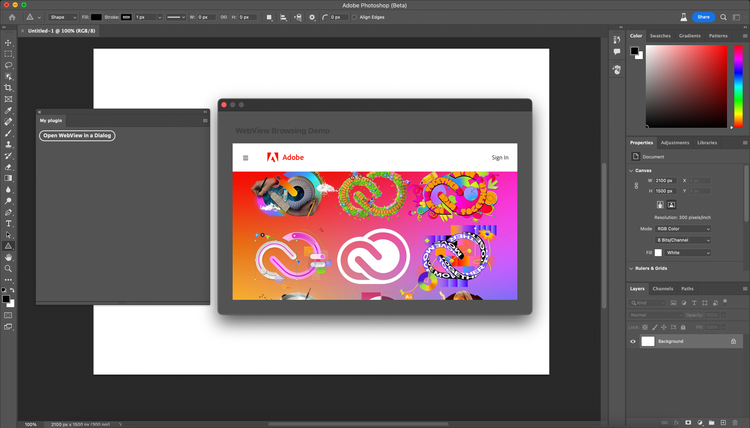
WebViews are available with UXP 6.0, and need to be configured in your plugin's manifest (v5 required).
In your manifest.json:
{
    "manifestVersion": 5,
    "requiredPermissions": {
        "webview": {
            "allow": "yes",
            // domains --> string[] | "all"
            "domains": [ "https://*.adobe.com", "https://*.google.com"],
        }
    }
}
Then in your plugin's code:
<dialog>
    <webview id="webview" width="100%" height="360px" src="https://www.adobe.com"></webview>
</dialog>
document.querySelector("dialog").showModal();
Limitations
WebViews are available within modal dialogs only for now.
GUID
Available from Photoshop v25.1 (or UXP v7.3), to identify a Creative Cloud User,
In your manifest.json:
"requiredPermissions": {
  "enableUserInfo": true
}
Then in your code:
let userId = require('uxp').userInfo.userId(); // Get the GUID of user
console.log(userId);