Large Document Support
How Adobe Express is changing to handle documents with a large number of pages.
Overview
Adobe Express is evolving to support much larger documents. The change rests on a single idea: Express supports large documents by efficiently managing pages in memory and activating content as needed. Some pages are active (their content is loaded and accessible) and others are inactive (with their content set aside until they are needed again).
Adobe is making this change because a document model that keeps every page's content in memory works well only until documents get big. As page counts climb, the cost of holding every shape, every block of text, and every image on every page grows with the document. Loading page content on demand lets Express scale more reliably across large documents and lower-end devices.
data-slots=header, text1
data-variant=info
Is my add-on affected?
Not every add-on is affected. An add-on that performs synchronous operations on the current page, and doesn't carry node references across asynchronous waits, generally needs no changes. If your add-on depends on content being available everywhere, all the time, you should review the rest of this page and the Support Large Documents how-to.
data-slots=header, text1, text2, text3
data-variant=info
Large Document Support Checker Skill
What add-ons are impacted?
The add-ons that need attention fall into a few recognizable use cases:
- Whole-document traversal. Anything that walks every page to read or change content—text find-and-replace, applying a color theme across the document, client-side export. These assume every page's content is reachable; with the new model, it isn't.
- Cross-page inspection. Reading content on pages other than the current one: off-screen content is not freely available.
- Async operations on content. An add-on that downloads an asset, waits, and then places it on the page; or one that does work after any
await. During the wait time the user can navigate away, and the page the add-on was holding can go inactive.
If your add-on does none of these, the model's introduction is invisible to it.
Which SDK surfaces are affected?
There's a split by which SDK surface you call. Add-ons that use only the iframe Add-on UI SDK (addOnUISdk.app.document.*, like renditions, page metadata, or adding media) are largely unaffected: Adobe Express activates the pages those calls need on your behalf.
The migration applies to Document Sandbox code (editor.*, pages.*), which works close to the document model and must reach content safely itself.
data-slots=header, text1, text2
data-variant=info
Keep your users informed
createRenditions(), getPagesMetadata(), and printQualityCheck() that span many pages can take noticeably longer on large documents, due to the on-the-fly page activation.Marketplace enforcement
The migration applies to every distribution model, but enforcement differs by where an add-on lives.
For Marketplace add-ons, Adobe will attempt to identify impacted add-ons and reach out to their developers. Despite our best efforts, this analysis may output false positives; we recommend that you review the results and double-check your add-on's actual logic and API usage.
Impacted add-ons that aren't updated by the end of the migration window may be removed from the marketplace, and users may see compatibility warnings before that point. Please note that updated add-ons must be resubmitted to the Marketplace to be recognized as compatible—resubmission is what tells the platform the add-on now meets the new requirements.
For Private and Internally Distributed add-ons, the same behavior changes apply, but the enforcement model is lighter: these add-ons are not automatically removed, as Adobe does not monitor or contact their owners the way it does for the Marketplace. The responsibility for testing and updating them rests with their owners. Left unmodified, they may stop working correctly once the migration period ends.
Developers whose add-ons are not impacted should not feel compelled to make changes or resubmit purely for compliance.
Rollout and Migration Timeline
Large Document Support will be introduced in a phased manner, over a seven-month migration window structured so that developers get time to assess, migrate, test, and resubmit before any enforcement. The per-API mechanics of this—how an API moves from deprecated to removed to fully withdrawn, and why your live add-on keeps working throughout—follow the platform's existing Deprecation Policy; the phases below time that lifecycle to the Large Document Support rollout.
data-slots=header, text1
data-variant=warning
Dates are targets
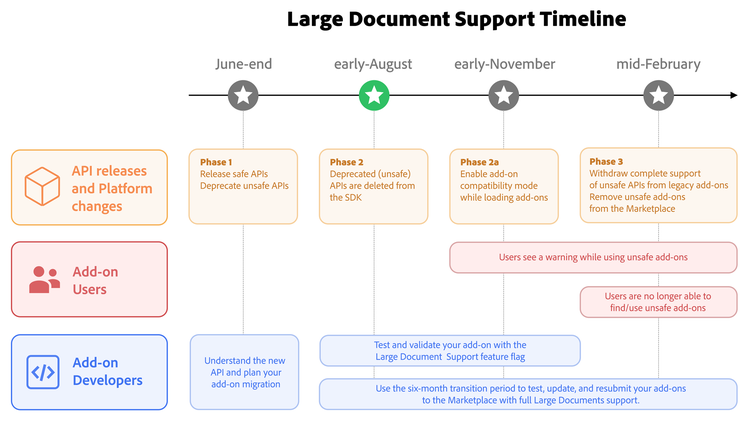
Understanding the new model
Large Document Support loads page content on demand. The pages you are working with are active and fully available; the rest are kept inactive until you return to them. The benefit is scale and stability. The consequence—the part that matters to add-on developers—is that content is no longer guaranteed to be available everywhere, all the time.
Active and Inactive Pages
Think of a document as a shelf of books. The book open on your desk is active: you can read its pages and write in its margins. The other books are still on the shelf—you can read each spine to know its title, but to read what's inside one you first have to take it down and open it.
Pages work the same way:
- An active page has its content loaded. You can read and modify everything in it—its artboards, text, shapes, and more.
- An inactive page does not. Its content is not accessible until the page becomes active again.
A useful rule of thumb is visible equals active: the page in the viewport is always active. The reverse does not hold—Express may keep several pages active at once, and a page you visited a moment ago may linger in an active state for a while. The important fact is to not rely on it: a page can be marked inactive at any time, and once it is, its entire subtree becomes inaccessible together.
Content vs Metadata
The model makes a net distinction between content and metadata.
Metadata describes a page; it includes id, name, width, height, and add-on data. Metadata is cheap and stays available even for inactive pages.
Content lives inside the page; it includes artboards, text, shapes, and nested nodes. Content is what Express loads and unloads, so it is only available on active pages.
The active page contract
The new model creates a simple contract: an add-on should only hold references to nodes on a currently active page. A node reference captured from an active page is valid only while that page stays active. Pass a stale reference—one whose page has since gone inactive—to any API, and the call deliberately throws.
Scrolling a page into view is not the same as activating it for content access: viewport.bringIntoView() only scrolls the viewport to a node. It does not activate an inactive page or make that page’s content available. bringIntoView() must be called with an active node; passing a stale reference from an inactive page, including an inactive artboard, throws an error. The method is a viewport primitive, not a page-switch primitive—using it to prepare a page for editing is the wrong pattern, and the new APIs are meant to handle that instead.
New document model APIs
The new APIs make the active/inactive distinction explicit and give add-ons safe ways to reach page content. This page describes what they're for.
data-slots=header, text1
data-variant=info
Examples and Best Practices
ActivePageNode
To make the active/inactive distinction explicit in code rather than implicit in your memory, the document model gains a new class. Today the hierarchy runs BaseNode → PageNode. Under Large Document Support it gains a leaf: BaseNode → PageNode → ActivePageNode.
PageNode remains the general page class—it carries the metadata that is always available. ActivePageNode represents a page whose content is currently accessible, and the content-bearing members move onto it. The split means the type you hold tells you what you're allowed to do: if you have an ActivePageNode, the content is there; if you have a plain PageNode, you have metadata and must activate the page to reach its content.
BaseNode → PageNodeBaseNode → PageNode → ActivePageNodeid, name, width, height, add-on data)PageNodeartboards and the nodes within)PageNode.artboardsActivePageNode.artboardsallDescendants, allTextContent)PageNodeActivePageNodecloneInPlace)PageNode.cloneInPlaceActivePageNode.cloneInPlaceIntroducing ActivePageNode does not, by itself, break existing add-ons: where the platform hands you the active page—editor.context.currentPage, for instance—you receive an ActivePageNode, and the content members you already use are still there. The same narrowing applies to pages.addPage() and artboard.parent, which now return an ActivePageNode too. What changes is that those members are no longer reachable from an inactive page, which is exactly the case the two new APIs address.
visitPages()
visitPages() answers "how do I reach content on pages that aren't in view?" Given a set of pages, it activates each one in turn and hands your callback a fully accessible ActivePageNode, guaranteeing the page stays active for the duration of that callback. It is the safe replacement for iterating pages and touching content directly.
visitPages(
  pages: PageNode[],
  callback: (page: ActivePageNode) => void | Promise<void>
): Promise<void>;
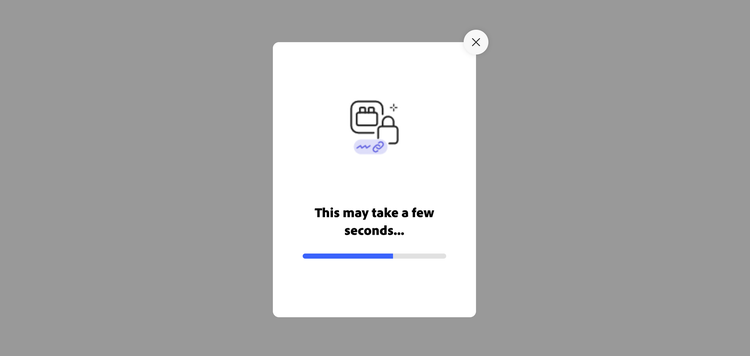
Because a pass over a large document can take several seconds, Express shows a modal progress bar while visitPages() runs, whose UI may see minor changes in later releases—cosmetic refinements that introduce no breaking changes for your add-on. The dialog blocks the user from switching pages while your callback executes—so the page it hands you cannot be pulled out from under you mid-pass—and it appears only after a short minimum delay, so a quick pass doesn't flash a dialog on screen. It also carries a way to cancel the operation, rejecting the promise visitPages() returned.
data-slots=text1
data-variant=warning
keepContentActiveDuringAsync()
keepContentActiveDuringAsync() answers "how do I keep working with this node across an await?" You hand it a target (the node or page to keep active), an async function that does the waiting (but doesn't mutate the document), and a synchronous follow-up that applies your edits while the target is still active—so an asset download or a translation call doesn't leave you holding a stale reference. It is the safe replacement for the older queueAsyncEdit() pattern.
keepContentActiveDuringAsync<AsyncResultT>(
  target: ActivePageNode | VisualNode,
  asyncCallback: () => Promise<AsyncResultT>,
  afterAsyncCallback: (asyncResult: AsyncResultT) => void
): Promise<void>;
Both visitPages() and keepContentActiveDuringAsync() shipped as experimental in the first phase of the rollout (see above). As of Phase 2 they have graduated to stable: they now sit inside the usual stability guarantees, and you no longer need the experimentalApis flag to call them.
Which work goes in which callback matters. The async lambda is for waiting—the network request, the translation call—and must not change the document. Every edit belongs in the synchronous follow-up (afterAsyncCallback), which Express runs while the target is still active. The split is enforced: call a mutating API from the async lambda and Express throws a runtime error rather than let a change land against a page that may already have gone inactive.
data-slots=header, text1, text2
data-variant=warning
Mutating APIs
Common migration mistakes
data-slots=header, text1
data-variant=info
Incorrect: iterating pages and reading content directly.
for (const page of editor.documentRoot.pages) {
  for (const node of page.allTextContent) {
    /* ... */
  } // silently empty on inactive pages
}
Use visitPages(), which activates each page before handing it to your callback. The wrong form is a silent bug: content getters on an inactive page return empty rather than throwing, so the loop quietly does nothing for every page that isn't active.
Incorrect: holding a node reference across an await.
const node = editor.context.selection[0];
await downloadSomething();
node.fullContent; // may throw: the page may now be inactive
Wrap the operation in keepContentActiveDuringAsync(). The wrong form fails because the user can navigate during the wait; the page the node lives on goes inactive, and the reference goes stale.
Add-on Compatibility Mode
For add-ons that haven't been updated yet, Express provides a temporary fallback called Add-on Compatibility Mode. It relaxes the model by attempting to keep all pages active, so a legacy add-on that assumes content is always available can keep working during the migration period.
It is essential to read compatibility mode for what it is: a migration aid, not a guarantee. As documents grow, keeping all content active is exactly the thing the model exists to avoid, and it may become impractical or impossible. An add-on that behaves correctly in compatibility mode on a small document can still fail on a significantly larger one, and on low-end devices Express may be unable to enter the mode at all. Its purpose is to buy time and reduce disruption—not to remove the need to migrate. The right posture is to treat it as breathing room and update to the new APIs regardless.
Treating Add-on Compatibility Mode as permanent is a mistake. It works until it doesn't—on a large enough document or a constrained device, keeping everything active is the very thing the model avoids.
Testing your add-on with Large Document Support
We are introducing a dedicated testing URL that turns on Large Document Support in Adobe Express as if the new model were already in place. Open https://new.express.adobe.com/lArg3-d0c-supp0rt-4-add0ns in its own browser tab and use Express there while you assess and validate your add-on.
Regular Express does not exercise page activation and deactivation the way production will once Large Document Support is fully rolled out. This URL acts as a developer feature flag: it enforces the active/inactive page behavior so you can see whether your add-on still works when content is not guaranteed to stay available everywhere, all the time.
data-slots=header, text1
data-variant=info
Some glitches in the testing environment are expected
Stress-test with your add-on open. The failure modes users trigger without thinking about them are the ones worth reproducing deliberately: add new pages, run asynchronous operations, and change the active page in the Express UI while your add-on is still mid-operation. Use very long documents with a lot of content, and repeat those flows. Whole-document passes, async work that spans an await, and any logic that assumes every page's content stays reachable are where silent failures and stale-reference errors tend to surface first.
Keep this testing environment to yourself—do not share the URL with your add-on's users, to avoid any confusion or misuse with other developers' add-ons. For the migration patterns to validate against it, see the Support Large Documents how-to.
FAQs
What is Large Document Support?
It is a change to how Adobe Express manages documents: instead of keeping every page loaded in memory at all times, Express keeps only some pages active. An active page's content is accessible; an inactive page's content is not, until the page is made active again. This lets Express scale to much larger documents without running out of memory.
Why is Adobe introducing it?
As documents grow, keeping every page's content in memory becomes impractical and eventually impossible, especially on lower-end devices. Large Document Support lets Express load page content on demand, so performance and stability hold up as documents scale.
Is my add-on affected?
Not all add-ons are impacted. Only add-ons that depend on content being available all the time are affected—those that iterate over all pages, read content on pages that aren't in view, jump between pages, or hold node references across an asynchronous operation. Add-ons that work only with the current page and don't span async boundaries generally need no changes.
How do I check whether my add-on is impacted?
As a starting point, run the Large Document Support add-on check—a skill Adobe provides that scans your add-on's code for the deprecated APIs and the unsafe node-reference patterns this page describes and reports whether your add-on is likely impacted. Treat the result as a starting point, not a ruling: it can produce false positives and false negatives, so always validate your add-on in the testing environment regardless of what it reports.
What is the difference between an active and an inactive page?
An active page has its content loaded and accessible. An inactive page does not: its metadata (id, name, dimensions, add-on data) is still readable, but its content (artboards, text, shapes) is not, until the page is made active again. A visible page is always active, but Express may keep additional pages active beyond the one in view.
What is an ActivePageNode?
A new class in the document model that represents a page whose content is currently accessible. Content-bearing members such as artboards, allTextContent, and cloneInPlace now live on ActivePageNode rather than on PageNode, which makes the active/inactive distinction explicit in the API surface.
Do I have to rewrite my add-on?
Most add-ons need only targeted changes: replace whole-document content traversal with visitPages(), wrap async operations in keepContentActiveDuringAsync(), and stop holding node references across asynchronous boundaries. The introduction of ActivePageNode by itself does not break existing code.
Do I still need the experimentalApis flag for visitPages and keepContentActiveDuringAsync?
No, not as of Phase 2. Both APIs shipped as experimental in Phase 1 and required the experimentalApis flag during development. With Phase 2 they have graduated to stable—they now sit inside the usual stability guarantees, and you no longer need the experimentalApis flag to call them.
What happens if the user cancels a visitPages operation?
While visitPages() runs, Express shows a modal progress bar that blocks page-switching for the duration of your callback. It carries a cancel button, and pressing it rejects the promise visitPages() returned, so handle that rejection in your code. Automatic rollback of partial changes on cancel is not yet in place, so if your callback had already modified some pages, cleaning up is currently your responsibility.
Do my iframe (Add-on UI SDK) calls like createRenditions need changes?
No. Add-ons that use only the iframe Add-on UI SDK (addOnUISdk.app.document.*) need no code changes—Express activates the pages those calls need on your behalf. The one thing to plan for is timing: calls that span many pages, such as createRenditions, getPagesMetadata, and printQualityCheck, can take noticeably longer on large documents, and there is no built-in progress UI. Surface your own feedback—a toast, a spinner, or an inline message—so a longer call reads as progress rather than a frozen add-on.
What is Add-on Compatibility Mode, and can I rely on it?
It is a temporary mode that keeps all pages active so that add-ons not yet updated can keep working during the migration period. It is a migration aid, not a guarantee: on large documents or low-end devices Express may be unable to keep everything active, and the add-on may still fail. Treat it as breathing room, not a permanent solution.
How long do I have to migrate?
The initiative provides a migration window of roughly seven months, spanning the phases from the first API release to final enforcement. Specific dates are targets and may shift; the phase overview on this page tracks where the rollout currently stands.
How do I test my add-on with Large Document Support?
Open https://new.express.adobe.com/lArg3-d0c-supp0rt-4-add0ns in its own browser tab. That URL enforces Large Document Support as if the new model were already in place, so you can validate your add-on before production rollout. Stress-test with your add-on open: add pages, switch pages in the Express UI mid-operation, and use very long documents with a lot of content. Don't share the URL with end users.
What happens to my marketplace add-on if I don't migrate?
Impacted marketplace add-ons that are not updated by the end of the migration window may be removed from the marketplace, and users may see compatibility warnings before then. Updating the code is not enough on its own—an impacted marketplace add-on must be resubmitted to be recognized as compatible.
Are private and internally distributed add-ons affected?
Yes, they are subject to the same behavior changes, but the enforcement differs: they are not automatically removed, and the responsibility for updating them rests with their owners. If left unmodified, they may stop working correctly once the migration period ends.
Why do I get a mutating-API error inside keepContentActiveDuringAsync?
Because a mutating API was called from the async lambda—the first callback, which is only for waiting. Every document change must happen in the synchronous follow-up (afterAsyncCallback). Some APIs are mutating because of their underlying implementation even when they look read-only, so judge an API by its effect rather than by whether its name sounds read-only. When you see the error, move that call into the follow-up.
I see glitches in the testing environment—is my add-on broken?
Not necessarily. The testing URL turns on Large Document Support ahead of the production rollout, so you may hit rough edges in Express itself. These are known and expected there, and they are fixed automatically as the rollout proceeds. To tell an environment issue from an add-on issue, reproduce the same step in regular Express without your add-on; if it still happens, it's the environment.
Related Topics
- Support Large Documents — the how-to with the
visitPagesandkeepContentActiveDuringAsyncrecipes and the deprecated-API migration table. - Deprecation Policy — the lifecycle every deprecated API follows, and why your live add-on keeps working through it.
- Document API Concepts — the scenegraph, node hierarchy, and how to read the Document API reference.
- Manage Pages — creating, accessing, and navigating pages.
Next Steps
- Work through the Support Large Documents how-to and apply the patterns to your add-on.
- Identify whether your add-on uses any of the deprecated APIs, and plan the migration before the Phase 2 cutoff.
- Enable the testing environment and validate your add-on with Large Document Support before resubmitting.