Admin Console Audit Logs
How to track changes made in or to your Admin Console.
Admin Console Audit Log events are available via Adobe I/O Events to be captured to your monitoring or other long term storage tools directly via API, webhooks or AWS EventBridge, as with all other I/O Events event providers.
Note the Admin Console audit log records changes made at the organizational level. It does not provide information around product-specific events, for example, when a certain Report Suite was created in Adobe Analytics, or when an HTML template was deleted in Adobe Acrobat Sign.
Accessing Audit Logs
For security reasons, accessing the Admin Console Audit log event provider works slightly differently from other event providers in terms of who can create projects that use the events. Typically, event providers are available for use by anyone with any developer role. Instead, the audit log event provider is limited to use only by:
- System administrators
- Admin developers
System Admins can use all event providers as usual. When creating a project within Adobe I/O Events, you will see Adobe Admin Console Audit Logs as an available provider to add to your project. If the provider is not listed, you do not have access.
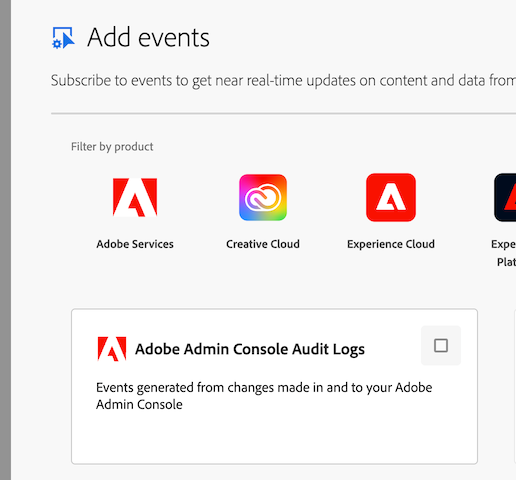
Users with developer access to Adobe Developer Console will be able to see the project in read-only mode, but will not be able to access the secret required to generate a credential to access.
Instructions for adding Event Providers to a project are at Add Events to a project.
Admin Developer User Role
The Admin developer role was introduced to help protect access to the audit log event stream. This is similar to other user roles available such as those for Adobe Express. You can read more about managing user roles these at Using Roles.
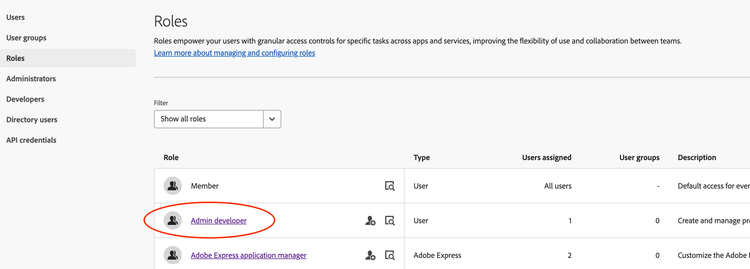
The Admin developer role behaves like the API developer role used for products - a user with this role has access to create and manage projects in Developer Console (including against APIs that do not require explicit access checks), and also grants them acccess to include the Adobe Admin Console Audit Logs event provider in projects. Revoking the role will remove that user's ability to access the relevant projects.
Note that you can add those role to user groups as well, but we generally recommend granting the role to individual users for clarity on who has the role.
Version Management
There are a number of ways that the audit log event format might change - we will aim to provide advance notice of major changes, but as ever you should work with tools and systems that enable flexibility.
The event payload adheres to OCSF standard values for most fields. The exception to this is where the standard doesn't support Adobe workflows or concepts, and an ID of 99 (meaning Other) is used. In this case, you should expect the string matching the name of the ID to be variable. This will be most common in events related to Entity Management as new features and capabilities are introduced to Admin Console. You should assume that new entity names, and activity names operating on those entities, could occur at short notice and design your integration to deal with that scenario.
For the avoidance of doubt, once a given "other" entity name (e.g., Role) has been used in a public release, altering it will be considered a breaking change.
If you're building custom software to store OCSF events, then you should consider simply using appropriate technology when designing your storage (e.g., store JSON files directly or in a JSON column, or use a database that allows for schema flexibility).
For Entity Management, note that the Managed Entity object is quite flexible, and the type will drive which other fields will be present, alongside the data field. Particularly for cases where Adobe uses a type_id of 99, the data field will contain critical information about the entity which can be highly variable, so again the recommendation would be to capture that as a JSON element as the spec recommends.
If it is deemed necessary to move to a new OCSF version (or any other breaking change), we will provide 90 days notice to communicate exact dates for when the old version would be turned off. We will always run the old and new versions in parallel for a period of time to allow you to test integrations against the new format.
Note that there may be circumstances that result in changes having to be made with no notice (e.g., security issues) - given the nature of these events that is expected to be low-risk, but is called out here for completeness.
Known Issues
The table below details current issues with the event stream compared with what can be seen in Admin Console's view or CSV export: