Troubleshooting
Use the following solutions to resolve common issues with App Management.
Cannot access App Management (permissions)
Only Admin users whose role includes the App Management resource can use App Management in the Adobe Commerce Admin. If Apps > App Management is missing or access is denied, the user’s role likely does not grant that permission.
-
Sign in as an Admin user who can edit roles.
-
Go to System > User Roles and open the role assigned to the user who needs access (or create or adjust a role for app managers).
-
Open the Role Resources tab. If you choose specific resources instead of All, set Resource Access to Custom.
-
In the tree, expand Admin UI SDK and select App Management.
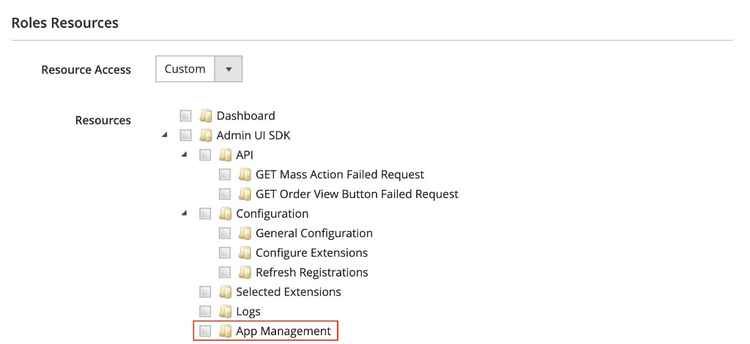
- Save the role and have the user sign out and back in if the menu does not update immediately.
For the full association and installation workflow, see Manage your app.
Initialize the configuration library in runtime actions
When your app defines businessConfig, each App Builder runtime action that calls getConfiguration, getConfigurationByKey, or setConfiguration must run initialize before any of those three methods.
An error message appears when you do not call initialize before any of those three methods:
Schema not initialized. Call `initialize({ schema })` before using configuration functions.
See Retrieve configuration at runtime for an example.
If your businessConfig schema uses dynamicList fields, the initialize call also needs params to resolve the list options at runtime. Omitting params produces:
Dynamic list options require runtime params. Call `initialize({ schema, params })` to resolve them.
Local Adobe Commerce instances
App Management is not supported for local Adobe Commerce development instances. Association, installation, and workflows in the Admin require an Adobe Commerce deployment that App Management can integrate with.
If you are developing against a local stack, plan to validate App Management behavior in a non-local environment.
Commerce instance behind an IP allowlist
If Adobe Commerce only accepts traffic from allowlisted IP addresses, add the Adobe I/O Runtime egress IPs used by your App Builder application to that allowlist. Fetch the current list by running:
aio runtime ip-list get
See Secure communication with back-end services in the App Builder documentation for the full process, including the one-time terms acceptance and contact email prompt.
Because this must be configured on the Commerce instance itself, only a Commerce administrator can apply the change, not the App Builder application owner.
Commerce instance behind HTTP authentication
App Management is not supported when Adobe Commerce is reachable only behind HTTP authentication (for example, HTTP Basic Auth in front of the Admin or APIs that App Management must call). HTTP authentication blocks every request regardless of its source IP address, so it is a separate problem from an IP allowlist; adding App Builder's egress IPs (see Commerce instance behind an IP allowlist) does not resolve it.
Plan network and access controls so Commerce endpoints required by App Management are reachable without HTTP authentication barriers that block Adobe-hosted runtime requests, in line with your security policies.
Scope tree synchronization issues
If new websites, stores, or store views exist in Commerce but Manage scopes in App Management looks stale (or scopes removed in Commerce still appear), the scope tree is almost certainly out of date.
Scope hierarchy in App Management is cached. Changes to Commerce websites, stores, or store views do not sync automatically.
What to do: For each associated application that uses business configuration, open Manage scopes, open Quick actions, then select Sync commerce scopes. Running sync again reads the current hierarchy from Commerce, which updates additions and removes scopes that were deleted in Commerce.
For full behavior and UI context, see Scope tree synchronization.
Configuration validation errors
app.commerce.config is validated against its schema every time the config is loaded. This happens during the postinstall and pre-app-build hooks, and whenever you run an npx aio-commerce-lib-app generate … command manually. If validation fails, check:
-
Required properties. Fields must have
nameandtype.labelis optional. -
Type-matched defaults. Default values must match the field type.
-
Valid metadata. In
app.commerce.config, themetadataobject must includeid,displayName,description, andversion, as required by@adobe/aio-commerce-lib-appwhen it validates the file.
If validation succeeds locally but associating the app still fails with a compatibility message in the Admin, see Association errors.
Association errors
Association errors in the Admin are not the same as schema validation failures in your local app.commerce.config. They usually mean the deployed app package is not set up for the App Management association flow.
Not compatible with Adobe Commerce
When you try to associate an application with App Management, the Admin may show the following error message:
The selected application is not compatible with Adobe Commerce.
data-variant=info
data-slots=text
Manage the Commerce instance
-
The app may still be appropriate for your project. Use the installation and configuration instructions on the Adobe Exchange listing and in the vendor’s documentation (including non-downloadable or enterprise apps that use custom onboarding).
-
If those materials do not explain Commerce integration, contact the app provider to confirm supported options.
Develop or maintain the application
-
Adobe Commerce treats an app as compatible with the association flow when the deployed package exposes the manifest and App Management runtime actions produced from
app.commerce.config(specifically including validmetadata) by@adobe/aio-commerce-lib-app. Generic App Builder projects are not sufficient without that library-driven definition and generation step. -
Add the SDK libraries, maintain a root
app.commerce.configwithmetadata(and other sections as needed), run generators so.generatedartifacts exist, then build and deploy. See Initialize your app and Define your configuration schema for more information.
App not appearing in App Management
-
Verify app is deployed:
aio app get-url # Only if you don't see listed the `app-management` actions aio app deploy --force-build --force-deploy -
Check runtime actions are generated in
.generatedfolders. -
Ensure your commerce app configuration is valid.
-
Verify correct organization in Developer Console.
Runtime actions
The pre-app-build hook regenerates the manifest, schema, and runtime actions under .generated automatically, so a regular aio app build keeps them in sync. When debugging, you can run the following command manually to refresh generated files without a full build (idempotent):
data-slots=heading, code
data-repeat=4
data-languages=BASH, BASH, BASH, BASH
npm
npx aio-commerce-lib-app generate all
yarn
yarn exec aio-commerce-lib-app generate all
pnpm
pnpm exec aio-commerce-lib-app generate all
bun
bun x aio-commerce-lib-app generate all
Encryption key errors
Business configuration password fields rely on AIO_COMMERCE_CONFIG_ENCRYPTION_KEY at runtime. Errors usually mean decrypt failures after a key change, or a missing or invalid key, in .env. The following covers both cases.
Failed to decrypt configuration (re-association or configuration page)
Errors when opening Configure in App Management after re-associating or redeploying an app that uses password fields. Runtime logs for app-management/__secured_config may report Failed to decrypt value.
-
App Builder runtime is using a different
AIO_COMMERCE_CONFIG_ENCRYPTION_KEYthan the key that was used when merchants originally saved those secrets. -
Restore
AIO_COMMERCE_CONFIG_ENCRYPTION_KEYto the default value from the first installation. Align local.envwith whatever is configured for the deployed runtime so ciphertext and key are paired.
Encryption key has not been given (writing password fields)
Calling setConfiguration to write a password field without passing encryptionKey in the options throws:
Encryption key has not been given
Pass encryptionKey: params.AIO_COMMERCE_CONFIG_ENCRYPTION_KEY whenever you call setConfiguration to write a password field.
Generate an encryption key
Run the command below to ensure AIO_COMMERCE_CONFIG_ENCRYPTION_KEY is present in .env. If a key already exists, the encryption setup command leaves it unchanged.
If .env was removed or has no key, the command generates a new key. That new key cannot decrypt configuration that was encrypted with an older key. If that happens, see Failed to decrypt configuration for more information.
data-slots=heading, code
data-repeat=4
data-languages=BASH, BASH, BASH, BASH
npm
npx aio-commerce-lib-config encryption setup
yarn
yarn exec aio-commerce-lib-config encryption setup
pnpm
pnpm exec aio-commerce-lib-config encryption setup
bun
bun x aio-commerce-lib-config encryption setup
Validate your encryption key configuration
If it's already there, validate that it has the expected format:
data-slots=heading, code
data-repeat=4
data-languages=BASH, BASH, BASH, BASH
npm
npx aio-commerce-lib-config encryption validate
yarn
yarn exec aio-commerce-lib-config encryption validate
pnpm
pnpm exec aio-commerce-lib-config encryption validate
bun
bun x aio-commerce-lib-config encryption validate