Use custom metadata with in-app messages
You can add and retrieve custom metadata in an in-app message payload by completing the following steps:
- Add custom metadata to an in-app message in AJO
- Implement and assign a
PresentationDelegate/MessagingDelegate - Retrieve custom metadata from the Message object
data-variant=info
data-slots=text1, text2, text3
- Mobile SDK Messaging extension for iOS version 5.7.0
- Mobile SDK Messaging extension for Android version 3.4.0
Add custom metadata to an in-app message in AJO
When authoring an in-app message in AJO, from the Content tab, under Message layout, select the Data tab to add key/value pairs to the payload of the in-app message.
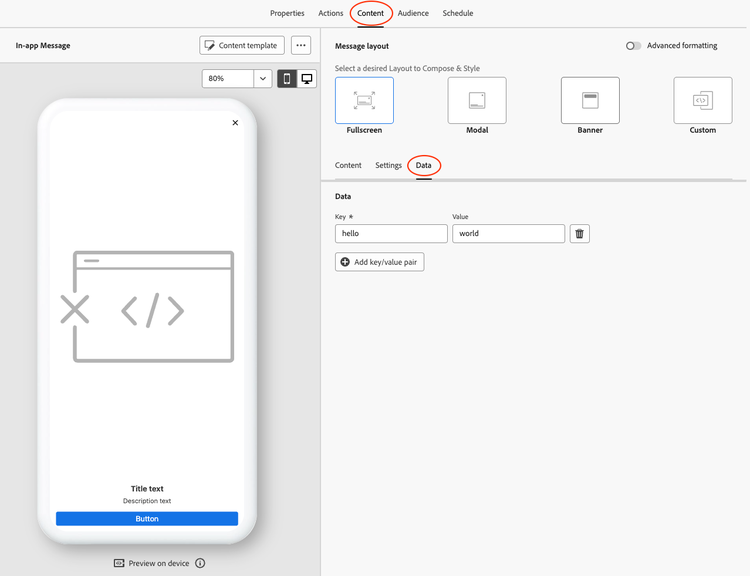
Implement and assign a PresentationDelegate/MessagingDelegate
To retrieve custom metadata from a Message object, you will first need to implement and set a PresentationDelegate (for Android SDK) or MessagingDelegate (for iOS SDK).
Please read the tutorial for more detailed instructions on implementing and using a PresentationDelegate/MessagingDelegate.
Retrieve custom metadata from the Message object
From within the PresentationDelegate or MessagingDelegate, call Message.getMetadata() or Message.metadata after getting an instance of the Message object.
Android 3.x
The following example shows retrieving custom metadata using the Message.getMetadata() API. The example uses the canShow method of the PresentationDelegate, however you may retrieve the custom metadata anywhere within the delegate where the Message object is available.
Android 3.x Kotlin
var currentMessagePresentable: Presentable<InAppMessage>? = null

override fun canShow(presentable: Presentable<*>): Boolean {
  if (presentable.getPresentation() !is InAppMessage) {
    return
  }
  currentMessagePresentable = presentable as Presentable<InAppMessage>

  // Get the Message object
  val message = MessagingUtils.getMessageForPresentable(currentMessagePresentable)
  // Retrieve the custom metadata as type Map<String, Any>
  val metadata = message?.metadata
}
Android 3.x Java
Presentable<InAppMessage> currentMessagePresentable = null;

@Override
public void canShow(Presentable<?> presentable) {
    if (!(presentable.getPresentation() instanceof InAppMessage)) {
      return;
    }
    currentMessagePresentable = (Presentable<InAppMessage>) presentable;

    // Get the Message object
    Message message = MessagingUtils.getMessageForPresentable(currentMessagePresentable);

    // Retrieve the custom metadata
    if (message != null) {
        Map<String, Object> metadata = message.getMetadata();
    }
}
The following example shows retrieving custom metadata using the Message.metadata API. The example uses the shouldShowMessage method of the MessagingDelegate, however you may retrieve the custom metadata anywhere within the delegate where the Message object is available.
iOS Swift
func shouldShowMessage(message: Showable) -> Bool {
    let fullscreenMessage = message as? FullscreenMessage
    let message = fullscreenMessage?.parent

    // Retrieve the custom metadata
    let metadata = message?.metadata

    return true
}